Retrospective for 2015

In past years I set goals at the beginning of the year and then recapped my progress on them the following year (see my retrospectives from 2010, 2011, 2012, 2013).  Unfortunately I posted my goals for 2014 but then never followed up (as I came to realize last week).  As such I felt that this might be a good time to switch things up.  Personally I found that my goals were either repeating themselves or becoming too formulaic.  Instead I’ll be focusing more on writing about my past year’s accomplishments and share out a few things I’m interested in.


Retrospective

2015 was a big year.  It was the first full year with our daughter Clara and first full year living in our new house.  We also completed a number of home projects including a new patio (previous one starting to sink in places) and remodeled our master bath.  Glad to have both of those behind us but already finding new things that need to be fixed  / replaced for 2016.  The joys of home ownership.

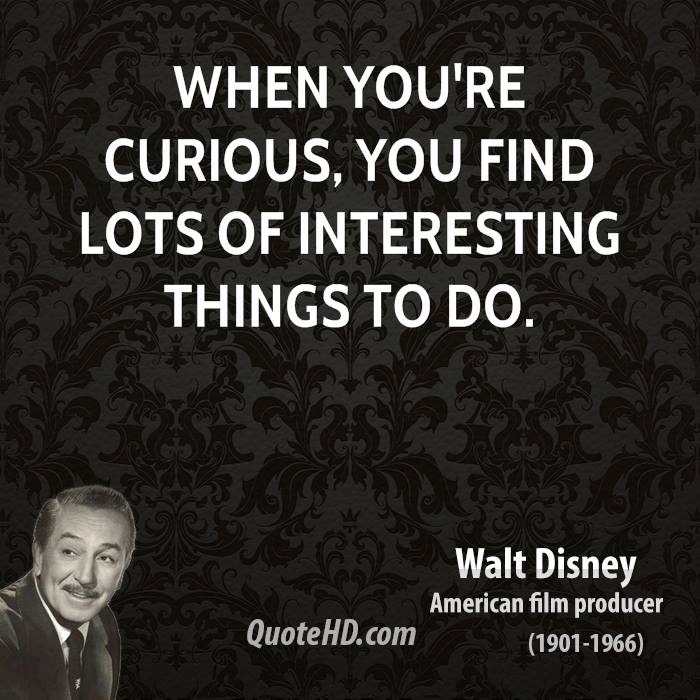
On the technology side I’ve been digging into Azure Infrastructure as a Service (IaaS) and given a number of internal and external presentations on this topic.  Additionally I’ve been following along the progression of PowerApps (read my Start Learning About PowerApps post here).  SharePoint 2016 will be releasing in 2016 and I’ve been lucky to have access to early bits to put them through their paces.  This is all part of my process to continue learning new things and also partially my natural desire to tinker with cool technology.  Walt Disney put it best when he said “[w]hen you’re curious, you find lots of interesting things to do.”
walt-disney-curious-quote


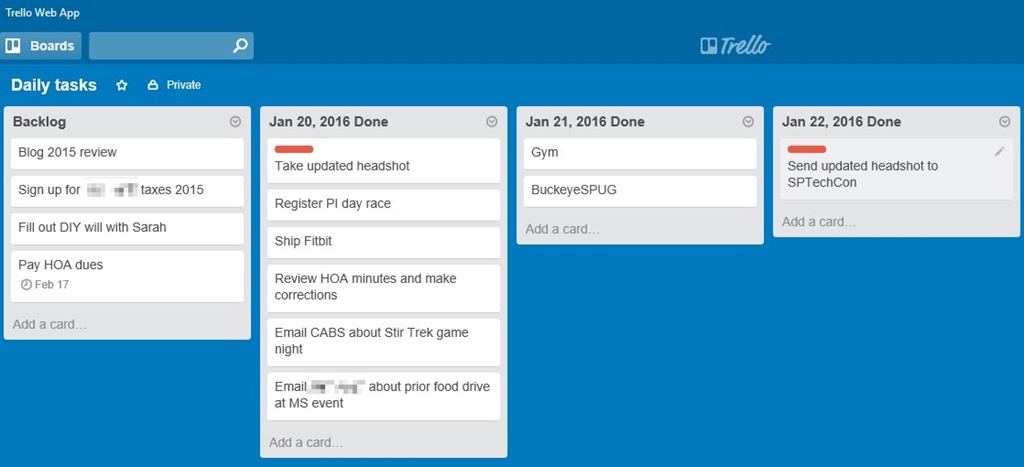
One side interest of mine has always been personal productivity and ways to track it.  Many systems exist such as Getting Things Done (which I’ve read David Allen’s book Getting Things Done a few years ago), Kanban, and more.  Recently I’ve taken up using Trello as my personal (non-work) task tracking system.  I like the concept of being able to create columns / lists for my daily tasks.  I have a backlog and 2-4 days (columns) of lists.  I move cards from my backlog to my daily column once they are completed.  I can quickly and easily archive a daily list to keep things tidy but also see prior days for a quick retrospective.  My target is to complete at least 2 tasks each day.  It is a work in progress but so far after 2+ weeks it is working better than any prior system I’ve tried.  See below for an example of my recent tasks.
TrelloBoard


Sharing Interests


Books

Over the past 6+ years I’ve started getting back into reading pretty heavily.  At first it started with audiobooks during the 30-45 min commute to various customers when I was a consultant with Sogeti.  I listened to some excellent audiobooks including The Lord of the Rings trilogy, the Asimov Robot series, and more.  I chose to get my audiobooks from the local library which while it had a number of excellent choices was still limited.

When I joined Microsoft I was traveling at least 2-5 times a month, usually driving or flying anywhere from 1-7 hours.  At this point my reading started shifting more towards physical books.  There is something about holding a physical book in your hands that resonates with me.  Perhaps it harkens back to my grade school days and summers reading.  Either way there are a number of used books stores and libraries that provide plenty of options.

A few of the recommendations from the last year or two:


Podcasts

During a summer vacation in 2009 (I distinctly remember the occasion) my oldest brother turned me on to a podcast called Stuff You Should Know.  I had started listening to audiobooks not too long before this so I was getting used to audio content but wasn’t fully ingrained in it as a medium.  Things changed after I started listening to this podcast.  Josh and Chuck (after a brief stint with a different starting duo) mix a blend of information, entertainment, inside jokes, and levity to a huge variety of topics (they have amassed over 700 episodes).  My wife also enjoys listening to them during car trips.

Over time I added other podcasts to during long drives, workouts, or relaxing at home.  Some podcasts haven’t kept my interest and I’ve stopped listening but these current shows are a mix of entertainment and technology information.


Conclusion

Hopefully by reading this retrospective and sharing of interests you are inspired to reflect on your own past year.  I find it invigorating and recharging looking back at the past year’s progress while looking forward to what can be accomplished the next year.  If you have any recommendations on books, podcasts, or other technology feel free to share.  Thanks for reading.


Note: Amazon links are referral links on my blog and go towards paying for hosting, domain registration, and writing this blog which is done on my own time.


-Frog Out
Start Learning About PowerApps

   In this post I’ll talk about PowerApps, a new enterprise service for building enterprise applications and share resources on where to find out more information.

   Note: PowerApps is currently in private preview and is subject to change after this article is posted.  As such this article may contain out of date information by the time you read this.  Additionally I am a Microsoft employee but the views and opinions expressed in this article are my own and not reflective of Microsoft or the PowerApps product group.


Background

   On Nov 30th, 2015 at the European Convergence conference Microsoft unveiled a new enterprise service for building enterprise applications called PowerApps.  At a high level PowerApps allows power users and developers to build scalable applications that connect to numerous services (Office 365, SalesForce, OneDrive, Dropbox, etc.) using PowerPoint and Excel-like tools to be consumed on Windows, iOS, and Android.  These applications can be built once and then consumed on any platform.  No need to re-compile, design separate UIs per platform, etc. like you see with the current state of most mobile or web development.


Components

   I’ll briefly walk through some of the highlights for different components or aspects of which to be aware.


Tools and client player

   Currently it is possible to create and consume PowerApps apps on Windows and iOS.  I can’t speak to the final plans but it is my understanding that it is on the roadmap to be able to create and consume on all platforms including Windows (PC and mobile), iOS, Android, and web.  You will not be limited to only consuming from the platform that you created on though.


Design language

   PowerApps is designed to be able to author apps using Excel and PowerPoint type skills.  There is no need to code your solution.  That said if you are a developer and wish to code backend interactions or create a custom API to connect to that is available (with the Enterprise plan, more on that below).


Connectors

   Out of the box PowerApps ships with a dozen or so connectors for pulling or pushing data to the following sources.  By configuring a connector to these services you can perform simple CRUD (create, read, update, and delete) operations on data in these sources.

  • Dropbox
  • Dynamics CRM Online
  • Google Drive
  • Microsoft Translator
  • Office 365 Outlook
  • Office 365 Users
  • OneDrive [consumer version]
  • Salesforce
  • SharePoint Online
  • Twitter

   Establishing a connection to these services is as simple as logging into the service.  Once you establish a connection it is persisted to the PowerApps cloud and will be available on any device that you log into your account.


Authentication

   Speaking of logging into accounts, authentication for PowerApps is handled by Azure Active Directory.  As such you will need to have an Azure Active Directory identity / domain in order to utilize PowerApps.  Thus you can view PowerApps as an enterprise solution more than a consumer solution even though you do have access to consumed focused connections (e.g. Twitter, OneDrive, etc.).


PowerFlows

   PowerFlows (also called Logic Flows) are still a work in progress but the goal is to provide simple yet robust workflows for data.  Think along the lines of If This Then That (IFTTT, www.ifttt.com) which is a popular website for connecting data from disparate sources and taking action when specific triggers are met.  Ex. when the forecast is predicting rain tomorrow send me a text message and put a calendar entry on my calendar to bring an umbrella to work.  IFTTT also integrates with home automation software, smartphone devices, design websites, and more.

   On the PowerFlows side you can define a triggers and then take actions based on that incoming trigger.  Ex. when a new tweet from Twitter contains specific data create a new entry in a SharePoint list, send me an email, and then create a case in Salesforce.  When used in conjunction with apps from PowerApps this can be a powerful complimentary toolset.


Sharing

   When it comes time to share your PowerApps app with others you can simply type in their email address and share it with them.  No need to worry about downloading the application, incompatibility of the OS, or other traditional blockers for enterprise applications.  In the enterprise plan it is possible to restrict access to the app so that only specific users are able to view and access your app.


Plans

   Speaking of plans there are 3 plan levels.  They are as follows.

  • Free – create and use unlimited apps, 2 connections to SaaS data per user, shared infrastructure
  • Standard – create and use unlimited apps, unlimited connections to SaaS data per user, shared infrastructure
  • Enterprise – create and use unlimited apps, unlimited connections to SaaS data per user, dedicated infrastructure, app governance, API management

   The last piece of the Enterprise plan is interesting to me.  This allows an organization to package up an API to line of business (LOB) or other data (i.e. SQL Server, on-prem SharePoint, etc.) and publish it to Azure.  That data source can then be consumed by PowerApps apps.


Sign up for preview

   PowerApps is currently in private preview but I encourage everyone to request an invite to gain access at the following URL.  Note that you may not be accepted in right away but you will be added to the list for future inclusion.


Request invite to PowerApps

https://powerapps.microsoft.com/en-us/signup/


Conclusion

   I am very excited to see PowerApps finally come to private preview.  I have been following Project Siena (precursor to PowerApps) for over a year now and tinkering around with the alpha and beta builds of both.  There is no release date yet for PowerApps but I encourage you and your organization to sign up for the preview and take a look at the videos and tutorials linked below.

   Lastly a few parting thoughts.  Think of all of the LOB apps that exist in your company or organizations and all of the time, effort, and money that goes into developers and / or designers creating and maintaining those applications.  Many of these applications are simple data entry, approval workflow, or similar type applications.  By exposing enterprise data in a structured and secure manner you can empower end users to create those types of applications much more quickly while freeing up resources and people for other business needs.


      -Frog Out


Additional Resources

Introducing Microsoft PowerApps
https://powerapps.microsoft.com/en-us/blog/introducing-microsoft-powerapps/

Microsoft PowerApps main site (and registration)
https://powerapps.microsoft.com/en-us/


Microsoft PowerApps tutorials

https://powerapps.microsoft.com/en-us/tutorials/


Microsoft PowerApps videos on Channel 9 

https://channel9.msdn.com/Events/Microsoft-Azure/PowerApps


Microsoft takes the wraps off PowerApps
http://www.zdnet.com/article/microsoft-takes-wraps-off-powerapps-mobile-app-creation-service/

My Experience Configuring Cloud Hybrid Search Service Application for SharePoint

   In this post I’ll talk through my personal experience deploying the new cloud hybrid search service application for SharePoint 2013 (also available in SharePoint 2016).  By no means am I an expert on this topic (especially in many of the supporting technologies such as AAD Connect, AD FS, etc.) but this is more meant to increase exposure to this new offering.  For an overview of cloud hybrid search and more information about actual implementation (which I will refer back to later) please read through Cloud Hybrid Search Service Application written by two of my Microsoft peers Neil and Manas (they are the true experts).


Components

   Here is a list of the high level components I used for my deployment.

Note: My Azure VM configuration is not using best practices for where or how to deploy different services.  Also my mention of GoDaddy and DigiCert are purely for example purposes and not an endorsement for either company.  I just happen to use their services and products in this scenario.

  • Office 365 (O365) trial tenant (sign up for one here)
  • 4 Azure VMs
    • A1 – Active Directory Domain Services (AD DS)
    • A1 – Active Directory Federation Services (AD FS)
    • A2 – Azure Active Directory Connect (AAD Connect), Web Application Proxy (WAP)
    • A4 – SQL Server 2014, SharePoint 2013 farm with Service Pack 1 and at least Aug 2015 CU
  • Custom domain (purchased through GoDaddy but any domain registrar should work)
    • Note: Office 365 does have a partnership with GoDaddy so configuration may be easier due to automated updates that can be performed
    • Additionally I was able to modify public DNS records through GoDaddy to allow federated authentication through AD FS
  • SSL wildcard certificate purchased from DigiCert
    • Only required if want to allow Office 365 user to open / preview a search result that resides on-prem with Office Online Server (new version of Office Web Apps Server 2013, not discussed in this post)
    • I also used this certificate for other purposes such as securing AD FS communication and implementing Remote Desktop Gateway (the latter is unrelated to this post)
  • Custom result source to display O365 search results in my on-prem farm


   Next we’ll take a look at some of these components more in depth.


SharePoint Server

   The new cloud hybrid search service application is available in SharePoint Server 2013 with the August 2015 CU or later.  I have heard from my peers that there are some issues with cloud hybrid search as of the October, November, and December 2015 CUs.  As such use either the August or September 2015 CUs at the time of this writing (Dec 8, 2015) or wait until the Jan 2016 CU which should contain the fix (link).  The SharePoint Server 2016 IT Preview 1 also supports cloud hybrid search although I have not tested it out myself.


Cloud Search Service Application

   To provision a cloud hybrid search service application the property CloudIndex on the service application must be set to True.  This property is a read-only property and can only be set at creation time.  As such you will need to create a new search service application in order to utilize the cloud hybrid search service.

   I have not tested creating a new cloud hybrid search service application using a restored backup admin database from an existing search service application.  The thought behind this would be to retain at least a portion of your existing search service application.  If you try this and have any findings let me know in the comments below.


Custom Domain

   A custom domain is not a requirement for cloud hybrid search.  I used one so that I could allow end users (demo accounts) to log into Office 365 as a federated user “someUser@<fakecompany>.com” rather than the default domain “someUser@<O365TenantDomain>.onmicrosoft.com”.


AAD Connect

   In order to search for on-prem content that has been indexed by Office 365 the user will need to have an account that is synchronized to Azure Active Directory / Office 365.  This allows the search service in Office 365 to show content based on the Access Control List (ACL) defined on-prem.

   There are multiple options available for synchronizing accounts between on-prem and AAD but the predominate ones include DirSync, AAD Sync, and AAD Connect.  Since AAD Connect is the future looking tool of choice of these three I decided to use it.  AAD Connect automates many of the tedious tasks of configuring federated authentication by stepping through a wizard.

   That said I did run into a number of issues during configuration due to missing certificates, invalid permissions, or other steps I missed or was unaware of.  If I got part of the way through the configuration and ran into a failure that I couldn’t recover from then I had to uninstall AAD Connect (do not remove all prerequisites when prompted), wipe out the contents of “<install drive>:Program FilesMicrosoft Azure AD SyncData”, and then re-install.


Display Search Results On-Prem


***PLEASE READ AS THIS IS IMPORTANT***

    The default scenario for cloud hybrid search is to index both on-prem and O365 content which are then queried in O365.  It is possible to create or modify an on-prem result source to use the remote index from your Office 365 tenant which allows for querying and display the combined search results on-prem.  The problem though is that when you query for and click results on-prem the search analytics click data is not incorporated back to the cloud index to further influence search results.

Ex. I queried for “SharePoint” in on-prem search center and clicked the 4th result on result page.  Multiple other users also searched for “SharePoint” and clicked the same 4th result.  SharePoint search (via timer jobs and other background processes) incorporates that click data and adjusts the 4th result to now appear higher in rankings upon subsequent search queries.

   I have unsuccessfully tested a few options to manually pass the search click data up to SharePoint Online.  These include creating a ClientContext object and calling the RecordPageClick() method on SearchExecutor, modifying the display template page, and more.  I did hear from a SharePoint MVP that successfully tested out a way to push search analytics data between on-prem and O365 but it took a fair amount of customizations to accomplish.  If I find out any additional information, workaround, or updates on this topic I’ll update this post to reflect that.


Example

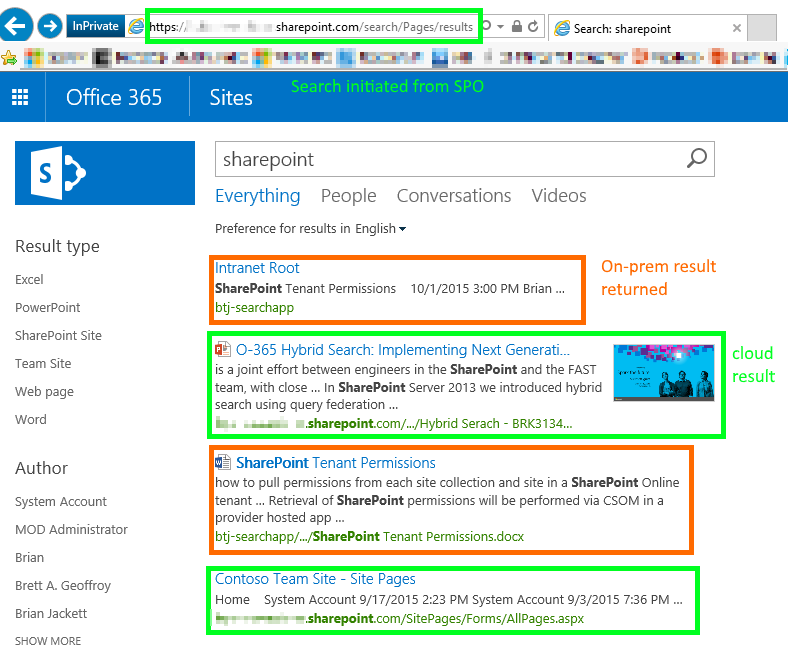
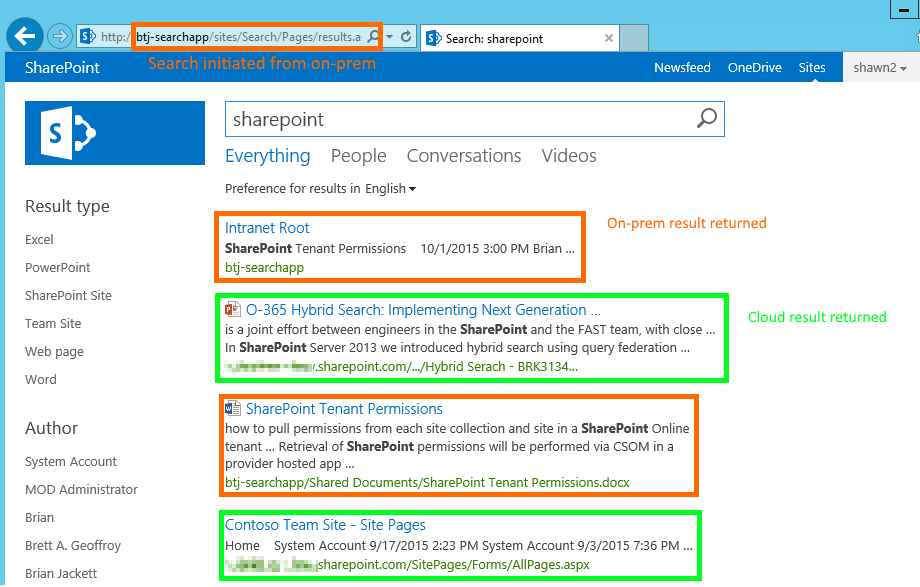
   As you can see from the below screenshots I can initiate a search query from on-prem or O365 (respectively) and get the same combined result set.


OnPremResults


SPOResults


Conclusion

   Due to my prior inexperience around AD FS, Web Application Proxy, AAD Connect, and other applications it took me a few days to get everything working end-to-end.  After that small hurdle I was very excited to be seeing combined on-prem and O365 search results in both on-prem and O365.  Do note though the section above calling out the current issue with search analytics data not being sent back and forth.  Aside from that I am looking forward to testing this out with customers and reaping the many benefits such as inclusion of content in the Microsoft Graph (formerly Office Graph) / Delve and other O365 only offerings.


      -Frog Out

Workaround for No Locations Available with Azure DevTest Labs

   In this post I’ll walk through a workaround to the “There are no locations available. You may not…” error when trying to provision a new instance of Azure DevTest Labs in the current preview (as of 2015/10/12).


Problem

   A few weeks ago during AzureCon 2015 there was an announcement that the new DevTest Labs offering was available in preview.  For those of you unfamiliar Dev Test Labs allows an administrator to set quotas for money used per month, size of VMs available, automatic shut down times for VMs, and more.  I immediately tried to register and followed the instructions to wait 30-60 minutes.  Later on I saw the DevTest Labs section available in the Create blade (note this requires using this link from the above page which as far as I can tell includes the “Microsoft_Azure_DevTestLab=true” querystring parameter to “enable” the DevTest Labs pieces in the UI).  When I attempted to create a new instance of a DevTest Labs I ran into an error stating that “there are no locations available”.

   I waited a little while longer and refreshed the browser but still had the same issue.  Today even days / weeks later no change and still the same error.  Thankfully I ran across a support forum post that led me in the right direction to resolve the issue.

Can’t create new lab in Azure DevTest Labs preview

https://social.microsoft.com/Forums/en-US/0ad3218b-6d18-44ac-915c-5ccd15b14f33/cant-create-new-lab?forum=DevTestLabs


Workaround

   As a fellow forum poster “runninggeek” mentioned there was an issue with the Microsoft.DevTestLab provider in my subscription.  Others who registered after me did not have this problem as a problem with the registration backend was fixed shortly after this announcement went out.  Here is the PowerShell script I ran to workaround my issue.  You can also download from my OneDrive.


Switch-AzureMode AzureResourceManager 
Add-AzureAccount 

# if you have multiple subscriptions tied to account may need to select specific one for below command 
Get-AzureSubscription | Select-AzureSubscription 
Unregister-AzureProvider -ProviderNamespace Microsoft.DevTestLab 
# confirm that provider is unregistered 
Get-AzureProvider -ProviderNamespace microsoft.devtestlab 
Register-AzureProvider -ProviderNamespace Microsoft.DevTestLab 
# confirm that provider is at least registering (mine took 1 minute to fully register) 
Get-AzureProvider -ProviderNamespace microsoft.devtestlab 

   Essentially you need to connect in Azure Resource Manager mode and unregister the Microsoft.DevTestLab provider.  Wait until the provider is unregistered and then re-register the provider.  Close all browser sessions logged in to the Azure Portal and re-launch it from the appropriate link.


Conclusion

   Hopefully very few people ran into this issue as it appears to be caused by the timing of when you registered for the Azure DevTest Labs preview.  Thanks to “runninggeek” for pointing me in the right direction to resolve this.  I provisioned an instance of DevTest Labs this afternoon and starting to pour through documentation and the initial set of offerings.


      -Frog Out

Slides and Scripts from SharePoint Saturday Cincinnati 2015

   Thank you to all of the attendees at my “Running your Dev / Test VMs in Azure for Cheap” presentation at SharePoint Saturday Cincinnati 2015 (or as the locals liked to call it ScarePoint Saturday Spookinnati due to the Halloween theme.)  The slides and scripts from my presentation are below.  Enjoy.


PowerShell Scripts


Slide Deck


      -Frog Out