PowerShell + SharePoint Presentation Links and Files

Just got back from giving my PowerShell + SharePoint presentation at the COSPUG Show-N-Tell event.  Great turn out with just under 100 registered.  Shane Young gave a good keynote even if he let slip a few juicy tidbits about SharePoint 2010.  Steve Carvajal also gave a good talk on the upcoming Geneva framework for rights identity.  Sadly I didn’t have time to see a speaker during the other slot.

Thanks to everyone who came to my talk.  Below are links to my presentation and the demo files I used.  You’ll want to copy the text from the Limited SharePoint Profile.txt into your own profile.  Please rate my talk if you attended and/or send me feedback, I appreciate negative and positive comments so that I can improve for any future talks I may give.  Special thanks to Jennifer Mason and the rest of the COSPUG steering committee for organizing the event and letting me have a slot.  I also have my pictures from the event linked below.


Links

Create Profile example 1

Create Profile example 2

Presentation and Demo Files

Rate my presentation


Photos

Presenting at COSPUG Show and Tell Event

On Friday, May 22nd the Central Ohio SharePoint User Group (COSPUG) is hosting a Show and Tell Event at the Microsoft office in Columbus.  I’ll be presenting on combining PowerShell and SharePoint.  This will be an introductory style presentation for those who have limited to medium experience with PowerShell and a few “laser show” type finale scripts to hopefully wow the crowd.  With the current schedule I’ll be presenting during the last technical track session of the day.  Shane Young from SharePoint911 will be the keynote speaker and as with almost all talks he gives I’m sure it will be energetic and informative.  On top of all those great reasons why you should attend, the event is FREE.  Hard to beat that.  Registration can be found at the following link: click here.  Hope to see you there.

    -Frog out

Deploy Files to SharePoint Web Application Virtual Directories At Feature Activation

Original: 2009/5/6

Updated: 2009/12/1 – see bottom

Updated: 2009/12/31 – see bottom (Follow up post here)

Have you ever had a need to deploy some files to all of the virtual directories (every IIS site folder corresponding to a zone in the web app) for a SharePoint web application feature?  After searching the interwebs high and low I was unable to find any information relating to this topic, so this might very well be one of the first publicly available.  I want to say that getting this to work yesterday was one of the most fun development tasks I’ve done in awhile.  Hopefully this can help someone else who is struggling with the same task or at least give you some fun things to try out.

First the premise.  My client is hosting Reporting Services 2005 reports for a SharePoint custom application.  The custom application lives in the Layouts folder of the 12 Hive.  The reports will not be hosted on Reporting Services, but instead locally in the web application.  Since the ReportViewer web control that will be displaying the reports only knows the virtual directory root (c:inetpubwwwrootwssVirtualDirectories<port number of SharePoint zone>) we need a way to copy the files into that directory (and all other virtual directories for the web app meaning 3 zones in our environment) instead of residing in the 12 Hive.  As such we wanted a clean solution for deploying these reports to the virtual directory folder that had the least amount of human intervention (ex. a batch command that ran XCOPY to copy the files into hardcoded folders would require human intervention beyond deploying the WSP file).

As with all SharePoint development solutions, I (under the pain of death) recommend wrapping them up as features and files inside of a WSP file.  I don’t recommend building your WSP by hand as it is very tedious and there are some free tools that can help you immensely in this area.  Currently I use either Visual Studio extensions for Windows SharePoint Services 1.2 (VSeWSS) or WSPBuilder.  Each has it’s own set of pros and cons, but I’ll save that for another blog post.  On this project we’re using WSPBuilder as the lead developer began using it and I’ve been grandfathered into it.

So we have a WSPBuilder project with all of our custom application files laid out in the appropriate folders.  Our reports are placed into a subfolder of feature DeployCustomApplication.  During installation of the WSP solution these files are copied to the corresponding 12 Hive folder.  To get them from that location to the web app virtual directory we created a feature receiver.  Feature receivers allow custom code to be called upon feature install, activate, deactivate, and uninstall.  The process is carried out as follows:

  1. Get reference to target web application
  2. For Each loop to process each dictionary pair in the web application’s IISSettings property
  3. Delete report files if they already exist (1)
  4. Perform file copy from the 12 Hive location to the bin directory of the individual web site virtual directory folders

(1) = Delete report files first as they are subject to source control and will be marked read-only.  The copy method is unable to overwrite a read-only file even with the OverWrite boolean flag set to true.

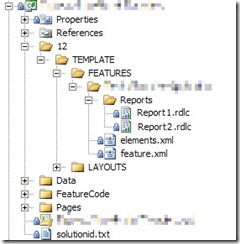
Here is a screenshot of the report files in the WSP project (pixelation on files done with Paint.Net, excellent free program I use all the time for image modifications similar to Photo Shop).  For those with a super keen eye you might even be able to tell that I doctored the report file names as well, but that’ll be our little secret.
DeployCustomApplicationWSPProject_2

Below is a slightly modified version (removing application name, client code, variable names, and other extraneous items) of the feature receiver code.  As an added bonus, you’ll also see in the AddHttpHandlerVerb() method how another teammate developed a process to modify the web.config file of each virtual directory to allow the ReportViewer web control.  I wish I could claim that as well, but sadly it was done by the time I joined the team.  Here is a link to the below code: download code here.

   1:  using System;
   2:  using System.Collections.Generic;
   3:  using System.Text;
   4:  using System.IO;
   5:  using System.Web.Hosting;
   6:  using Microsoft.SharePoint;
   7:  using Microsoft.SharePoint.Administration;
   8:  using Microsoft.SharePoint.Utilities;
   9:  using System.Web;
  10:  using System.Web.UI;
  11:  using System.Web.UI.WebControls;
  12:  
  13:  namespace CustomApplication
  14:  {
  15:      class CustomApplication : SPFeatureReceiver
  16:      {
  17:  
  18:          private SPWebApplication _webApp;
  19:          private String _Owner;
  20:  
  21:          public override void FeatureActivated(SPFeatureReceiverProperties properties)
  22:          {
  23:              try
  24:              {
  25:          // get references to target web application and feature definition
  26:                  _webApp = (SPWebApplication)properties.Feature.Parent;
  27:                  _Owner = properties.Feature.DefinitionId.ToString();
  28:  
  29:                  DeployReportFiles();
  30:  
  31:          AddHttpHandlerVerb();
  32:              }
  33:              catch (Exception ex)
  34:              {
  35:                  string message = "Error occurred while activating CustomApplication feature";
  36:                  Logger.logException(ex, message, System.Diagnostics.EventLogEntryType.Error, "<GUID>");
  37:  
  38:                  throw new SPException("Error during Activation.  See event log for further details");
  39:              }
  40:          }
  41:  
  42:          public override void FeatureDeactivating(SPFeatureReceiverProperties properties)
  43:          {
  44:              try
  45:              {
  46:          // get references to target web application
  47:                  _webApp = (SPWebApplication)properties.Feature.Parent;
  48:  
  49:                  RemoveReportFiles();
  50:              }
  51:              catch (Exception ex)
  52:              {
  53:                  string message = "Error occurred while deactivating feature CustomApplication";
  54:                  Logger.logException(ex, message, System.Diagnostics.EventLogEntryType.Error, "<GUID>");
  55:  
  56:                  throw new SPException("Error during Feature Deactivation. See event log for further details");
  57:              }
  58:          }
  59:  
  60:          public override void FeatureInstalled(SPFeatureReceiverProperties properties)
  61:          {
  62:          }
  63:  
  64:          public override void FeatureUninstalling(SPFeatureReceiverProperties properties)
  65:          {
  66:          }
  67:  
  68:          private void DeployReportFiles()
  69:          {
  70:              // first remove report files if they exist
  71:              RemoveReportFiles();
  72:  
  73:          // loop through each IisSettings dictionary pair (zones [dafault, intranet, internet, etc.] configured for web application)
  74:              foreach (KeyValuePair<SPUrlZone, SPIisSettings> pair in _webApp.IisSettings)
  75:              {
  76:          // copy report from 12 Hive location to the IisSettings zone virtual directory
  77:                  File.Copy(SPUtility.GetGenericSetupPath(@"TEMPLATEFEATURESCustomApplicationReportsReport1.rdlc"), pair.Value.Path.FullName.ToString() + @"binReport1.rdlc", true);
  78:                  File.Copy(SPUtility.GetGenericSetupPath(@"TEMPLATEFEATURESCustomApplicationReportsReport2.rdlc"), pair.Value.Path.FullName.ToString() + @"binReport2.rdlc", true);
  79:              }
  80:          }
  81:  
  82:          private void RemoveReportFiles()
  83:          {
  84:          // loop through each IisSettings dictionary pair (zones [dafault, intranet, internet, etc.] configured for web application)
  85:              foreach (KeyValuePair<SPUrlZone, SPIisSettings> pair in _webApp.IisSettings)
  86:              {
  87:                  // if Report1 report exists, delete
  88:                  if (File.Exists(pair.Value.Path.FullName.ToString() + @"binReport1.rdlc"))
  89:                      File.Delete(pair.Value.Path.FullName.ToString() + @"binReport1.rdlc");
  90:  
  91:                  // if Report2 report exists, delete
  92:                  if (File.Exists(pair.Value.Path.FullName.ToString() + @"binReport2.rdlc"))
  93:                      File.Delete(pair.Value.Path.FullName.ToString() + @"binReport2.rdlc");
  94:              }
  95:          }
  96:  
  97:          private void AddHttpHandlerVerb()
  98:          {
  99:          // get reference to web config modification object and set properties
 100:              SPWebConfigModification HttpHandlerMod = new SPWebConfigModification();
 101:              HttpHandlerMod.Owner = _Owner;
 102:              HttpHandlerMod.Path = "configuration/system.web/httpHandlers";
 103:              HttpHandlerMod.Name = "add verb HttpHandler ReportViewer";
 104:              HttpHandlerMod.Value = "<add verb="*" path="Reserved.ReportViewerWebControl.axd" type = "Microsoft.Reporting.WebForms.HttpHandler, Microsoft.ReportViewer.WebForms, Version=9.0.0.0, Culture=neutral, PublicKeyToken=b03f5f7f11d50a3a" />";
 105:  
 106:          // if web configuration modification exists, remove
 107:              if (_webApp.WebConfigModifications.Contains(HttpHandlerMod))
 108:              {
 109:                  _webApp.WebConfigModifications.Remove(HttpHandlerMod);
 110:              }
 111:  
 112:          // apply web configuration modificatoin
 113:              _webApp.WebConfigModifications.Add(HttpHandlerMod);
 114:          }
 115:      }
 116:  }

What I like about this solution is that it was developed in a short amount of time (hour or two to work out kinks), it is easily repeatable, and can be applied to other needs besides just Reporting Services reports.  Please leave any feedback if you end up using this process, have suggestions to make it better, or have any other comments.  Thanks and enjoy.

<Update1 – 2009/12/1>

After 6 months using the below method to deploy files to our development environments, it wasn’t until just recently that I noticed a fatal flaw in the below design: files are only deployed on the server from which the feature activate command is processed.  In plain English, if you have 3 web front ends (WFEs) and you activate the feature on WFE1 then WFE1 will get the files, but WFE2 and WFE3 will not.  The solution to this problem was suggested by my new good friend Sean McDonough: deploy using a SharePoint timer job.  I’m working on ironing out some of the changes for this and will have a new post on the matter once that’s complete.  Look for a link to that post from here soon.

</Update1>

<Update2 – 2009/12/31>

Here is the link to the follow up post I mentioned above: Click here.  After doing a little research and trying out timer jobs I found that a timer job was not the best solution for my situation.  Instead I opted for a method of looping through the web front ends and doing a file copy directly to the servers.  That same mechanism can be wrapped around the logic in this post so that files are copied to all web application folders on each web front end.  Read more about it in that follow up post.

</Update2>

-Frog Out

Technologies I’m Using and/or Watching

    As this week has been very busy I haven’t had time to write up a full blog post about some of the fun things I’m working on, but instead I thought I’d throw out a listing of some technologies I’m currently working on or watching.

  • Windows 7 Beta (build 7000) – I have this installed as my primary OS on my home desktop.  Loving the slick interface and list of new features that keep getting announced.  My only gripes so far are that the included build of IE8 is beta and can’t be upgraded to RTM, and that I need to get used to doing certain things under “Run as Administrator”.  Looking forward to the RC being released next week to the public, at least so I hear.
  • PowerShell 2.0 CTP 1.3 – I’ve been following PowerShell for awhile now and it is a tool that really intrigues me.  A few years ago I was writing shell scripts in Unix land to support some Oracle systems at my then employer.  I then moved onto AutoIt which is an excellent Windows automation tool.  Now though I am very excited about PowerShell.  Not only does it allow scripting of normally mundane tasks, but it also is able to process .Net objects such as elements available through the SharePoint API.  As you can see from my previous post I like to push tools to see what they are capable of.  PowerShell 2.0 RTM is schedule to launch with Windows 7 and it’s my personal opinion that we’ll be seeing a greater emphasis on PowerShell in the coming product releases.
  • SharePoint 2010 – Until recently SharePoint 14.  This is a no-brainer for anyone who working with SharePoint currently.  I hear that this will be a prominent discussion piece at SharePoint Conference 2009.  Here’s hoping I can get time off and make it to this conference.
  • Visual Studio Extensions for Windows SharePoint Services 1.2 – OK, Microsoft could really use to shorten this title up, and they have by renaming it Visual Studio 2010.  In case you haven’t seen, Visual Studio 2010 is meant to include the proper SharePoint development tools that should’ve existed back when SharePoint 2007 was released.  For now though my personal choices are between VSeWSS 1.2 and WSPBuilder, but I’ve had more use with the former so I tend to know it a little better.
  • Sysinternals Suite – Hopefully I don’t need to be the first to let many people know about this set of tools, but if this is your first hearing about Sysinternals you owe yourself as a technology person to check them out.  I use Process Explorer, AutoRuns, and a few other tools almost daily.
  • Windows Live Programs – I was apprehensive about downloading these programs for some reason, but I’m quickly starting to love some of the offerings.  I’m using Live Writer for my blog and Sky Drive (no download required) for sharing documents and other files.  I’ll start exploring the other programs as I have time.
  • TweetDeck – I’m using Twitter more and more lately and beginning to experiment with different clients.  Digsby was my favorite until I started getting overwhelmed by followers/followees.  TweetDeck is suiting me well currently, but I’ve heard good things about Blu as well.
  • Digsby – Best IM / social networking client I’ve ever used.  It combines my Facebook, LinkedIn, Gmail, GChat, AIM, and until recently Twitter accounts.  Can’t even imagine going back to having 6 separate applications or windows open to manage them all.

Well that turned into a much longer post than expected.  Feel free to leave feedback about any new tools, products, or applications you are using that you think should be shared.  I love to check out new technology as much as I can and share the word.

The Power of PowerShell and SharePoint: Enumerating SharePoint Permissions and Active Directory

<Update 2013-07-01> This script has been updated for SharePoint 2010 / 2013.  Please see my updated script and blog post at PowerShell
Script to Enumerate SharePoint 2010 or 2013 Permissions and Active Directory
Group Membership
.

</Update 2013-07-01>

<Update>

Posting code didn’t format as well as hoped.  Download the below script here.

</Update>

For those of you who are SharePoint admins or developers but have never dug into the SharePoint API or PowerShell, I would recommend first checking out some tutorials on both and referencing the SharePoint Developer Center.  At a later date I hope to be able to provide some quick demo scripts that highlight the power, time savings, and overall usefulness that can be gained by combining PowerShell and the SharePoint API.  For now though I wish to post a script I developed almost a year ago as a side project to combine a number of powerful features into one script.  To start, let me overview what the below script is capable of.

  1. Recursively crawl a site or entire web application within SharePoint
  2. Enumerate permissions assigned to a SharePoint site
  3. Detail the SharePoint users assigned to a SharePoint group
  4. Determine if an Active Directory group is a member of a SharePoint group
  5. Detail the Active Directory users who are members of an Active Directory group
  6. Search for a specific user’s permissions on a SharePoint site

Before anyone says anything, yes I realize that combining so many utilities into one script is probably a bad design and I should’ve broken out functionality.  Yes this is probably true, but I want to state that this script was never intended for Production release.  Instead I was prototyping what was possible with PowerShell and I even surprised myself with what I ended up with.  Here is an attempt to visualize what the above hierarchy would look like.

–Site

——SharePoint User A

——SharePoint Group A

————SharePoint User B

————Active Directory Group A

——————Active Directory User A

——————Active Directory User B

As you can see, this allows you to dig much further than what you might normally surface from the SharePoint API.  The true purpose of this script was to determine if a user was assigned permissions anywhere within a web application, even if indirectly by membership in a SharePoint group or Active Directory group.  This was only ever intended for a test environment, so you may still find some bugs when running against your own environment.

Before running this, ensure that you have loaded the SharePoint assembly with the following call (typically placed into your PowerShell profile for ease of use):

[void][System.Reflection.Assembly]::LoadWithPartialName(“Microsoft.SharePoint”)

Please leave me feedback if you end up trying out this script or have any questions on how/why I wrote things the way I did.  I always enjoy constructive criticism and dialog.  If you do re-post this anywhere, be sure to include the reference to the source material for the Active Directory call portion as I borrowed it from the PowerShell Script Center.

Example call:

.DisplaySPWebApp6.ps1 http://server WebApp userA


Note: The below script does not format properly through WordPress after I migrated my blog.  Please refer to the source script for better view.


###########################################################
#DisplaySPWebApp6.ps1 -URL  -searchScope  -userToFind 
#
#Author: Brian Jackett
#Last Modified Date: Jan. 12, 2009
#
#Supply Traverse the entire web app site by site to display
# hierarchy and users with permissions to site.
###########################################################

&nbsp;

#DECLARE VARIABLES
[string]$siteUrl = $args[0]
[string]$searchScope = $args[1]
[string]$userToFind = $args[2]

#DECLARE CONSTANTS
$BUFFER_CHARS = " "

function DetermineSpaceBuffer #-iterations 
{
[string]$spaceBuffer = ""
for($i = 0; $i -lt $args[0]; $i++)
{$spaceBuffer += $BUFFER_CHARS}

return $spaceBuffer
}

#DECLARE FUNCTIONS
function DrillDownADGroup #-group  -depth 
{
[string]$spaceBuffer = DetermineSpaceBuffer $args[1]
$domain = $args[0].Name.substring(0, $args[0].Name.IndexOf("\") + 1)
$groupName = $args[0].Name.Remove(0, $args[0].Name.IndexOf("\") + 1)

#BEGIN - CODE ADAPTED FROM SCRIPT CENTER SAMPLE CODE REPOSITORY
#http://www.microsoft.com/technet/scriptcenter/scripts/powershell/search/users/srch106.mspx

#GET AD GROUP FROM DIRECTORY SERVICES SEARCH
$strFilter = "(&amp;(objectCategory=Group)(name="+($groupName)+"))"
$objDomain = New-Object System.DirectoryServices.DirectoryEntry
$objSearcher = New-Object System.DirectoryServices.DirectorySearcher
$objSearcher.SearchRoot = $objDomain
$objSearcher.Filter = $strFilter

#
$colProplist = ("name","member")
foreach ($i in $colPropList)
{
$catcher = $objSearcher.PropertiesToLoad.Add($i)
}
$colResults = $objSearcher.FindAll()

#END - CODE ADAPTED FROM SCRIPT CENTER SAMPLE CODE REPOSITORY

&nbsp;

foreach ($objResult in $colResults)
{
foreach ($member in $objResult.Properties.member)
{
$indMember = [adsi] "LDAP://$member"

#ATTEMPT TO GET AD OBJECT TYPE FOR USER, NOT WORKING RIGHT NOW
#$user = $indMember.PSBase
#$user.Properties

$fullUserName = $domain + ($indMember.Name)
DisplayADEntry $fullUserName ($args[1])
}
}
}

function DisplaySPGroupMembers #-group  -depth 
{
[string]$spaceBuffer = DetermineSpaceBuffer $args[1]

if($args[0].Users -ne $Null)
{
#START SHAREPOINT USERS ENTITY
Write-Output $spaceBuffer""

foreach($user in $args[0].Users)
{
DisplayADEntry $user ($args[1] + 1)
}

#END SHAREPOINT USERS ENTITY
Write-Output $spaceBuffer""
}
}

function DisplayADEntry #-user/group  -depth 
{
#FILTER RESULTS IF LOOKING FOR SPECIFIC USER
if($args[0].IsDomainGroup -eq "True")
{
$outputText = "$spaceBuffer$BUFFER_CHARS" + ($args[0])
Write-Output $outputText
DrillDownADGroup $args[0] ($args[1])
$outputText = "$spaceBuffer$BUFFER_CHARS"
Write-Output $outputText
}
else
{
#USER FOUND AS A CHILD OF AN EMBEDDED AD GROUP
if(($userToFind -ne "" -and ($userToFind.ToUpper() -eq $args[0].LoginName.ToUpper() -or $userToFind.ToUpper() -eq $args[0].ToUpper())) -or $userToFind -eq "")
{
$outputText = "$spaceBuffer$BUFFER_CHARS" + ($args[0]) + ""
Write-Output $outputText
}
}
}

function DetermineUserAccess #-web  -depth 
{
[string]$spaceBuffer = DetermineSpaceBuffer $args[1]

#START SHAREPOINT GROUPS ENTITY
Write-Output "$spaceBuffer"

foreach($perm in $args[0].Permissions)
{
#CHECK IF MEMBER IS AN ACTIVE DIRECTORY ENTRY OR SHAREPOINT GROUP
if($perm.XML.Contains('MemberIsUser="True"') -eq "True")
{
DisplayADEntry $perm.Member ($args[1] + 1)
}
#IS A SHAREPOINT GROUP
else
{
$outputText = "$spaceBuffer$BUFFER_CHARS" + ($perm.Member)
Write-Output $outputText
DisplaySPGroupMembers $perm.Member ($args[1] + 2)
Write-Output "$spaceBuffer$BUFFER_CHARS"
}
}

#END SHAREPOINT GROUPS ENTITY
Write-Output "$spaceBuffer"
}

function DisplayWebApplication #-webApp 
{
[string]$spaceBuffer = DetermineSpaceBuffer $args[1]

#START WEB APPLICATION ENTITY
$outputText = "$spaceBuffer" + ($args[0].Name)
Write-Output $outputText

if($args[0].Sites -ne $Null)
{
#START CONTAINED SITE COLLECTIONS ENTITY
Write-Output "$spaceBuffer$BUFFER_CHARS"

foreach($spSiteColl in $args[0].Sites)
{
DisplaySiteCollection $spSiteColl ($args[1] + 2)
$spSiteColl.Dispose()
}

#END CONTAINED SITE COLLECTIONS ENTITY
Write-Output "$spaceBuffer$BUFFER_CHARS"
}

#END WEB APPLICATION ENTITY
"$spaceBuffer"
}

function DisplaySiteCollection #-siteColl  -depth 
{
[string]$spaceBuffer = DetermineSpaceBuffer $args[1]
$sc = $args[0].OpenWeb()

#START SITE COLLECTION ENTITY
$outputText = "$spaceBuffer" + ($sc.URL)
Write-Output $outputText

if($sc -ne $Null)
{
#START CONTAINED SITES ENTITY
Write-Output "$spaceBuffer$BUFFER_CHARS"

foreach ($spWeb in $sc)
{
DisplayWeb $spWeb ($args[1] + 2)
$spWeb.Dispose()
}

#END CONTAINED SITES ENTITY
Write-Output "$spaceBuffer$BUFFER_CHARS"
}

#END SITE COLLECTION ENTITY
Write-Output "$spaceBuffer"

#CLEANUP SITE COLLECTION VARIABLE
$sc.Dispose()
}

function DisplayWeb #-web  -depth  -parentWeb 
{
[string]$spaceBuffer = DetermineSpaceBuffer $args[1]

#START SITE ENTITY
$outputText = "$spaceBuffer" + ($args[0].URL)
Write-Output $outputText

if($args[0].HasUniquePerm -eq "True")
{
DetermineUserAccess $args[0] ($args[1] + 1)
}
else
{
Write-Output "$spaceBuffer<!--Inherits from parent&gt;-->"
}

&nbsp;

if($args[0].Webs -ne $Null)
{
#START CONTAINED SUBSITES ENTITY
Write-Output "$spaceBuffer$BUFFER_CHARS"

#RECURSIVELY SEARCH SUBWEBS
foreach ($spSubWeb in $args[0].Webs)
{
DisplayWeb $spSubWeb ($args[1] + 2)
$spSubWeb.Dispose()
}
#END CONTAINED SUBSITES ENTITY
Write-Output "$spaceBuffer$BUFFER_CHARS"
}

#END SITE ENTITY
Write-Output "$spaceBuffer"
}

function DisplayMissingParametersMessage
{
#Write-Output "You are missing a parameter for 'Site URL'"
$script:siteURL = Read-Host "Enter Site URL"
}

############
# MAIN
############

#IF MISSING PARM FOR SITE URL, ASK FOR INPUT TO FILL
if($args.length -eq 0)
{
DisplayMissingParametersMessage
}

$rootSite = New-Object Microsoft.SharePoint.SPSite($siteUrl)
$spWebApp = $rootSite.WebApplication

&nbsp;

Write-Output ""

#IF SEARCH SCOPE SPECIFIED FOR SITE, ONLY SEARCH SITE
if($searchScope -eq "-site")
{
DisplaySiteCollection $rootSite 1
}
#ELSE SEARCH ENTIRE WEB APP
else
{
DisplayWebApplication $spWebApp 1
}
Write-Output ""

&nbsp;

#CLEANUP
$rootSite.Dispose()

An Introduction

Hello blog readers.  This is my first official blog so let me introduce myself and let you know what types of things to expect from this blog.


My name is Brian Jackett and I’m a Senior IT Consultant for Sogeti USA in the Columbus, OH area.  My primary focus is on the Microsoft stack, but I started out in the Java realm when I first became a consultant.  Throughout life I’ve been called a “utility player”, “jack of all trades”, and general dabbler in many different areas.  Much of that led to why I enjoy consulting work so much as it allows me to see and work with numerous different technologies and always keeps me on my toes.  Generally I gravitate towards web development (ASP.Net, SharePoint), automation (Power Shell, shell scripting) and database development (SQL Server, Reporting Services) with my work engagements.  In my spare time I also do enjoy computer animation, attending local user groups (COSPUG), playing video games, tinkering with new technologies, karaoke, and playing sports.


So that’s me.  Onto why I’m starting this blog.  Over the years I’ve gained a lot of knowledge from various blogs, forums, and helpful hints from other people in the IT industry.  As my way of giving back I’ll be posting various solutions that I’ve designed, troubleshooting tips I’ve discovered, and passing along other information that others might find useful.  The name of my blog is meant to reflect that passing along of information.  A simple drop of knowledge into the pond of the interwebs can create a ripple in all directions that I hope helps someone somewhere to do their job better or improve a side project.  So with that I thank you for stopping by and I hope to keep this updated as frequently as I can.  Please feel free to leave feedback and I’ll respond as much as possible.


Frog out