Speaking at SPS St. Louis 2011 and SPS Michigan 2011

<Updated 2011-5-1: slides and code from SPSSTL linked below (or click here) and sessions for SPSMI added>

<Updated 2011-5-15: slides and code from SPSMI linked below (or click here)>

SharePointSaturday_thumb

April 30th, 2011 I’ll be presenting at SharePoint Saturday St. Louis. My presentation is “The Expanding Developer Toolbox for SharePoint 2010” which covers many of the new tools and functionality available to developers. This session is fairly demo heavy but stays more on the “overview” side rather than deep dive. I’m excited to visit St. Louis again as I have a number of friends who live there and I’ve heard the SharePoint community is in full swing. Click here for registration information.

SharePointSaturdayMichigan_thumb

May 14th, 2011 I’ll be presenting at SharePoint Saturday Michigan. My presentation is “PowerShell for the SharePoint 2010 Developer” which covers a sweep from intermediate to deep dive PowerShell material.  This session is demo heavy and can get into the deep water towards the latter end. I always enjoy going back to Michigan as it is my home state and I typically visit with family as a side part of the trip. In addition the planning committee for last year’s SPSMichigan really went all out to make the speakers feel at home even if they weren’t from Michigan. Click here for registration information.


Sessions

Where: SharePoint Saturday St. Louis 2011

Title: The Expanding Developer Toolbox for SharePoint 2010

Audience and Level: Developer, Beginner/Intermediate

Abstract: LINQ to SharePoint, native Visual Studio 2010 support, easier access to logging, Business Connectivity Services… The list of new features and tools available to developers rapidly grew between SharePoint 2007 and 2010. In this session we will cover these and many of the other newest features added for SharePoint developers to utilize. This session is targeted to SharePoint 2007 developers upgrading their skills to SharePoint 2010 or developers new to SharePoint 2010.


Slides and Code download: click here


Where: SharePoint Saturday Michigan 2011

Title: PowerShell for the SharePoint 2010 Developer

Audience and Level: Developer, Intermediate

Abstract: PowerShell is not just for SharePoint 2010 administrators. Developers also get access to a wide range of functionality with PowerShell. In this session we will dive into using PowerShell with the .Net framework, web services, and native SharePoint commandlets. We will also cover some of the more intermediate to advanced techniques available within PowerShell that will improve your work efficiency. Not only will you learn how to automate your work but also learn ways to prototype solutions faster. This session is targeted to developers and assumes a basic familiarity with PowerShell.

Slides and Code download: Click here

(Note: I included many hidden slides for some PowerShell basics and intro material.  Also included extra scripts for additional areas to look into.)


Photos

Pics on Facebook (with tags):

SharePoint Saturday Michigan: Click here

Pics on Windows Live (higher res):


-Frog Out

PowerShell Script To Display All SharePoint Site Collection Administrators In Web Application

In this post I present a script that will display all of the site collection administrators for a given web application.  This script will work for SharePoint 2007 or 2010 as it uses the object model rather than the new SharePoint 2010 commandlets.  Special thanks to Tasha Scott (Twitter) for posting a request for this script.  It took less than 15 minutes to come up with and formalize.

tweet1

Solution

The solution is fairly straight forward.  First you grab a reference to a site collection.  Get the web application from that.  Then loop through all of the site collections within the web application.  For each site collection iterate over the SiteAdministrators property for the RootWeb.  Then write out the site url and admin display names.  The script below is the condensed version, but the version on the Script Repository is a bit fleshed out.

Click here for link to TechNet Script Repository full version

$siteUrl = Read-Host "Enter Site URL"


$rootSite = New-Object Microsoft.SharePoint.SPSite($siteUrl)

$spWebApp = $rootSite.WebApplication


foreach($site in $spWebApp.Sites)

{

    foreach($siteAdmin in $site.RootWeb.SiteAdministrators)

    {

        Write-Host "$($siteAdmin.ParentWeb.Url) - $($siteAdmin.DisplayName)"

    }

    $site.Dispose()

}

$rootSite.Dispose()

Conclusion

As in past times a friend on Twitter has run into a roadblock, requested help, and I was able to come up with a PowerShell script in a short amount of time to solve the problem.  I really enjoy the SharePoint community and how it can band together when situations like this arise.  Hopefully you’ll use this script and share some of your own in the future.  For now enjoy documenting the site collection admins in your farm.

-Frog Out

Stir Trek: Thor Edition Registration Opens March 17th

thorWeb - Dark

Registration for Stir Trek: Thor Edition opens at 12:00am “Thors”day March 17th.  Stir Trek is now in its third year and this is the second year I’ve helped with planning.  For those unfamiliar the Stir Trek conference here is the description from the website.

Stir Trek is an opportunity to learn about the newest advances and latest trends in Web and Mobile development. There will be 30 Sessions in six tracks, so you can pick the content that interests you the most. And the best part? At the end of the day you will be treated to a private screening of Thor on its opening day!

Last year Stir Trek: Iron Man Edition sold out well before the conference and had a long waitlist.  Based on CodeMash selling out in just 3.5 days earlier this year I highly recommend you register early.  We also have a star studded list of speakers ranging from international experts to local leaders.  This will be the best $35 you spend all year.


Easter Egg:  I originally had an idea that we should start selling tickets at 1:30am rather than 12:00am.  If you can figure out why I proposed 1:30am leave a comment below.  Any good sleuths will find this riddle elementary.


-Frog Out

Slides, Scripts, and Photos from SharePoint Saturday New Orleans 2011

SharePointSaturdayNola

This weekend I presented “Managing SharePoint 2010 Farms with PowerShell” at SharePoint Saturday New Orleans.  This was my first time visiting New Orleans so I was excited for the experience.  A big thanks to everyone who attended my session.  I condensed the material a little but the slides and scripts below have additional material that we couldn’t cover.  Let me know if you have any comments, questions, or feedback.  Thanks.

Slides and Scripts

Managing SharePoint 2010 Farms with PowerShell

Photos

Pictures on Facebook

click here

Pictures on Windows Live (higher res)

Conclusion

SharePoint Saturday New Orleans 2011 was a great conference overall.  This was my first visit to New Orleans and despite some issues with my flight in on Friday the weekend ended up positive.  I met some great speakers, organizers, sponsors, and attendees as well as meeting old friends.  It was nice to get a sense of the local community with Hubig’s pies, Mardi Gras parades, and Cajun food.  I hope I get a chance to visit the area again in the future.  A big thanks to everyone who made SharePoint Saturday New Orleans 2011 a big success.


-Frog Out

SharePoint Designer 2010 Workflow Email Link To Item

<Update: 2015-06-15> My colleague Joe Rodgers pointed out that the below steps do not work in SharePoint 2013 style workflows.  As it turns out there was an issue with the link that was generated for the “Workflow Context: Current Item Url”.  This issue is addressed in the SharePoint  2013 June 2014 CU (requires Service Pack 1 or the March 2013 PU).  See below for more details.

</Update>

In this post I’ll walk you through the process of sending an email that contains a link to the current item from a SharePoint Designer 2010 workflow.  This is a process that has been published on many other forums and blogs, but many that I have seen are more complex than seems necessary.


Problem

A common request from SharePoint users is to get an email which contains a link to review/approve/edit the workflow item.  SharePoint list items contain an automatic property for Url Path, but unfortunately that Url is not properly formatted to retrieve the item if you include it directly on the message body.  I tried a few solutions suggested from other blogs or forums that took a substring of the Url Path property, concatenated the display form view Url, and mixed in some other strings.  While I was able to get this working in some scenarios I still had issues in general.


Solution

My solution involved adding a hyperlink to the message body.  This ended up being far easier than I had expected and fairly intuitive once I found the correct property to use.  Follow these steps to see what I did.

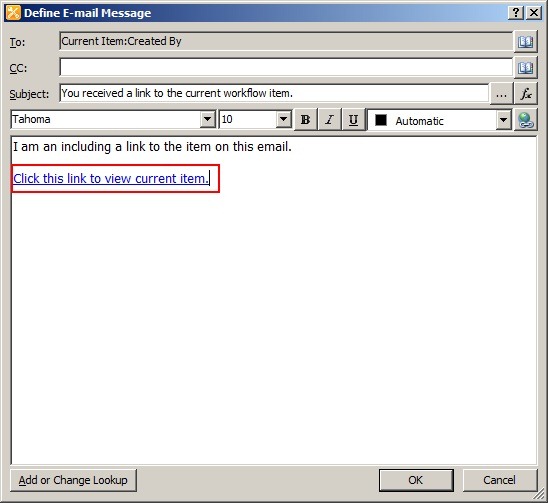
First add a “Send an Email” action to your workflow.  Edit the action to pull up the email configuration dialog.  Click the “Add hyperlink” button seen below.

EmailLink1

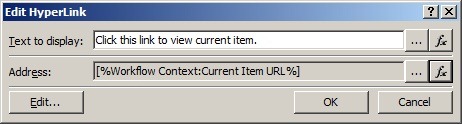
When prompted for the address of the link click the fx button to perform a lookup.  Choose Workflow Context from the “data source” dropdown.  Choose Current Item URL from the “field from source” dropdown.  Click OK.

EmailLink2

Your Edit Hyperlink dialog should now look something like this.

EmailLink3

The end result will be a hyperlink added to your email pointing to the current workflow item.  Note: this link points to the non-modal dialog display form (display form similar to what you had in 2007).

EmailLink4


SharePoint 2013 Considerations (update 2015-06-15)

If you attempt to use this process for SharePoint 2013 style workflows (based on Workflow Manager and not the out of the box SharePoint 2010 workflow engine) you will notice that the URL generated is incorrect (ex. “Lists/MyList/1_.00”).  It will look something like the following.

EmailLinkWFItem2013_3_thumb[1]


The solution to this is to install the SharePoint 2013 June 2014 CU (I tested with the Server package but it may be included in the Foundation package as well).  After you install this cumulative update you may notice that the URL generated only includes from the list level and down (ex. “LIsts/MyList/DispForm.aspx?ID=1).  As such you will need to combine this with the site URL.  See below for example of the new URL that is generated.

EmailLinkWFItem2013_4_thumb


Conclusion

In this post I walked you through the steps to create a SharePoint Designer 2010 workflow with an email that contains a link to the current item.  While there are many other options for accomplishing this out on the web I found this to be a more concise process and easy to understand.  Hopefully you found this helpful as well.  Feel free to leave any comments or feedback if you’ve found other ways that were helpful to you.


-Frog Out

Slides, Code, and Photos from SPTechCon San Francisco 2011

    Note: Updated 2/12/11 with links to both presentation materials.

    This past week I presented two sessions at SPTechCon San Francisco 2011.  The first session was “The Expanding Developer Toolbox for SharePoint 2010” which .  Thanks to all of my attendees for this session.  They had so many great questions that we ran out of time before covering all of the planned material.  Especially for them I’ve provided the slides and code samples to walk through them on their own.

The second session was “Real World Deployment of SharePoint 2007 Solutions”.  In talking with attendees before the session many were looking for 2007 content.  At the conference SharePoint 2010 was represented much more heavily than 2007, so I was glad to fill a need in the community.

Slides and Code

Click here for “The Expanding Developer Toolbox for SharePoint 2010” materials

Click here for “Real World Deployment of SharePoint 2007 Solutions” materials

Photos

Pictures on FaceBook

Click here

Pictures on Windows Live (higher res)

Side Trips

Aside from the conference itself I also got to take a few side trips during the nights.  A special thanks to Dux Raymond Sy (Twitter) for organizing a Mongolian Hot Pot dinner on Monday (see pictures) and Michael Noel (Twitter) for organizing a Korean bbq dinner on Tuesday (again see pictures).  These were both new experiences for me and I thoroughly enjoyed the time with friends and trying something new.  Another thanks to Mark Miller (Twitter) for giving a personal tour around various sites of San Fran to myself and a few others.  It was great hearing the backstory of different neighborhoods and buildings from someone who had lived in the area for years.  Overall a great addition to the conference itself.

Conclusion

This is the 3rd SPTechCon I’ve attended and the conference is getting better with each iteration.  The fine folks at BZ Media should be proud of the effort they’ve put in.  The next SPTechCon will be in Boston in June.  As of right now I won’t be attending that one but I highly recommend anyone to go if you have the chance.

-Frog Out