PowerShell Script To Traverse All Sites In SharePoint 2010 (or 2007) Farm

    Over the past few years I’ve written a number of blog posts on performing various actions against a site collection or web application (display site collection admins, find all SPShell admins with database, find closed web parts).  Invariably with every post I get some comments along the lines of “this is great, how can I run this against every site in the farm”.  Well today you get your wish (sort of).  Below you will find a template script that traverses all sites within your local farm.  Isn’t that great!?!

    In it’s current state this script will simply output the title and URL of every site within the farm.  You may modify the function to perform your desired actions.  One stipulation is that you must have proper access to each of the web applications / site collections in order to actually traverse them.  Please leave any feedback that you have on this template in the comments.


Scripts

SharePoint 2010

Download the SharePoint 2010 template here.


Here is the source as well

function RecurseSiteAndDoSomething() {
    param([Microsoft.SharePoint.SPWeb]$SiteIdentity)

    Write-Output "Site: $($SiteIdentity.Url)"
    
    if($SiteIdentity.Webs.Count -gt 0)
    {
        foreach($subWeb in $SiteIdentity.Webs)
        {
            RecurseSiteAndDoSomething -SiteIdentity $subWeb
        }
    }
}

$contentWebAppServices = (Get-SPFarm).services |
 ? {$_.typename -eq "Microsoft SharePoint Foundation Web Application"}

foreach($webApp in $contentWebAppServices.WebApplications)
{
    Write-Output "Web Application: $($webApp.name)"
    foreach($siteColl in $webApp.Sites)
    {
        Write-Output "Site Collection: $($siteColl.Url)"
        RecurseSiteAndDoSomething -SiteIdentity $($siteColl.RootWeb)
    }
} 

SharePoint 2007

I am still ironing out a few things with the SharePoint 2007 version, but here is the current script.


function RecurseSiteAndDoSomething() {
    param([Microsoft.SharePoint.SPWeb]$SiteIdentity)

    Write-Output "Site: $($SiteIdentity.Url)"
    
    if($SiteIdentity.Webs.Count -gt 0)
    {
        foreach($subWeb in $SiteIdentity.Webs)
        {
            RecurseSiteAndDoSomething -SiteIdentity $subWeb
        }
    }
}

$contentWebAppServices = ([Microsoft.SharePoint.Administration.SPFarm]::Local).services | 
? {$_.typename -eq "Microsoft SharePoint Foundation Web Application"}

foreach($webApp in $contentWebAppServices.WebApplications)
{
    Write-Output "Web Application: $($webApp.name)"
    foreach($siteColl in $webApp.Sites)
    {
        Write-Output "Site Collection: $($siteColl.Url)"
        RecurseSiteAndDoSomething -SiteIdentity $($siteColl.RootWeb)
    }
} 


Conclusion

    In this post I presented a template script for recursively traversing each site within the local SharePoint farm.  This is just a first pass at this template.  If I make any updates in the future I will update this post to reflect.


      -Frog Out

Unable To Activate SharePoint 2010 Publishing Features If Create Subsites Is Disabled

Recently I was at a client that was experiencing an odd issue: they couldn’t activate the SharePoint Server Publishing Infrastructure site collection feature. In this post I’ll walkthrough some of the processes that we went through to diagnose the error. For those wanting the short version it turns out the web application policy for “Create Subsites” had been disabled.  You can jump to the Solution section jump to the solution section below.


Diagnose

To start we checked the ULS logs to see what showed for the correlation ID.  Results were inconclusive.  We found a whole host of errors, but nothing seemed definitive.  The most promising error was related to an “access denied” and failure to create site PressReleases (remember this point.)  The logged in user had full control access to the site, was a site collection administrator, and had no other warning signs of why it would get an access denied error.

We checked the web application policies applied to the permission levels (Full Control, Contributor, etc.) to see if any had denied any permissions.  All were showing as enabled.

We then tried to replicate the error in a different site collection in the same web application.  That attempt failed.  This verified that it wasn’t an issue with just that site collection so we went one level higher and created a new web application.  On the new web application we attempted to activate the feature in a new site collection which succeeded.  This led us closer to determining it was an issue with the web application.

In order to get more information about the above errors we turned verbose logging on for all options.  We then triggered the error and read through the ULS logs (now with verbose details).  After a bit of digging we found the following line that stuck out.

“PermissionMask check failed. asking for 0x00800000, have… <permission mask we had>”

I looked up the permissions masks within the SPRights class (click here) to find out the permission it was asking for.  It turns out 0x00800000 corresponds to the “ManageSubwebs” right.  Looking back this validated our error for failure to create site PressReleases.

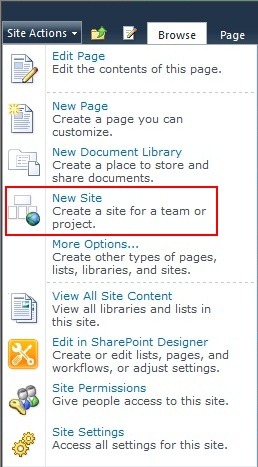
We then decided to create a blank subsite to see if that also had an issue.  This is where we really honed in on the issue: the menu option to create a subsite was missing!  The create list, page, and other options were available but not create subsite.

CreateSubSites2

    Here is a screenshot of the out of the box action menu for comparison.  Notice that “New Site” is an available option.

CreateSubSites3


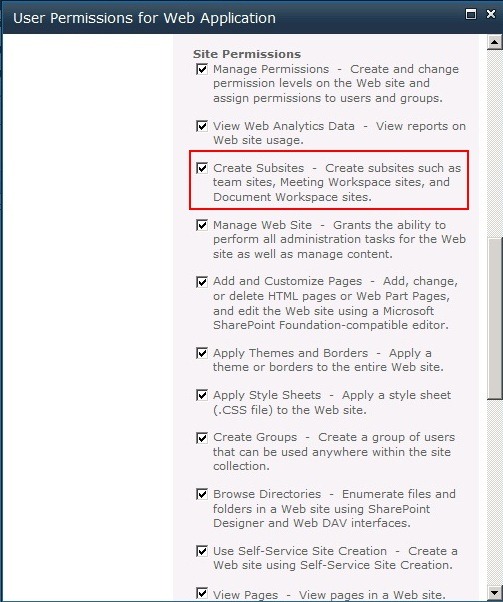
Now that we found we couldn’t create subsites we returned again to Central Administration for the web application policy.  The previous time we checked the policies applied to permission levels but not the overall policy.  As we scrolled down the allowed permissions lo and behold we found something disabled: Create Subsites.


Solution

Navigate to Central Administration and click Manage Web Applications.  Click the picture of a person with a key in front.  Scroll down until you see the Create Subsites permission.  Check the box for this permission.


CreateSubSites4

CreateSubSites1


Conclusion

In summary the client was experiencing issues with activating the publishing infrastructure features.  A side issue we noticed was that we couldn’t create subsites which also turned out to be the root cause.  Although we took a few twists and turns while troubleshooting this issue I hope you see some of the common areas and thought processes to go through.


-Frog Out


Links

SPRights permissions masks

http://technet.microsoft.com/en-us/query/dd585419

Life Is Full Of Changes (Part 2)

    In my last post (read here) I mentioned that I recently took a position with a new company.  Starting yesterday my new position is with Microsoft as a SharePoint Premier Field Engineer (PFE).  I’m very excited about this opportunity as it will provide me a new set of challenges, a great network of some of the brightest minds in the industry, and a chance to grow myself while supporting clients.  I will be traveling more than I did previously, but I will still be based out of Columbus, OH.  As I said before I plan to stay involved in the community with various user groups and events.  I’m really looking forward to ramping up with Microsoft.


      -Frog Out

Life Is Full Of Changes (Part 1)

    Today will be my last day with Sogeti.  I’ve been with Sogeti USA for just over 4 years.  In that time I’ve gotten to work on some great projects, develop relationships with some brilliant and passionate people, participate in the .Net developer and SharePoint communities, and grow my skills in a number of areas I’m passionate about.

    As with all good things they must come to an end though.  I’ve accepted a position with another company and will provide more details once the transition has completed.  This decision was a difficult one to make but it provides a great career opportunity on many levels.  As much as my new schedule allows I plan to continue participating in local user groups, speaking at conferences, and blogging.

    Speaking of which, you may have noticed my reduced blogging activity in the past few months.  In addition to a career change I’m also in the process of moving to a new residence (only a few miles from my current residence, so I’ll still be in Columbus.)  Searching for a new place, filling out paperwork, and all of the other work associated with this move has taken away a good chunk of the time I used to devote to blogging.  Once everything gets settled out with the move and job change I’ll re-evaluate how much time I can devote to blogging.

    A big thanks to Sogeti and everyone who has been so supportive over my time with them.  It’s hard to move on, but I am excited for the prospects that the future will bring.


      -Frog Out

SharePoint Saturday Columbus 2011 Call for Speakers and Sponsors Is Open

2011_SPS_Logo_Columbus

Once again myself and a great group of individuals (Jennifer Mason, Sean McDonough, Nicola Young, and Michelle Caldwell) are organizing a SharePoint Saturday in Columbus, OH.  The event will be on August 20, 2011 at the OCLC Conference Center, a fantastic venue that attendees (including speakers and sponsors) gave high praises on for last year’s event.

Today we announced the opening of call for speakers and sponsors.  If you are interested in speaking please fill out the speaker submission form (click here) and email back to spscolumbus@live.com by July 6th.  If you are interested in sponsoring please email spscolumbus@live.com for details.  We have many sponsorship opportunities available.  You can find more information for both on the SPSColumbus homepage (website).

Registration has not yet opened, but stay tuned for details.  We’re looking to make this an even better event this year.  Hope to see you there!


-Frog Out

Speaking at BuckeyeSPUG May 2011 Meeting

Print

This Thursday May 19th, 2011 I will be presenting my “PowerShell for the SharePoint 2010 Developer” session at the Buckeye SharePoint User Group (BuckeyeSPUG).  BuckeyeSPUG is my local SharePoint user group and I always enjoy giving back by helping out with the steering committee, presenting, and volunteering with any other areas that I can.  I recently gave this presentation at SharePoint Saturday Michigan last weekend and the early feedback I heard was good.  I’m looking forward to a good meeting and hope everyone can learn something.  See you there.


Session

Where: Buckeye SharePoint User Group (BuckeyeSPUG)

Title: PowerShell for the SharePoint 2010 Developer

Audience and Level: Developer, Intermediate to Advanced

Abstract: PowerShell is not just for SharePoint 2010 administrators. Developers also get access to a wide range of functionality with PowerShell. In this session we will dive into using PowerShell with the .Net framework, web services, and native SharePoint commandlets. We will also cover some of the more intermediate to advanced techniques available within PowerShell that will improve your work efficiency. Not only will you learn how to automate your work but also learn ways to prototype solutions faster. This session is targeted to developers and assumes a basic familiarity with PowerShell.

Slides and Code download: Click here

(Note: I included many hidden slides for some PowerShell basics and intro material. Also included extra scripts for additional areas to look into.)


-Frog Out