PowerShell Script to Create PowerShell Profile

    Utilizing a PowerShell profile can help any PowerShell user save time getting up and running with their work.  For those unfamiliar a PowerShell profile is a file you can store any PowerShell commands that you want to run when you fire up a PowerShell console (or ISE.)  In my typical profiles (example here) I load assemblies (like SharePoint 2007 DLL), set aliases, set environment variable values (such as max history), and perform other general customizations to make my work easier.  Below is a sample script that will check to see if a PowerShell profile (Console or ISE) exists and create it if not found.  The .ps1 script file version can also be downloaded from my SkyDrive here.

Note: if downloading the .ps1 file, be sure you have enabled unsigned scripts to run on your machine as I have not signed mine.


$folderExists = test-path -path $Env:UserProfileDocumentsWindowsPowerShell

if($folderExists -eq $false)

{

    new-item -type directory -path $Env:UserProfileDocumentsWindowsPowerShell > $null

    echo "Containing folder for profile created at: $Env:UserProfileDocumentsWindowsPowerShell"

}


$profileExists = test-path -path $profile

if($profileExists -eq $false)

{

    new-item -type file -path $profile > $null

    echo "Profile file created at: $profile"

}

    A few things to note while going through the above script.

  • $Env:UserProfile represents the personal user folder (c:documents and settings…. on older OSes like XP and c:Users… on Win 7) so it adapts to whichever OS you are running but was tested against Windows 7 and Windows Server 2008 R2.
  • “ > $null” sends the command to a null stream.  Essentially this is equivalent to DOS scripting of “@ECHO OFF” by suppressing echoing the command just run, but only for the specific command it is appended to.  I haven’t yet found a better way to accomplish command suppression, but this is definitely not required for the script to work.
  • $profile represent a standard variable to the file path of the profile file.  It is dynamic based on whether you are running PowerShell Console or ISE.


Conclusion

    In less than two weeks (Apr. 10th to be exact) I’ll be heading down to SharePoint Saturday Charlotte (SPSCLT) to give two presentations on using PowerShell with SharePoint.  Since I’ll be prepping a lot of material for PowerShell I thought it only appropriate to pass along this nice little script I recently created.  If you’ve never used a PowerShell profile this is a great chance to start using one.  If you’ve been using a profile before, perhaps you learned a trick or two to add to your toolbox.  For those of you in the Charlotte, NC area sign up for the SharePoint Saturday and see some great content and community with great folks.


      -Frog Out

SharePoint Saturday Michigan 2010 Recap, Slides, and Photos

michigan

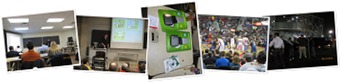
This past weekend I attended SharePoint Saturday Michigan (SPSMI) in Ann Arbor, Michigan.  For those unfamiliar, SharePoint Saturday is a community driven event where various speakers gather to present at a FREE conference on all topics related to SharePoint.  This made my third SharePoint Saturday attended and second I’ve spoken at.  I believe today it was announced that about 210 people total attended the event.  I was very happy with the turnout, especially the ratio of male to female attendees.  Typically with computer related conferences the ratio leans towards more males attending, but both Peter Serzo (one of conference organizers) and I both commented to each other that at the end of the day it appeared to be close to 40% women in the crowd.  So here’s my recap of the weekend.

Arrival

Friday afternoon I drove up from Columbus, OH to Ann Arbor, MI and arrived around 4pm.  I was attempting to avoid the rush hour traffic and construction backups.  Turned out to be a good idea because other speakers coming up Friday got stuck on a highway which literally closed down in both directions due to a bad accident.  I was talking my friend Sean McDonough through the highway closing and this was the first time I had seen a solid black traffic line on Google Maps.  Most of us are familiar with Green, Yellow, and Red, but this line was black if that tells you how bad it got.

Speaker “Dinner”

Fast forward a few hours and it was time for the speaker “dinner.”  I put “dinner” in quotes because with this night alone SPSMI set a new bar for nicest and most extravagant speaker appreciation events for SharePoint Saturday.  By tapping into some very influential contacts, the conference organizers were able to provide a truck limo (yep you heard right) with refreshments, access to an underground suite at the Palace of Auburn Hills, and courtside tickets to see the Detroit Pistons play that night.  Being a Michigan native I have to say that I was absolutely floored by this experience and very thankful to our conference organizers Peter, Sebastian, and Jesse along with Trillium Teamologies.

Sessions

The actual conference started Saturday morning at 9am with the keynote by Rob Collie who is the Microsoft program manager for PowerPivot.  The day continued and I attended the following sessions:

  • Mike Watson (@mikewat) – “SharePoint 2010 Fight Night: Devs vs. Admins”
  • Karl Swedeberg (@kswedberg) – “A Walk on the Client Side with jQuery“
  • [my session] Brian Jackett (@briantjackett) – “Real World Deployment of SharePoint 2007 Solutions”
  • Jeff Willinger (@jwillie) – “Social Computing and Collaboration Inside and Outside the 4 Walls”
  • Paul Schaeflein (@paulschaeflein) – “PowerShell for the SharePoint Developer”

My Presentation

I had a great time presenting my session on Deploying SharePoint 2007 Solutions, but it wasn’t without its fair share of technical issues.  As my session was right after lunch I came in to my room 10 mins early to set up my laptop, slides, and demos.  As a quick background note, a few months ago I got an upgraded laptop from my company Sogeti and have been dual booting it between XP (factory installed) and Windows Server 2008 R2 w/ Hyper-V.  As such I had prepared all of my demo virtual machines to run under Hyper-V.  About 3 minutes before my session was scheduled to start though it became apparent that I did not have the correct display drivers to connect Windows Server 2008 R2 to the projector…

As you can imagine this was a slight cause for concern as I was potentially going to be unable to give my presentation.  Luckily for me I usually prepare for such unforeseen issues and had my presentation and some spare VMs that would run on XP on my external hard drive.  Knowing this I rebooted my machine into XP and began my presentation without slides until about 5 mins into the session when everything was up and running on XP.  Despite this being the first time I gave this presentation I have to say it was one of my favorites I’ve given so far.  The audience was very engaged in the session and I received some great, positive feedback afterwards.  Thanks to all who attended my session, I appreciate it very much.

Link to Presentation Files

For those of you who attended my session and would like my slides or demo PowerShell scripts they can be found on my SkyDrive at the link below.  Also, if you have a few minutes and wouldn’t mind rating my session I have this session posted on SpeakerRate.  As speakers we always appreciate any and all feedback attendees offer, so thank you if you are able to provide any.

SkyDrive folder with session files

Rate my SharePoint 2007 Solutions session

Picture Albums

For everyone else, here are my pictures from the weekend.  The first link is to my FaceBook album which will have tagging (recommend this one.)  The second is to my Live album if you care for higher resolution images.

http://www.facebook.com/album.php?aid=2154482&id=21905041&l=a3fb72ee8c

Conclusion

A big thank you goes out to all of the organizers, speakers, sponsors, and attendees of SPSMI.  As I’ve said so many times, without each and every one of you these events wouldn’t be possible.  I thoroughly enjoyed this trip back to my home state and presenting a new session.  For those interested in my upcoming schedule I will be giving two sessions on PowerShell at SharePoint Saturday Charlotte in April, helping plan Stir Trek: Iron Man Edition in May, and I’m submitting sessions to Day of .Net Ann Arbor in May as well.  Beyond that I haven’t planned out any travels.  Thanks for reading my recap.  Look forward to more technical posts now that I have a short break in conferences.

-Frog Out

links: Michigan image

SharePoint Saturday Michigan Is Coming Up!

     Next Saturday March 13th Ann Arbor, MI will be hosting SharePoint Saturday Michigan (SPSMI).  For those unfamiliar, SharePoint Saturday is a community driven event where various regional and national speakers gather to present at a FREE conference on all topics related to SharePoint.  This will be my third SharePoint Saturday and second one I’ve had the honor of presenting at.  My presentation is titled “Real World Deployment of SharePoint 2007 Solutions“ (click here for the SpeakerRate link.)

    After taking a look at the speaker and session list I can tell you with great excitement that this event is packed with great speakers and topics.  Register here and come on out to SharePoint Saturday Michigan on March 13th.  If you’re attending feel free to track me down and say hi.  See you there.


      -Frog Out

SharePoint Saturday Cleveland 2009 Recap

As noted in my previous post I attended and spoke at the SharePoint Saturday Cleveland 2009 conference.  For those unfamiliar, SharePoint Saturday is a community driven event where various speakers gather to present at a FREE conference on all topics related to SharePoint.  This was my first SharePoint Saturday and it was a great community event to attend.  Over the past 6 months or so I’ve been following various Twitter users talking about SharePoint Saturdays in their region so I was excited to see what all the buzz was about.

Friday night I arrived in Cleveland for the speaker (nerd) dinner at Fahrenheit in Tremont.  I was finally able to put a face (real, not just their picture online) to various names like Eric Harlan (@ericharlan) and Jesse Murray (@lackscreativity) from the Baltimore and Detroit Sogeti offices, Rick Black (@ricknology), and also see some familiar faces again like John Ferringer (@ferringer), Sean McDonough (@spmcdonough), Callahan (@cacallahan) and Melissa Lucarelli (@smartyskirt).  Can you sense that I know too many people by their Twitter names?

Saturday started off early as I was scheduled to speak during the first session.  I gave my “The Power of PowerShell + SharePoint” presentation to about 20 people.  As most of the crowd was still waking up I threw in some jokes and funny slides to keep things lively.  They had a number of great questions as we went along and hopefully learned a good introduction to PowerShell and how to use it with SharePoint.

After my session I tried to attend talks on other topics that I hadn’t heard much about such as PerformancePoint, InfoPath Forms, SharePoint branding, and the new Metadata Manager.  I wish I could have attended more sessions, but only so much time in the day and I can only be in one place at a time.  Overall the level of content was good and I appreciate all the time and hard work each speaker put into the day.

Following the conference wrap-up session a dozen or so attendees and speakers met at The Blind Pig in downtown Cleveland for a ritual SharePint.  The Blind Pig was nice enough to host us and provide drinks and appetizers while us conference folks got to unwind from the day.  It was good to hear positive feedback from the conference and get to share SharePoint and personal stories.

As all good things must come to an end, so did my time at SharePoint Saturday Cleveland.  I was able to snap a few pictures which I’ve posted a link to below.  I’ve heard there will be a SharePoint Saturday Indianapolis early in 2010 as well as ones being planned for Pittsburgh and Columbus not far after.  If you’ve never been to a SharePoint Saturday I would highly encourage you to attend (did I mention it’s FREE!)  A final thanks to everyone who helped put on the event, spoke, sponsored, or had any hand in making this event happen.  Without you this never would have been possible.  I look forward to attending more such events and keeping the SharePoint community growing.

-Frog Out

SharePoint Saturday Cleveland Slides and Demo Scripts – PowerShell + SharePoint

     This weekend I spoke at the SharePoint Saturday Cleveland event and gave my “PowerShell + SharePoint” talk.  At some point I believe they will be publishing our slides and any demo items but I wanted to list mine here as I promised I would for various attendees.  Below are links to my SkyDrive where I have hosted these files.  If you have any questions or issues getting them let me know.  I’ll be posting a recap with some pictures soon as well.  Thanks to all who attended my presentation and SPSCleveland, look forward to more such events in the future.


SharePoint Saturday Cleveland demo files and slides


   -Frog Out

Organize Your Desktop With Fences™ From Stardock

Are you a presenter having to deal with your desktop getting jumbled while switching resolutions for a projector?  Are you an end user who has too many unorganized desktop icons?  I feel like Ron Popeil with lead ins like these, but really I just wanted to pass along a great FREE product I’ve been using the past few months to help me organize my desktop for multiple needs.

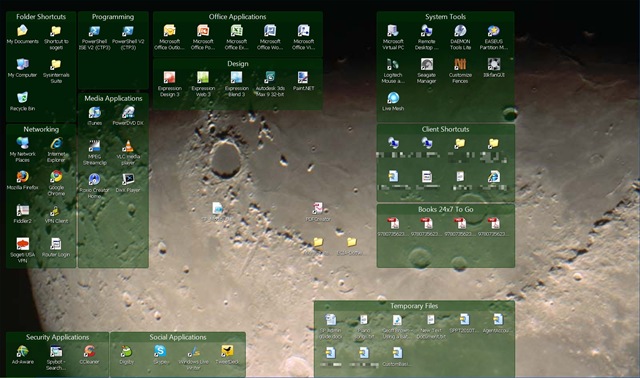
Stardock released their desktop management tool called Fences which a coworker referred me to a few months ago.  Essentially you can create groupings (fences) on your desktop and place your icons inside these groupings.  If you resize your desktop or adjust the individual fences, the tool will automatically adjust accordingly.

Fences1     Another nice feature is the ability to hide portions of your desktop to remove the clutter.  I really like this feature so that only the fences and icons that I’m currently using the most are displayed.  Other icons like a DVD burning program or rarely used shortcuts and applications can be hidden.  Just configure the fences or icons that will always display, then double click anywhere on the desktop to hide the rest.

Fences2

One last feature I like is taking snapshots of your desktop layout.  This allows you to create multiple configurations (home, work, just a backup, etc.) that can be restored at any time.  So check out this great tool and let me know how you like it.  I’ve seen a few minor updates over the past months I’ve used it.  At the time of this writing it’s just made it to a release candidate recently.  Hopefully it’ll remain a free product once it becomes a full product.  Enjoy.

And finally a video a Ron Popeil for those of you who know you know him but can’t quite put a face to the name.


-Frog Out