[Update 2025-07-09] After internal discussion with Merill Fernando and others, it does appear that you can use delegated authenticated with interactive auth prompt. I will be testing this out soon and share more once testing is complete. [/Update]
Recently I had the chance to test out a number of new technologies as part of my org’s Fix Hack Learn (FHL) week. This includes an MCP (model context protocol) server for Microsoft Graph to ingest public data into a Copilot connector using GitHub Copilot agent mode. While I’ve had lots of experience with Microsoft Graph and Copilot connectors (formerly Graph connectors), the other areas were new to me. In this post I’ll walk through my experience and observations based on my time spent so far.
In general, I was pleasantly pleased with how easy it was to get started. It literally took 5-10 mins starting from nothing to having my first successful prompt successfully responding from the MCP server. The following days I dug in really deep and got a bit lost trying out different models, adding instruction files, and testing out various prompts. By the end of the week, I had a working process that you can see in this shortened video.
Use case
To frame the scenario, my goal was to identify a set of publicly available data (ex. data.gov) and ingest that into M365 Copilot via a Copilot connector without writing any code. Once the data is ingested I could then use M365 Copilot to reason over the data through user prompts.
In my reading thus far, MCP is generally used as a way to expose “tools” to an LLM so that the LLM can identify APIs or other resources to use when processing a user prompt. In my case though I was essentially treating MCP as a means to prototype a development artifact (i.e. Microsoft Graph requests that worked with users, Copilot connectors, SharePoint sites, etc.) Think of this like a developer REPL akin to Microsoft Graph Explorer but instead of calling APIs directly I used natural language prompts as the input.
Getting started
This post is not intended to be an introduction to MCP, but for those interested I found the following resources useful.
https://modelcontextprotocol.io/introduction
https://www.anthropic.com/news/model-context-protocol
From the Microsoft Graph perspective, there is not an official Microsoft Graph MCP server, but I did find a community-based MCP server called https://lokka.dev from my peer Merill Fernando. You can run Lokka locally which I did as an NPM package in VS Code (now natively supported) as well as other options.
Merill provided a quick and easy guide for installation and running the Lokka MCP server. A few of the set up instructions didn’t match the UI screens as this is recently GA’d and subject to change, but I shared with Merill and he was able to update as of the time of writing.
https://lokka.dev/docs/install
Ensure that you have the pre-requisites installed. In my environment that includes (may be higher than stated pre-reqs):
- Node v22.16.0
- VSCode v1.101.2 (user setup)
Lastly, ensure that you have created and consented permissions on a Microsoft Entra application registration. Note that at this time, as far as I’m aware, this currently only supports application (i.e. app-only) permissions. There are some workarounds I’ve read about to implement delegated permissions, but it doesn’t appear to be formally supported or part of the MCP spec as of yet. I was originally led to believe that only application permissions are supported (which is what my sample used), but after internal discussion I’m told that delegated auth is now available although not widely adopted by many MCP servers yet. I will be testing delegated auth over the coming week or two and share a separate update.
I purposely only consented the following permissions so that I could test out scenarios that weren’t consented:
- User.ReadWrite.All
- ExternalConnection.ReadWrite.OwnedBy
- ExternalItem.ReadWrite.OwnedBy
Comparing LLM Models
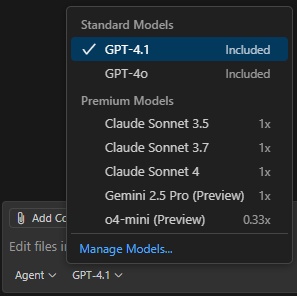
One thing that was not clear to me at first was that GitHub Copilot agent mode supports different LLMs, but more importantly that some of those models are considered “premium” models and have different consumption / usage limits. Additionally, some models (ex. Claude Sonnet 3.7) are only accessible with a paid plan such as Copilot Pro or similar.
https://docs.github.com/copilot/get-started/plans-for-github-copilot
I tried out three different models and landed on GPT-4.1 as my preferred, but recommend that you compare models to best suit your solution needs.
https://docs.github.com/copilot/reference/ai-models/choosing-the-right-ai-model-for-your-task
Ex. screenshot of differing consumption rates depending on model used:
Testing out commands / models
I attempted a number of simple scenarios such as getting users from the tenant, filtering on user properties, and updating metadata on a user. All of these were successful with varying formats of output depending on the model used.
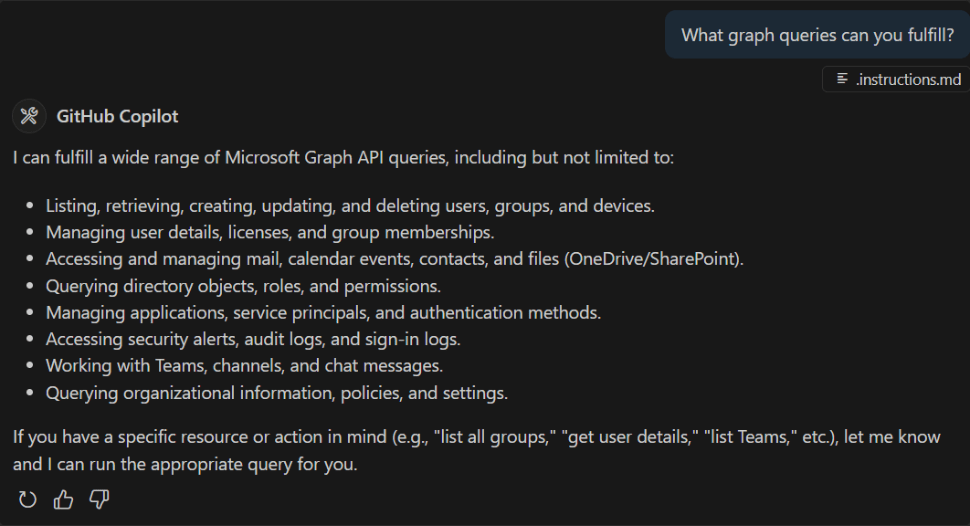
- GPT-4.1 was my preferred model, primarily because it struck a good balance between figuring things out on its own, good formatting, and prompting me as the developer before proceeding with various creative / destructive actions.
- Claude Sonnet 3.7 attempted a number of actions on its own without asking me for input and in many cases those has undesired effects. This was the “magic” that I referred to in a previous LinkedIn post. In just 2 testing prompts, I had created a Copilot connector, registered a schema, and ingested sample items. Sadly the schema and sample items were very far off from what was intended and thus this soured my experience.
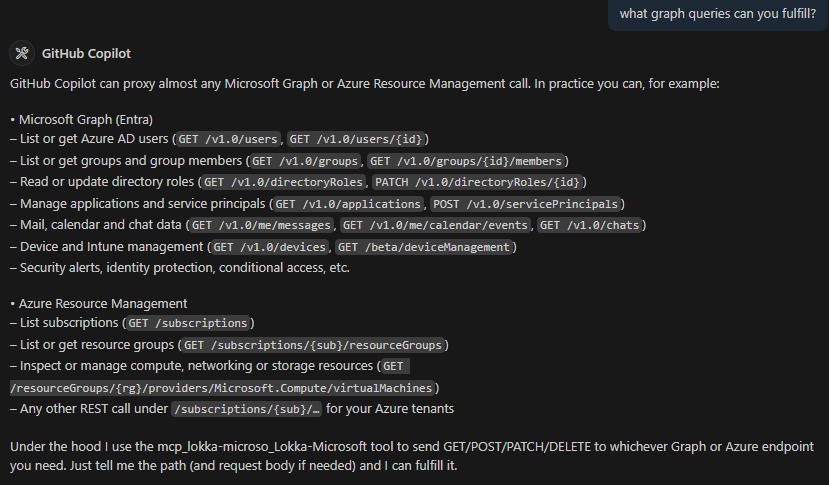
- o4-mini on the other hand was very sparse on information that it returned and I perceived it to be much slower (i.e. time to first token in response was at least 50-100% slower than the others).
GPT o4-mini (preview)
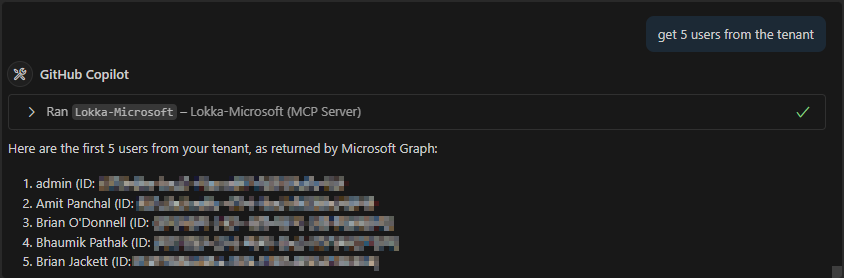
Claude Sonnet 3.7


GPT-4.1 [my preferred so far]

I ran a number of other scenarios as well that are too lengthy to share here, but these include:
- Creating a Copilot connector (see video near top for overview)
- Scraping information from website pages
- Using instruction files (for GitHub Copilot agent mode) to encourage / discourage prompting developer for confirmation of actions
- Attempting to access resources not granted permissions to
- ex. read SharePoint files, access Exchange mailboxes
- Modifying user data in Microsoft Entra
- ex. assign job title, department, email address, etc.
Conclusion
I am very happy with my time and outcomes testing out MCP + Graph + VS Code, but realize that this is not a production-worthy solution yet. First among them is only supporting application permissions, many of which require global admin consent. There are still big gaps when it comes to fully supporting delegated OAuth, fine-tuning the right amount of control vs. creativeness of the models, and rough edges getting a scenario implemented. I see lots of potential and will continue to keep an eye on this space.
If you have any questions or suggestions for additional use cases, or are already using MCP in your solutions, please share in the comments below.
-Frog Out






 The Frog Pond of Technology