Speaking at SPTechCon SF 2011 and SPSNOLA 2011

SPTC_SanFran_headerJAN21

From Feb 7th-9th I’ll be presenting two sessions at SPTechCon San Francisco 2011.  My first presentation is a new session called “The Expanding Developer Toolbox for SharePoint 2010” which covers many of the new tools and functionality available to SharePoint 2010 developers.  My second sessions is called “Real World Deployment of SharePoint 2007 Solutions” (presented at last SPTech Con Boston) which covers tips, tricks, and advice on deploying SharePoint 2007 solutions.  If you hurry you may still be able to register for this SPTechCon.  Click here for registration information.  Hope to see you there.

SharePointSaturday

In addition to SPTechCon, I’ll also be speaking at SharePoint Saturday New Orleans 2011 on Feb 26th.  My presentation is called “Managing SharePoint 2010 Farms with PowerShell”.  I’ve given this presentation at a number of recent conferences and it has been popular.  I’m excited for this weekend as well since it will be my first time visiting New Orleans.  Click here for registration information.


Sessions

Where: SPTech Con San Francisco 2011

Title: The Expanding Developer Toolbox for SharePoint 2010

Audience and Level: Developer, Beginner/Intermediate

Abstract: LINQ to SharePoint, native Visual Studio 2010 support, easier access to logging, Business Connectivity Services… The list of new features and tools available to developers rapidly grew between SharePoint 2007 and 2010.  In this session we will cover these and many of the other newest features added for SharePoint developers to utilize.  This session is targeted to SharePoint 2007 developers upgrading their skills to SharePoint 2010 or developers new to SharePoint 2010.


Where: SPTech Con San Francisco 2011

Title: Real World Deployment of SharePoint 2007 Solutions

Audience and Level: Admin/Developer, Intermediate

Abstract: “All I have to do is run some STSADM commands to deploy my SharePoint solutions, right?”  If you are saying that to yourself then you are missing out on some of the more advanced processes you can employ to deploy and maintain your SharePoint solutions and farm.  In this session we will cover lessons learned from 3 years of deploying and automating SharePoint solutions.  This will include using a combination of STSADM, PowerShell, SharePoint API and a number of other tools in a real world situation to deploy an entire suite of custom SharePoint solutions.  This session is targeted to farm administrators and developers.  Prior experience with SharePoint solutions, STSADM and minimal PowerShell experience is suggested.


Where: SharePoint Saturday New Orleans

Title: Managing SharePoint 2010 Farms with PowerShell

Audience and Level: Admin, Beginner

Abstract: Having you been using STSADM (or worse hand editing processes) to manage your SharePoint 2007 farms? Are you hearing about needing to learn PowerShell to manage SharePoint 2010 farms? This session will serve as part introduction to PowerShell and part overview of how you can use PowerShell to more efficiently and effectively manage your SharePoint 2010 farm. This session is targeted to farm administrators and IT pros and no previous experience with PowerShell is required.


-Frog Out

The One Thing: Brian Jackett and SharePoint 2010

Last weekend at SharePoint Saturday Virginia Beach (website) I was asked by Christian Buckley (twitter) from Axceler (website) to do a short video for his “The One Thing You Need To Know About SharePoint 2010” video series.  Below is the video.

Background

When Christian asked me to do this video I was in a time crunch to make it to the airport for my flight home.  I was literally running out the door right after we finished.  As a result I was rushed in my response which led to my funny line at the end about “being a better person.”  If I had more time I would’ve talked about how PowerShell now gives SharePoint admins native support for installing, configuring, and managing a 2010 farm with commandlets.  Also mentioning the benefits of PowerShell over STSADM such as being object oriented, having a consistent syntax, including a better help system, and integrating with other systems.  Since I wasn’t able to fit those in, at least I was funny right?

The Video

The One Thing: Brian Jackett and SharePoint 2010


-Frog Out

Goals for 2011

    Recently I posted a recap of my goals from 2010.  Now it’s time to post my goals and focus areas for 2011.  Just as I did in 2010 I’m splitting goals between professional and personal.

Professional

  • Blog – I intended to continue blogging at least twice a month, sometimes more frequently when time and motivation allows.  I have begun looking at other platforms or distribution methods for my blogging and will continue to investigate those.  I’ll post details on here if anything changes.
  • Speaking – In 2010 I spoke at a conference, user group, or other venue about once a month.  While I gained much from those opportunities it was also very time consuming, expensive (many times paid out of my own pocket), and emotionally draining.  This year I already have 3 engagements lined up in the first 2 months.  In 2011, if given the opportunity, I will probably limit myself to speak at 6 total events outside of Columbus / Ohio and then do 1-2 locally.
  • Open Source – Last year I started an open source project on CodePlex called SavePSToSP.  You can read about the origins of that project here.  The idea has been implemented into a PowerShell module which assists with saving script files to a SharePoint document library.  I plan to support this project with monthly builds at least through June of this year.
  • Volunteering – Last year I helped out with SharePoint Saturday Columbus and Stir Trek conferences as well as serving on the steering committee for Buckeye SPUG.  I’m already helping the volunteer board for the next Stir Trek conference and the steering committee for Buckeye SPUG.  Nothing official has started with SharePoint Saturday so nothing to report on that front.
  • Windows Phone 7 Development – Sometime in Feb this year I should be getting a corporate Windows Phone 7 device.  I’m really looking forward to this so that I can develop on real hardware.  I plan to develop at least one application by year end.  Most likely it will have hooks into SharePoint or PowerShell.  I don’t know if it’s something I will submit to the marketplace yet.
  • Portal and Collaboration Lead – This year with the Sogeti Columbus office I have a more official role of Portal and Collaboration Lead within the new Application Development and Integration practice.  This new role means that I will be expanding my scope of knowledge outside just Microsoft products to include IBM and other open source solutions for portal and collaboration solutions.  This will be an interesting challenge, but I hope to learn about at least 2 other solutions aside from SharePoint.

Personal

  • Volunteering – I plan to continue volunteering at my parish’s high school youth group with weekly meetings and side events.  I also plan to continue doing an event once every other month with the Columbus Gives Back organization (website).
  • House/Condo – I plan to buy a house or condo this summer when my apartment lease runs out.  I’ve already begun the search and talked to a realtor and lender so it is quickly becoming a reality.

Conclusion

    Once again I’ve outlined some goals for myself this year.  Many are similar to ones from last year but I have a few new ones.  All of these along with work, social, and other commitments will keep me busy as always.  If you have any goals for 2011 that you’d like to share feel free to leave a comment.  Thanks and good luck fulfilling your goals as well.


      -Frog Out

Slides, Materials, and Pictures from SharePoint Saturday Virginia Beach 2011

This past weekend I presented “Managing SharePoint 2010 Farms with PowerShell” and “SharePoint 2010 and Integrating Line of Business Applications” SharePoint Saturday Virginia Beach.  A big thanks to everyone who attended my sessions.  I had a great time presenting, getting to meet new folks, and exploring a little bit of the local life.  Below are slides, materials, and pictures from the event.  Let me know if you have any comments, questions, or feedback.  Thanks.

Slides and Materials

Managing SharePoint 2010 Farms with PowerShell

SharePoint 2010 and Integrating Line of Business Applications

Photos

Pictures on Facebook

Click Here

Pictures on Windows Live (higher res)

Side Note: SavePSToSP CodePlex Project

During my “Managing SharePoint 2010 Farms with PowerShell” I made mention of a CodePlex project I am working on called SavePSToSP.  Click here for the link to that project.  I have been pushing out updates roughly once a month or more.  If you have any feedback or find it helpful feel free to let me know.


-Frog Out

SharePoint 2010 PowerShell Script to Find All SPShellAdmins with Database Name

<Update 2011-29-06: Modify script to handle multiple admins per database>

Problem

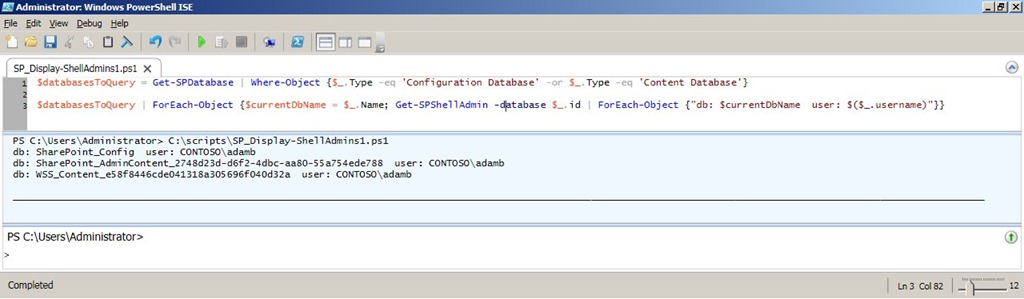
Yesterday on Twitter my friend @cacallahan asked for some help on how she could get all SharePoint 2010 SPShellAdmin users and the associated database name.  I spent a few minutes and wrote up a script that gets this information and decided I’d post it here for others to enjoy.

Twitter q1Twitter q2


Background

The Get-SPShellAdmin commandlet returns a listing of SPShellAdmins for the given database Id you pass in, or the farm configuration database by default.  For those unfamiliar, SPShellAdmin access is necessary for non-admin users to run PowerShell commands against a SharePoint 2010 farm (content and configuration databases specifically).  Click here to read an excellent guest post article my friend John Ferringer (twitter) wrote on the Hey Scripting Guy! blog regarding granting SPShellAdmin access.

Solution

Below is the script I wrote (formatted for space and to include comments) to provide the information needed.

Click here to download the script (updated script to handle multiple admins per database and sort them alphabetically).

# declare an array to store results

$results = @()


# fetch databases (only configuration and content DBs are needed)

$databasesToQuery = Get-SPDatabase |

    Where-Object {$_.Type -eq 'Configuration Database' -or $_.Type -eq 'Content Database'} |
    Sort-Object –Property Name


# for each database get spshelladmins and add db name and username to result

$databasesToQuery |

    ForEach-Object {$dbName = $_.Name;

                    Get-SPShellAdmin -database $_.id |
                        Sort-Object $_.username |

                        ForEach-Object {$results += @{$dbName=$($_.username)}}}


# sort results by db name and pipe to table with auto sizing of col width

$results.GetEnumerator() | ft -AutoSize

ScriptRun1


Conclusion

In this post I provided a script that outputs all of the SPShellAdmin users and the associated database names in a SharePoint 2010 farm.  Funny enough it actually took me longer to boot up my dev VM and PowerShell (~3 mins) than it did to write the first working draft of the script (~2 mins).  Feel free to use this script and modify as needed, just be sure to give credit back to the original author.  Let me know if you have any questions or comments.  Enjoy!

-Frog Out

Links

PowerShell Hashtables

http://technet.microsoft.com/en-us/library/ee692803.aspx

SPShellAdmin Access Explained

http://blogs.technet.com/b/heyscriptingguy/archive/2010/07/06/hey-scripting-guy-tell-me-about-permissions-for-using-windows-powershell-2-0-cmdlets-with-sharepoint-2010.aspx