Slides and Demo Scripts from Dog Food Conference 2016

   A big thank you out to the organizers, attendees, and sponsors from Dog Food Conference.  I had a great time getting to talk with attendees and fellow speakers as well as presenting two sessions.  Slides, code, and scripts from my sessions are below.  If you have any feedback or follow up questions please leave a comment below.


PowerApps and Microsoft Flow Intro for Developers

GitHub link to demo project files

https://github.com/BrianTJackett/BTJ.PowerApps.AzureDBSample

Slides


Running Your Azure Dev / Test VMs for Cheap

PowerShell script for creating new Azure RM VM

Slides


      -Frog Out

Upcoming Speaking Events September 2016

   After many months away from blogging and speaking (baby #2 was born recently) I’m speaking at a few conferences in the coming months.  If you are attending any of these conferences please stop by and say hi.  Looking forward to returning to each of these events.  Here are the sessions and abstracts.


Sessions

SharePoint Saturday Detroit (Sept 17th, 2016)

Title: PowerApps and Microsoft Flow for the SharePoint Developer

Abstract: PowerApps and Microsoft Flow are enterprise services (currently in preview) that allows power users and developers to build scalable applications that connect with numerous consumer and enterprise sources using PowerPoint and Excel-like tools. In this session we will overview the integration points for PowerApps and Microsoft Flow with various sources such as OneDrive, Twitter, Azure, and more. We will also talk about the developer story for integrating with custom APIs and on-prem data sources such as SQL Server and SharePoint. Lastly we will demo a number of scenarios to show how easily you can create and consume apps across Windows, iOS, Android, and web.


DogFood Con (Oct 5-6, 2016)

Title: PowerApps and Microsoft Flow Intro for Developers

Abstract: PowerApps and Microsoft Flow are enterprise services (currently in preview) that allows power users and developers to build scalable applications that connect with numerous consumer and enterprise sources using PowerPoint and Excel-like tools.  In this session we will overview the integration points for PowerApps and Microsoft Flow with various sources such as OneDrive, Twitter, Azure, and more.  We will also talk about the developer story for integrating with custom APIs and on-prem data sources such as SQL Server and SharePoint.  Lastly we will demo a number of scenarios to show how easily you can create and consume apps across Windows, iOS, Android, and web.


Title: Running Your Dev / Test VMs in Azure for Cheap

Abstract: With an MSDN subscription you can run your dev / test environment in Azure IaaS for less than the cost of a cup of coffee each day. In this session we will overview the basics of Azure IaaS (Infrastructure as a Service), the pieces you will use to be successful deploying SharePoint in Azure (including the new Azure Resource Manager templates), and how to use resources as efficiently as possible to reduce your costs and boost your farm performance. This session is targeted to SharePoint developers and administrators. Prior knowledge of Azure is helpful but not a requirement.


SharePoint Saturday Twin Cities (Oct 29, 2016)

Title: PowerApps and Microsoft Flow for Developers

Abstract: PowerApps and Microsoft Flow are enterprise services (currently in preview) that allows power users and developers to build scalable applications that connect with numerous consumer and enterprise sources using PowerPoint and Excel-like tools.  In this session we will overview the integration points for PowerApps and Microsoft Flow with various sources such as OneDrive, Twitter, Azure, and more.  We will also talk about the developer story for integrating with custom APIs and on-prem data sources such as SQL Server and SharePoint.  Lastly we will demo a number of scenarios to show how easily you can create and consume apps across Windows, iOS, Android, and web.​


      -Frog Out

SharePoint 2016 Configuration Change to Support AppFabric Background Garbage Collection

!Note: This post is written as of the SharePoint 2016 Release Candidate.  Pre-release software is subject to change prior to release.  I will update this post once SharePoint 2016 hits RTM or the related information has changed!

   In this post I’ll walk through the steps to enable background garbage collection for AppFabric 1.1 which is used by  the SharePoint 2016 Distributed Cache service.  I also provide a sample PowerShell script to automate the change.  Skip down to the Solution section for specific changes and a script to automate implementing the change.


Background

   The change that I describe is not a new one.  It was first introduced during SharePoint 2013’s lifecycle when Microsoft AppFabric 1.1 Cumulative Update 3 (CU3) was released.  CU3 allowed for a non-blocking garbage collection to take place but in order to take advantage of this capability an administrator needed to update a Distributed Cache configuration file (described below in the Solution section).  Later Microsoft AppFabric cumulative updates also require this same change to the configuration file.

   Fast forward to SharePoint 2016 which continues to use Microsoft AppFabric 1.1 for the Distributed Cache service.  As of the release candidate (RC) SharePoint 2016 ships with Microsoft AppFabric 1.1 Cumulative Update 7.  Since this cumulative update builds upon CU3 it also requires the same configuration file change to enable background garbage collection.


Problem

  Depending on server configuration, hardware, workloads being run, and more factors a SharePoint farm may or may not experience any issues with the Distributed Cache service if the background garbage collection change has not been applied.  In my lab environment I simulated load (10-50 requests / sec) against the SharePoint Newsfeed.  After a few minutes I began to experience issues with Newsfeed posts not appearing and eventually the Distributed Cache service instances crashed on the two servers hosting that service.  A restart of the AppFabric service allowed the Distributed Cache to recover and function normally again.


Solution

   The configuration change to allow for background garbage collection in Microsoft AppFabric 1.1 is outlined in Cumulative Update 3.  An administrator who has access to the SharePoint server(s) hosting the Distributed Cache service will need to perform the following actions.

  1. Upgrade the Distributed Cache servers to the .NET Framework 4.5 (as of the publishing of this blog .Net 4.5 is no longer supported and .Net 4.5.2 will need to be installed.)
  2. Install the cumulative update package (already installed for SharePoint 2016 Release Candidate).
  3. Enable the fix by adding / updating the following setting in the DistributedCacheService.exe.config file:
    <appSettings><add key="backgroundGC" value="true"/></appSettings>
  4. Restart the AppFabric Caching service for the update to take effect.

Note: By default, the DistributedCacheService.exe.config file is located under the following directory:

”%ProgramFiles%AppFabric 1.1 for Windows Server” where %ProgramFiles% is the folder where Windows Program Files are installed.


   While it is possible to modify this file by hand it is preferred to automate this process especially when multiple servers need to be updated.  The below script leverages the System.Configuration.ConfigurationManager class to make the necessary changes on an individual server running the Distributed Cache service.

Note: This script must be run from each server running the Distributed Cache service.  For an automated way to run on all Distributed Cache servers in a SharePoint farm see the PowerShell snippet following this script.


THIS SAMPLE CODE AND ANY RELATED INFORMATION ARE PROVIDED “AS IS” WITHOUT WARRANTY OF ANY KIND, EITHER EXPRESSED OR IMPLIED, INCLUDING BUT NOT LIMITED TO THE IMPLIED WARRANTIES OF MERCHANTABILITY AND/OR FITNESS FOR A PARTICULAR PURPOSE.


Download link:

https://gallery.technet.microsoft.com/SharePoint-update-7816fa74

[system.reflection.assembly]::LoadWithPartialName(“System.Configuration”) | Out-Null 

# intentionally leave off the trailing “.config” as OpenExeConfiguration will auto-append that 
$configFilePath = “$env:ProgramFilesAppFabric 1.1 for Windows ServerDistributedCacheService.exe” 
$appFabricConfig = [System.Configuration.ConfigurationManager]::OpenExeConfiguration($configFilePath) 
# if backgroundGC setting does not exist add it, else check if value is “false” and change to “true” 
if($appFabricConfig.AppSettings.Settings.AllKeys -notcontains “backgroundGC”) 
{ 
    $appFabricConfig.AppSettings.Settings.Add(“backgroundGC”, “true”) 
} 
elseif ($appFabricConfig.AppSettings.Settings[“backgroundGC”].Value -eq “false”) 
{ 
    $appFabricConfig.AppSettings.Settings[“backgroundGC”].Value = “true” 
} 
# save changes to config file 
$appFabricConfig.Save() 


   Optionally the following snippet can be run from any machine in a SharePoint farm that has the SharePoint commandlets available.  This will identify each Distributed Cache server and remotely run the previous script to implement the Distributed Cache configuration change.

Note: Update $UpdateDistributedCacheScriptPath with the path of the above script.  Also ensure that  PowerShell remoting is enabled and the account running the script has access to the target machines.


$UpdateDistributedCacheScriptPath = “C:ScriptsUpdateDistributedCacheBackgroundGCSetting.ps1” 

$serversRunningDistributedCache = Get-SPServiceInstance | where typename -eq “Distributed Cache” | select server | %{$_.Server.ToString().Split(‘=’)[1]} 
foreach($server in $serversRunningDistributedCache) 
{ 
    Write-Verbose “Modifying config file on server: $server” 
    Invoke-Command -FilePath $UpdateDistributedCacheScriptPath -ComputerName $server 
    Write-Verbose “Script completed on server: $server” 
} 


Conclusion

   In this post I walked through the update required to enable background garbage collection in Microsoft AppFabric 1.1 Cumulative Update 3 and higher.  This configuration change is required for SharePoint 2013 or SharePoint 2016 (as of Release Candidate).  I also provided a script for automating the process of implementing this configuration change.  I’m told a future update may automatically apply this change for SharePoint 2016.  If and when that change is released I’ll update this post to reflect that change.


      -Frog Out

Slides and Scripts from SPTechCon Austin 2016

   Thanks to all of the attendees at my SPTechCon Austin 2016 sessions.  On this blog post I’ll share my slides and demo scripts (and update it with future slide decks as I give the presentations).  Note that all scripts are provided as-is with no warranty.  Run them in a non-production environment first.


PowerShell for Your SharePoint Tool Belt

Slides


Demo scripts


Running Your Dev / Test VMs in Azure for Cheap

Slides


Scripts


PowerApps Enterprise Integration and Demos

Slides (not yet posted while PowerApps is still in preview)


      -Frog Out

My Experience Configuring Cloud Hybrid Search Service Application for SharePoint

   In this post I’ll talk through my personal experience deploying the new cloud hybrid search service application for SharePoint 2013 (also available in SharePoint 2016).  By no means am I an expert on this topic (especially in many of the supporting technologies such as AAD Connect, AD FS, etc.) but this is more meant to increase exposure to this new offering.  For an overview of cloud hybrid search and more information about actual implementation (which I will refer back to later) please read through Cloud Hybrid Search Service Application written by two of my Microsoft peers Neil and Manas (they are the true experts).


Components

   Here is a list of the high level components I used for my deployment.

Note: My Azure VM configuration is not using best practices for where or how to deploy different services.  Also my mention of GoDaddy and DigiCert are purely for example purposes and not an endorsement for either company.  I just happen to use their services and products in this scenario.

  • Office 365 (O365) trial tenant (sign up for one here)
  • 4 Azure VMs
    • A1 – Active Directory Domain Services (AD DS)
    • A1 – Active Directory Federation Services (AD FS)
    • A2 – Azure Active Directory Connect (AAD Connect), Web Application Proxy (WAP)
    • A4 – SQL Server 2014, SharePoint 2013 farm with Service Pack 1 and at least Aug 2015 CU
  • Custom domain (purchased through GoDaddy but any domain registrar should work)
    • Note: Office 365 does have a partnership with GoDaddy so configuration may be easier due to automated updates that can be performed
    • Additionally I was able to modify public DNS records through GoDaddy to allow federated authentication through AD FS
  • SSL wildcard certificate purchased from DigiCert
    • Only required if want to allow Office 365 user to open / preview a search result that resides on-prem with Office Online Server (new version of Office Web Apps Server 2013, not discussed in this post)
    • I also used this certificate for other purposes such as securing AD FS communication and implementing Remote Desktop Gateway (the latter is unrelated to this post)
  • Custom result source to display O365 search results in my on-prem farm


   Next we’ll take a look at some of these components more in depth.


SharePoint Server

   The new cloud hybrid search service application is available in SharePoint Server 2013 with the August 2015 CU or later.  I have heard from my peers that there are some issues with cloud hybrid search as of the October, November, and December 2015 CUs.  As such use either the August or September 2015 CUs at the time of this writing (Dec 8, 2015) or wait until the Jan 2016 CU which should contain the fix (link).  The SharePoint Server 2016 IT Preview 1 also supports cloud hybrid search although I have not tested it out myself.


Cloud Search Service Application

   To provision a cloud hybrid search service application the property CloudIndex on the service application must be set to True.  This property is a read-only property and can only be set at creation time.  As such you will need to create a new search service application in order to utilize the cloud hybrid search service.

   I have not tested creating a new cloud hybrid search service application using a restored backup admin database from an existing search service application.  The thought behind this would be to retain at least a portion of your existing search service application.  If you try this and have any findings let me know in the comments below.


Custom Domain

   A custom domain is not a requirement for cloud hybrid search.  I used one so that I could allow end users (demo accounts) to log into Office 365 as a federated user “someUser@<fakecompany>.com” rather than the default domain “someUser@<O365TenantDomain>.onmicrosoft.com”.


AAD Connect

   In order to search for on-prem content that has been indexed by Office 365 the user will need to have an account that is synchronized to Azure Active Directory / Office 365.  This allows the search service in Office 365 to show content based on the Access Control List (ACL) defined on-prem.

   There are multiple options available for synchronizing accounts between on-prem and AAD but the predominate ones include DirSync, AAD Sync, and AAD Connect.  Since AAD Connect is the future looking tool of choice of these three I decided to use it.  AAD Connect automates many of the tedious tasks of configuring federated authentication by stepping through a wizard.

   That said I did run into a number of issues during configuration due to missing certificates, invalid permissions, or other steps I missed or was unaware of.  If I got part of the way through the configuration and ran into a failure that I couldn’t recover from then I had to uninstall AAD Connect (do not remove all prerequisites when prompted), wipe out the contents of “<install drive>:Program FilesMicrosoft Azure AD SyncData”, and then re-install.


Display Search Results On-Prem


***PLEASE READ AS THIS IS IMPORTANT***

    The default scenario for cloud hybrid search is to index both on-prem and O365 content which are then queried in O365.  It is possible to create or modify an on-prem result source to use the remote index from your Office 365 tenant which allows for querying and display the combined search results on-prem.  The problem though is that when you query for and click results on-prem the search analytics click data is not incorporated back to the cloud index to further influence search results.

Ex. I queried for “SharePoint” in on-prem search center and clicked the 4th result on result page.  Multiple other users also searched for “SharePoint” and clicked the same 4th result.  SharePoint search (via timer jobs and other background processes) incorporates that click data and adjusts the 4th result to now appear higher in rankings upon subsequent search queries.

   I have unsuccessfully tested a few options to manually pass the search click data up to SharePoint Online.  These include creating a ClientContext object and calling the RecordPageClick() method on SearchExecutor, modifying the display template page, and more.  I did hear from a SharePoint MVP that successfully tested out a way to push search analytics data between on-prem and O365 but it took a fair amount of customizations to accomplish.  If I find out any additional information, workaround, or updates on this topic I’ll update this post to reflect that.


Example

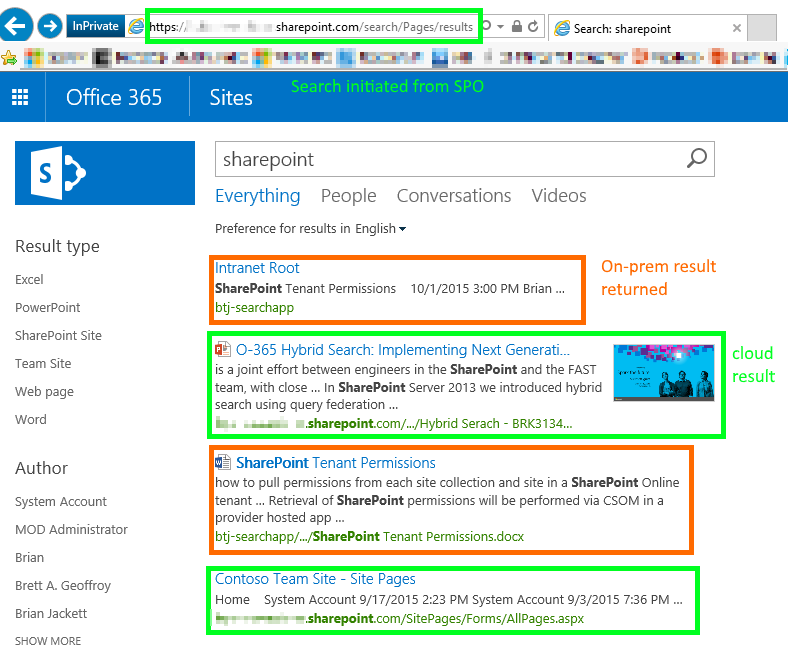
   As you can see from the below screenshots I can initiate a search query from on-prem or O365 (respectively) and get the same combined result set.
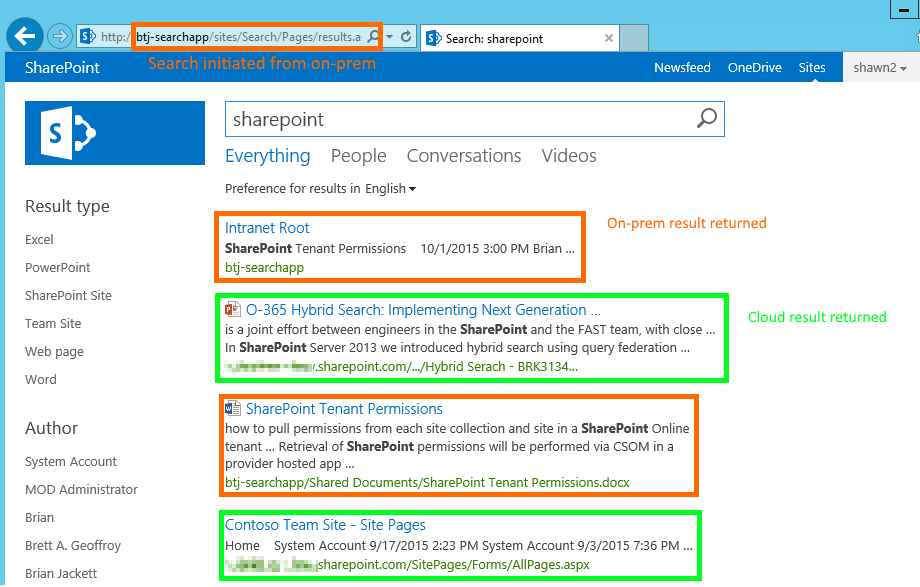
 

OnPremResults


SPOResults


Conclusion

   Due to my prior inexperience around AD FS, Web Application Proxy, AAD Connect, and other applications it took me a few days to get everything working end-to-end.  After that small hurdle I was very excited to be seeing combined on-prem and O365 search results in both on-prem and O365.  Do note though the section above calling out the current issue with search analytics data not being sent back and forth.  Aside from that I am looking forward to testing this out with customers and reaping the many benefits such as inclusion of content in the Microsoft Graph (formerly Office Graph) / Delve and other O365 only offerings.


      -Frog Out
Slides and Scripts from SharePoint Saturday Cincinnati 2015

   Thank you to all of the attendees at my “Running your Dev / Test VMs in Azure for Cheap” presentation at SharePoint Saturday Cincinnati 2015 (or as the locals liked to call it ScarePoint Saturday Spookinnati due to the Halloween theme.)  The slides and scripts from my presentation are below.  Enjoy.


PowerShell Scripts


Slide Deck


      -Frog Out