Goals for 2010 Retrospective

    As we approach the end of 2010 I’d like to take a  few minutes to reflect back on this past year and revisit the goals that I set for myself at the beginning of the year (click here to see those goals).  I feel it is important to track your goals not only to see if you accomplished them but also to see what new directions in life you pursued.  Once we enter into 2011 I’ll follow up with a new post on goals for the new year.

Professional

  • Blog – This year I intended to write at least 2 posts a month.  Looking back I far surpassed that goal by writing 47 posts (this one being my 48th).  As with many things in life, quantity does not mean quality.  A good example is a number of my posts announcing upcoming speaking engagements and providing links to presentation slides and scripts.  That aside, I like to at least keep content relatively fresh on this blog  which I was able to accomplish.  At the same time I’ve gotten much more comfortable in my blogging style and it has become much easier to write.
  • Speaking – I didn’t define a clear goal for speaking engagements, but had a rough idea of wanting to speak at 2-3 events.  Once again I far exceeded that number by speaking at 10 separate events and delivering 12+ presentations.  I’m very thankful for all of the opportunities that I was given and all of the wonderful people I have met as a result.
  • Volunteering – This year I intended to help out with the COSPUG (now Buckeye SPUG) steering committee and Stir Trek conference.  I fulfilled both goals and as well as taking on lead organizer duties for the first ever SharePoint Saturday Columbus.  Each of these events and groups turned out to be successful and I was glad to be a part of them all.  I look forward to continuing to volunteer with each next year in some capacity.
  • Android Development – My goal for getting into Android development was a late addition, but one I didn’t necessarily fulfill.  I spent a couple nights downloading the tools, configuring my environment, and going through some “simple” tutorials.  I say “simple” because in my opinion the tutorials were not laid out very well, took a long time to get running properly, and confused me more than helped.  After about a week I was frustrated with the process and didn’t think it was a good use of my time.  On a side note, I’ve dabbled in Windows Phone 7 development over the past few months and have been very excited by how easy and intuitive it was to get started and develop some proof of concepts.

Personal

  • Getting in Shape – I had intended to play on recreational sports leagues and work out on a semi-regular basis.  For the most part I fulfilled this goal by playing on various softball and volleyball leagues as well as using the gym.  At the same time I had some major setbacks.  In the spring I badly sprained my ankle and got hit in the knee with a softball which kept me inactive for almost 2 months.  More recently I broke my knuckle (click here to read about it) which I am still recovering from.
  • Volunteering – On the volunteering front I kept my commitments at my parish’s high school youth group.  As for other volunteering opportunities I got involved with a great organization called Columbus Gives Back (website).  I’ve volunteered with them a few times and really enjoy their goal to provide opportunities to people with busy schedules.  They  offer a variety of events typically after work hours and spread out around Columbus with no set commitments on time you need to put in.  If you have the time or motivation I highly recommend them.
  • House/Condo – I had been thinking of buying a house or condo this past summer, but decided to extend my apartment lease for another year instead.  I have begun the search for a place in the past few weeks and am excited begin the process of owning a home.

Conclusion

    This year I was able to set and achieve many of my goals.  For next year I’ll try to put more specific numbers to all of my goals.  If any of you readers set goals for 2011 feel free to send me a link as I’d love to see what you are aiming to accomplish.  Have a great end of 2010 and best wishes for the start of 2011!

      -Frog Out
Reduced Blogging For A Few Weeks

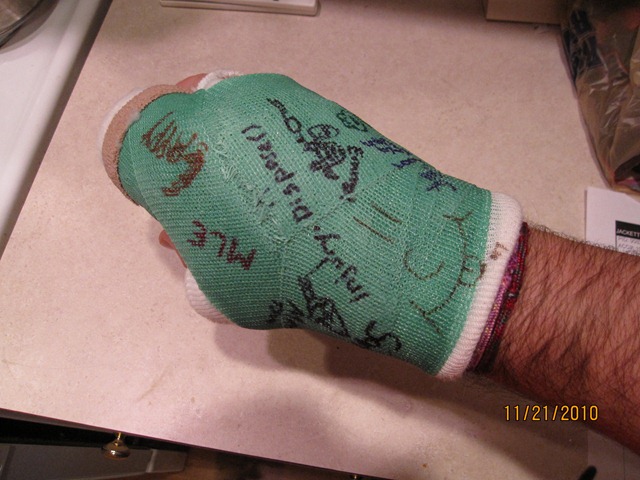
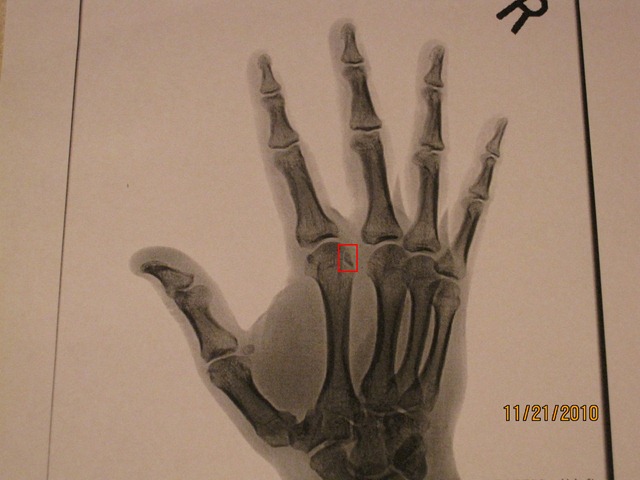
I typically post technical content on this blog, but I have a personal note this time around.  As some of you who follow me on Twitter or Facebook may know, last week I found out I fractured my right index knuckle and strained a ligament between my index and middle finger.  In order to heal this injury I’ll be wearing a cast for the next 3 1/2 weeks.  This is day 4 and I’m starting to get used to it, but my typing speed is still reduced and causes pain over long usage.  As such I am cutting back on a few side activities such as this blog, the SavePSToSP CodePlex project, and general research I do at nights.  I’ll still be responding to comments on this blog as they come up, but new content will be most likely be on hold until mid December when I get my fracture re-examined and hopefully can get rid of this cast for good.  Below is a copy of one x-ray showing the fracture and the other a shot of my cast today with some of the signatures I’ve collected.  I look forward to my hand healing and getting back to normal.  Have a fun and safe Thanksgiving holiday to all those that celebrate.

IMG_2174_adj IMG_2175


-Frog Out

Co-Authoring a Book and Guest Blog Post Coming Soon

    A few posts ago you may have read that I have a few side projects going on that would be taking up my time the next few months.  I can’t give you full details on many of those yet, but I did want to drop a little information as I’ve been getting questions from friends lately.

    The first thing that I’m working on is a writing two chapters for a book coming from a big (at least in the SharePoint world) publisher.  This project came about because of some great connections I’ve made in the SharePoint community through conferences, speaking engagements, user groups, etc.  I don’t have a firm publish date, but I can tell you that this book is exclusively SharePoint 2010 and I’m working with some amazing authors on it.  This is my first crack and writing for a book and it’s been quite a ride so far, especially draining much of that elusive “free time” I thought I would have after SPSColumbus finished.  More details on this later.

    The second thing I was working on (just finished a week ago) is a guest blog post for a fairly big name blog.  I was a bit surprised when the blog owner asked me to write a guest post, but I am honored to submit a post to them.  The subject matter is a really fun idea I had recently that a few people on Twitter recommended I blog about.  Looks like I will get the chance to, just on a much larger distribution than my own blog.  I do know the date that will be published, but I’ll write another post announcing when it actually happens in case dates get shifted for any reason.  You won’t have to wait long for that one though.

    Aside from those 2 big items there are a few other items a little further out that I’m working on.  I have confirmed two new SharePoint 2010 presentations that I’ll be giving for the first time at different conferences in the coming months.  One is on connecting SharePoint 2010 to Line of Business (LOB) applications and the other on the new SharePoint 2010 developer tools.  I’m excited to be creating new presentation materials in these areas.

Conclusion

    Hopefully I’ve answered some questions that I’ve been getting recently or at least given you some insight into what I’m working on currently.  Sorry I can’t give more details but they will come in due time.  Until then happy SharePoint-ing and keep sharing and growing the community.


      -Frog Out

Dell E6410 Integrated HD Graphics Driver Update Causes Blue Screen of Death

If you’re not wincing already by see those feared words “blue screen of death” (BSOD) then allow me to detail how this story got even worse.  This situation may affect you if you are running Windows Server 2008 R2 on a Dell E6400 or E6500 series laptop.  If you’d like the solution steps skip down to the bottom, although you may not like what I tell you since (at the time of writing) it involves installing Server ‘08 R2 Service Pack 1 beta.

Background

Our story begins with me in Ney York for SharePoint Saturday New York City 2010 this past weekend.  I arrived Friday night for the speaker dinner and continued the night with friends for karaoke and seeing the town.  I got back to my hotel too late to give my presentation a last run through and make sure everything was in order.

The next morning I arrived at the conference venue early to finish those last minute checks I had neglected the night before.  The laptop I use for most of my work (recently upgraded to) is a Dell E6410 with Intel Integrated HD graphics card.  I dual boot it between Windows 7 and Windows Server 2008 R2 (for Hyper-V and 64 bit VMs.)  Not surprisingly I had forgotten to update the graphics drivers on my Server ‘08 R2 install to allow it to connect to a projector.  Ironically I had run into this same issue at SharePoint Saturday Michigan earlier this year on my previous laptop.  When I faced this issue that time I just installed the latest display driver appropriate for Windows 7 and was good to go in 10 minutes.  This time around I was not so fortunate.

Issue

Learning from my mistakes the previous time I went out to the Intel site and searched for the latest Windows 7 version of my display drivers.  After downloading I ran the installer.  Just as the install progress bar hit 100% and popped up the success window everything went to hell as my machine blue screened.  “Ohh no, this is not good” I exclaimed to the other speakers in the room.  Many of them offered to let me use their laptops if I couldn’t get it working, so thanks to all of them.  I didn’t panic quite yet and figured a reboot might solve the issue.  I did a hard recycle of my laptop and was greeted by a garbled welcome screen similar to the old days when you tried to tune your TV to a blocked movie channel.  Not a good sign.  I rebooted once again but this time into Safe Mode and rolled back the display drivers which got me back to square one.

Resolution

As I mentioned above, the solution to my issue was to install Server ‘08 R2 Service Pack 1 (SP1) beta (download here).  Make sure to launch your browser in “Run As Admin” mode to actually start the download.  After doing some quick searching across the interwebs I ran across this forum post on Connect.  The general consensus from comments is that Hyper-V didn’t mix well with the display drivers on my Server ‘08 R2 install.  Some users were able to correct it with SP 1 beta.  Since I only had a few hours until my presentation it was worth a shot.  I downloaded the service pack beta, ran the installer, and 30ish minutes later I was greeted by the welcome screen.  I ran the display driver update again and thankfully this time didn’t have any blue screens.  Fabian Williams actually snapped a really good picture of me waiting for the screen to come back up.

Brian Updates Display Drivers BSOD

Conclusion

There appears to be a semi-widespread issue with Dell E6400 and E6500 series laptops running Server ‘08 R2 and Hyper-V.  It may not be specific to those Dell laptops, but that’s where I’m seeing the most comments about it occurring.  I was able to resolve this issue by installing the Service Pack 1 beta (at time of writing) so that may be a solution for now.  Seeing as I’ve had this issue in the past I may start moving away from Hyper-V and towards VirtualBox or VMWare, but I’ve had really good performance out of Hyper-V so I’m still undecided.  Lesson for all of you readers is that you should always test out every aspect of your presentation well before you deliver it and have backups (screenshots, files hosted in cloud, etc.) as much as possible.


-Frog Out

PowerShell Interview on Technology and Friends

    Three weeks ago at the Central Ohio Day of .Net 2010 conference (my recap here) I was approached by one of my Sogeti coworkers David Giard to do a guest interview on PowerShell for his popular video series Technology and Friends.  If you’ve never gotten a chance to see this series, in each episode David interviews a special guest on topics ranging across all forms of technology.  David even puts in some nice production value with music, overlays, and a special unique ending.  His series is a great way to get wide exposure to a variety of topics with a personal touch that you may not typically run into in your typical experience.  If you have any feedback on the video please feel free to leave comments here.  Enjoy the show!


Technology and Friends: Brian Jackett on PowerShell

http://technologyandfriends.com/archive/2010/06/28/tf097.aspx

http://www.viddler.com/player/5086095a/


      -Frog Out

Motorola Droid App Recommendations

motorola droid app screen

Just as a disclaimer, the views and opinions expressed in this post are solely my own and I’m not getting paid or compensated for anything.

Ok, so I’m one of the crazy few who went out and bought a Droid the week it was released a few months back.  The Motorola Droid was a MAJOR upgrade in phone capabilities for me as my previous phone had no GPS, no web access, limited apps, etc.  I now use my Droid for so much of my life from work to personal to community based events.  Since I’ve been using my Droid for awhile, a number of friends (@toddklindt, @spmcdonough, @jfroushiii, and many more) who later got a Droid asked me which apps I recommended.  While there are a few sites on the web listing out useful Android apps, here’s my quick list (with a few updates since first put together.)

Note: * denotes a highly recommended app


Android App Recommendations for Motorola Droid (Updated after 2.1 update)

RemoteDroid – install a thin client on another computer and Droid becomes mouse pad / keyboard, control computer remotely

PdaNet – free version allows tethering (only to HTTP, no HTTPS) without paying extra monthly charge.  A paid version allows HTTPS access.

SportsTap – keep track of about a dozen sports, favorite teams, etc

*Movies – setup favorite theaters, find movie times, buy tickets, etc

WeatherBug elite – paid app, but gives weather alerts, 4 day forecast, etc.  Free version also exists.  (Update: Android 2.1 offers free weather app, but I still prefer WeatherBug.)

*Advanced Task Killer – manually free up memory and kill apps not needed

Google Voice – have to have a Google Voice account to really use, but allows visual voice mail, sending calls to specific phones, and too many other things to list

AndroZip – access your phone memory like a file system

Twidroid – best Twitter client I’ve found so far, but personal preference varies.  I’m using free version and suits me just fine.

Skype (beta) – I only use this to send chat messages, not sure how/if phone calls works on this. (Update: Skype Mobile app just released, but uninstalled after few days as it kept launching in background and using up memory when not wanted.)

*NewsRob – RSS reader syncs to Google Reader.  I use this multiple times a day, excellent app. (Update: this app does ask for your Google username and password, so security minded folks be cautioned.)

ConnectBot – don’t use often myself, but allows SSH into remote computer.  Great if you have a need for remote manage server.

Speed Test – same as the online website, allows finding upload/download speeds.

WiFinder – store wifi preferences and find wifi spots in area.

TagReader – simple Microsoft Tag Reader, works great.

*Google Listen – audible podcast catcher that allows putting items into a queue, sync with Google Reader RSS, etc. I personally love this app which has now replaced the iPod I used to use in my car, but have heard mixed reviews from others.

Robo Defense – (paid app) tower defense game but with RPG elements to upgrade towers over lifetime playing. I’ve never played FieldRunners but I’m told very similar in offering. Nice distraction when in airport or have some time to burn.

Phit Droid 3rd Edition – drag and drop block shapes into a rectangle box, simple game to pass the time with literally 1000s of levels. Note this game has been updated dozens of times with numerous editions so unsure exactly which are still on the market.

Google Sky Map – impress your friends by holding Droid up to sky and viewing constellations using Droid screen.

wootCheck Lite – check up on daily offerings on Woot.com and affiliated wine, sellout, shirt, and kids sites.


Side notes: I’ve seen that Glympse and TripIt have recently come out with Android apps.  I’ve installed but haven’t gotten to use either yet, but I hear good things.  Will try out on 2 upcoming trips in May and update with impressions.


-Frog Out


Image linked from http://images.tolmol.com/images/grpimages/200910191814100_motorola-droid.gif