Deploy Files to SharePoint Web Application Virtual Directories At Feature Activation


Original: 2009/5/6

Updated: 2009/12/1 – see bottom

Updated: 2009/12/31 – see bottom (Follow up post here)

Have you ever had a need to deploy some files to all of the virtual directories (every IIS site folder corresponding to a zone in the web app) for a SharePoint web application feature?  After searching the interwebs high and low I was unable to find any information relating to this topic, so this might very well be one of the first publicly available.  I want to say that getting this to work yesterday was one of the most fun development tasks I’ve done in awhile.  Hopefully this can help someone else who is struggling with the same task or at least give you some fun things to try out.

First the premise.  My client is hosting Reporting Services 2005 reports for a SharePoint custom application.  The custom application lives in the Layouts folder of the 12 Hive.  The reports will not be hosted on Reporting Services, but instead locally in the web application.  Since the ReportViewer web control that will be displaying the reports only knows the virtual directory root (c:inetpubwwwrootwssVirtualDirectories<port number of SharePoint zone>) we need a way to copy the files into that directory (and all other virtual directories for the web app meaning 3 zones in our environment) instead of residing in the 12 Hive.  As such we wanted a clean solution for deploying these reports to the virtual directory folder that had the least amount of human intervention (ex. a batch command that ran XCOPY to copy the files into hardcoded folders would require human intervention beyond deploying the WSP file).

As with all SharePoint development solutions, I (under the pain of death) recommend wrapping them up as features and files inside of a WSP file.  I don’t recommend building your WSP by hand as it is very tedious and there are some free tools that can help you immensely in this area.  Currently I use either Visual Studio extensions for Windows SharePoint Services 1.2 (VSeWSS) or WSPBuilder.  Each has it’s own set of pros and cons, but I’ll save that for another blog post.  On this project we’re using WSPBuilder as the lead developer began using it and I’ve been grandfathered into it.

So we have a WSPBuilder project with all of our custom application files laid out in the appropriate folders.  Our reports are placed into a subfolder of feature DeployCustomApplication.  During installation of the WSP solution these files are copied to the corresponding 12 Hive folder.  To get them from that location to the web app virtual directory we created a feature receiver.  Feature receivers allow custom code to be called upon feature install, activate, deactivate, and uninstall.  The process is carried out as follows:

  1. Get reference to target web application
  2. For Each loop to process each dictionary pair in the web application’s IISSettings property
  3. Delete report files if they already exist (1)
  4. Perform file copy from the 12 Hive location to the bin directory of the individual web site virtual directory folders

(1) = Delete report files first as they are subject to source control and will be marked read-only.  The copy method is unable to overwrite a read-only file even with the OverWrite boolean flag set to true.

Here is a screenshot of the report files in the WSP project (pixelation on files done with Paint.Net, excellent free program I use all the time for image modifications similar to Photo Shop).  For those with a super keen eye you might even be able to tell that I doctored the report file names as well, but that’ll be our little secret.
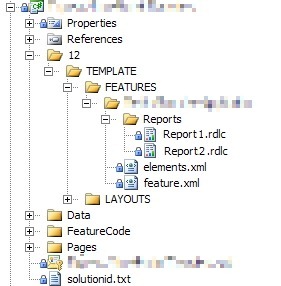
DeployCustomApplicationWSPProject_2

Below is a slightly modified version (removing application name, client code, variable names, and other extraneous items) of the feature receiver code.  As an added bonus, you’ll also see in the AddHttpHandlerVerb() method how another teammate developed a process to modify the web.config file of each virtual directory to allow the ReportViewer web control.  I wish I could claim that as well, but sadly it was done by the time I joined the team.  Here is a link to the below code: download code here.

   1:  using System;
   2:  using System.Collections.Generic;
   3:  using System.Text;
   4:  using System.IO;
   5:  using System.Web.Hosting;
   6:  using Microsoft.SharePoint;
   7:  using Microsoft.SharePoint.Administration;
   8:  using Microsoft.SharePoint.Utilities;
   9:  using System.Web;
  10:  using System.Web.UI;
  11:  using System.Web.UI.WebControls;
  12:  
  13:  namespace CustomApplication
  14:  {
  15:      class CustomApplication : SPFeatureReceiver
  16:      {
  17:  
  18:          private SPWebApplication _webApp;
  19:          private String _Owner;
  20:  
  21:          public override void FeatureActivated(SPFeatureReceiverProperties properties)
  22:          {
  23:              try
  24:              {
  25:          // get references to target web application and feature definition
  26:                  _webApp = (SPWebApplication)properties.Feature.Parent;
  27:                  _Owner = properties.Feature.DefinitionId.ToString();
  28:  
  29:                  DeployReportFiles();
  30:  
  31:          AddHttpHandlerVerb();
  32:              }
  33:              catch (Exception ex)
  34:              {
  35:                  string message = "Error occurred while activating CustomApplication feature";
  36:                  Logger.logException(ex, message, System.Diagnostics.EventLogEntryType.Error, "<GUID>");
  37:  
  38:                  throw new SPException("Error during Activation.  See event log for further details");
  39:              }
  40:          }
  41:  
  42:          public override void FeatureDeactivating(SPFeatureReceiverProperties properties)
  43:          {
  44:              try
  45:              {
  46:          // get references to target web application
  47:                  _webApp = (SPWebApplication)properties.Feature.Parent;
  48:  
  49:                  RemoveReportFiles();
  50:              }
  51:              catch (Exception ex)
  52:              {
  53:                  string message = "Error occurred while deactivating feature CustomApplication";
  54:                  Logger.logException(ex, message, System.Diagnostics.EventLogEntryType.Error, "<GUID>");
  55:  
  56:                  throw new SPException("Error during Feature Deactivation. See event log for further details");
  57:              }
  58:          }
  59:  
  60:          public override void FeatureInstalled(SPFeatureReceiverProperties properties)
  61:          {
  62:          }
  63:  
  64:          public override void FeatureUninstalling(SPFeatureReceiverProperties properties)
  65:          {
  66:          }
  67:  
  68:          private void DeployReportFiles()
  69:          {
  70:              // first remove report files if they exist
  71:              RemoveReportFiles();
  72:  
  73:          // loop through each IisSettings dictionary pair (zones [dafault, intranet, internet, etc.] configured for web application)
  74:              foreach (KeyValuePair<SPUrlZone, SPIisSettings> pair in _webApp.IisSettings)
  75:              {
  76:          // copy report from 12 Hive location to the IisSettings zone virtual directory
  77:                  File.Copy(SPUtility.GetGenericSetupPath(@"TEMPLATEFEATURESCustomApplicationReportsReport1.rdlc"), pair.Value.Path.FullName.ToString() + @"binReport1.rdlc", true);
  78:                  File.Copy(SPUtility.GetGenericSetupPath(@"TEMPLATEFEATURESCustomApplicationReportsReport2.rdlc"), pair.Value.Path.FullName.ToString() + @"binReport2.rdlc", true);
  79:              }
  80:          }
  81:  
  82:          private void RemoveReportFiles()
  83:          {
  84:          // loop through each IisSettings dictionary pair (zones [dafault, intranet, internet, etc.] configured for web application)
  85:              foreach (KeyValuePair<SPUrlZone, SPIisSettings> pair in _webApp.IisSettings)
  86:              {
  87:                  // if Report1 report exists, delete
  88:                  if (File.Exists(pair.Value.Path.FullName.ToString() + @"binReport1.rdlc"))
  89:                      File.Delete(pair.Value.Path.FullName.ToString() + @"binReport1.rdlc");
  90:  
  91:                  // if Report2 report exists, delete
  92:                  if (File.Exists(pair.Value.Path.FullName.ToString() + @"binReport2.rdlc"))
  93:                      File.Delete(pair.Value.Path.FullName.ToString() + @"binReport2.rdlc");
  94:              }
  95:          }
  96:  
  97:          private void AddHttpHandlerVerb()
  98:          {
  99:          // get reference to web config modification object and set properties
 100:              SPWebConfigModification HttpHandlerMod = new SPWebConfigModification();
 101:              HttpHandlerMod.Owner = _Owner;
 102:              HttpHandlerMod.Path = "configuration/system.web/httpHandlers";
 103:              HttpHandlerMod.Name = "add verb HttpHandler ReportViewer";
 104:              HttpHandlerMod.Value = "<add verb="*" path="Reserved.ReportViewerWebControl.axd" type = "Microsoft.Reporting.WebForms.HttpHandler, Microsoft.ReportViewer.WebForms, Version=9.0.0.0, Culture=neutral, PublicKeyToken=b03f5f7f11d50a3a" />";
 105:  
 106:          // if web configuration modification exists, remove
 107:              if (_webApp.WebConfigModifications.Contains(HttpHandlerMod))
 108:              {
 109:                  _webApp.WebConfigModifications.Remove(HttpHandlerMod);
 110:              }
 111:  
 112:          // apply web configuration modificatoin
 113:              _webApp.WebConfigModifications.Add(HttpHandlerMod);
 114:          }
 115:      }
 116:  }

What I like about this solution is that it was developed in a short amount of time (hour or two to work out kinks), it is easily repeatable, and can be applied to other needs besides just Reporting Services reports.  Please leave any feedback if you end up using this process, have suggestions to make it better, or have any other comments.  Thanks and enjoy.

<Update1 – 2009/12/1>

After 6 months using the below method to deploy files to our development environments, it wasn’t until just recently that I noticed a fatal flaw in the below design: files are only deployed on the server from which the feature activate command is processed.  In plain English, if you have 3 web front ends (WFEs) and you activate the feature on WFE1 then WFE1 will get the files, but WFE2 and WFE3 will not.  The solution to this problem was suggested by my new good friend Sean McDonough: deploy using a SharePoint timer job.  I’m working on ironing out some of the changes for this and will have a new post on the matter once that’s complete.  Look for a link to that post from here soon.

</Update1>

<Update2 – 2009/12/31>

Here is the link to the follow up post I mentioned above: Click here.  After doing a little research and trying out timer jobs I found that a timer job was not the best solution for my situation.  Instead I opted for a method of looping through the web front ends and doing a file copy directly to the servers.  That same mechanism can be wrapped around the logic in this post so that files are copied to all web application folders on each web front end.  Read more about it in that follow up post.

</Update2>


-Frog Out

SharePoint Saturday Cleveland 2009 Recap

As noted in my previous post I attended and spoke at the SharePoint Saturday Cleveland 2009 conference.  For those unfamiliar, SharePoint Saturday is a community driven event where various speakers gather to present at a FREE conference on all topics related to SharePoint.  This was my first SharePoint Saturday and it was a great community event to attend.  Over the past 6 months or so I’ve been following various Twitter users talking about SharePoint Saturdays in their region so I was excited to see what all the buzz was about.

Friday night I arrived in Cleveland for the speaker (nerd) dinner at Fahrenheit in Tremont.  I was finally able to put a face (real, not just their picture online) to various names like Eric Harlan (@ericharlan) and Jesse Murray (@lackscreativity) from the Baltimore and Detroit Sogeti offices, Rick Black (@ricknology), and also see some familiar faces again like John Ferringer (@ferringer), Sean McDonough (@spmcdonough), Callahan (@cacallahan) and Melissa Lucarelli (@smartyskirt).  Can you sense that I know too many people by their Twitter names?

Saturday started off early as I was scheduled to speak during the first session.  I gave my “The Power of PowerShell + SharePoint” presentation to about 20 people.  As most of the crowd was still waking up I threw in some jokes and funny slides to keep things lively.  They had a number of great questions as we went along and hopefully learned a good introduction to PowerShell and how to use it with SharePoint.

After my session I tried to attend talks on other topics that I hadn’t heard much about such as PerformancePoint, InfoPath Forms, SharePoint branding, and the new Metadata Manager.  I wish I could have attended more sessions, but only so much time in the day and I can only be in one place at a time.  Overall the level of content was good and I appreciate all the time and hard work each speaker put into the day.

Following the conference wrap-up session a dozen or so attendees and speakers met at The Blind Pig in downtown Cleveland for a ritual SharePint.  The Blind Pig was nice enough to host us and provide drinks and appetizers while us conference folks got to unwind from the day.  It was good to hear positive feedback from the conference and get to share SharePoint and personal stories.

As all good things must come to an end, so did my time at SharePoint Saturday Cleveland.  I was able to snap a few pictures which I’ve posted a link to below.  I’ve heard there will be a SharePoint Saturday Indianapolis early in 2010 as well as ones being planned for Pittsburgh and Columbus not far after.  If you’ve never been to a SharePoint Saturday I would highly encourage you to attend (did I mention it’s FREE!)  A final thanks to everyone who helped put on the event, spoke, sponsored, or had any hand in making this event happen.  Without you this never would have been possible.  I look forward to attending more such events and keeping the SharePoint community growing.

-Frog Out

SharePoint Saturday Cleveland Slides and Demo Scripts – PowerShell + SharePoint

     This weekend I spoke at the SharePoint Saturday Cleveland event and gave my “PowerShell + SharePoint” talk.  At some point I believe they will be publishing our slides and any demo items but I wanted to list mine here as I promised I would for various attendees.  Below are links to my SkyDrive where I have hosted these files.  If you have any questions or issues getting them let me know.  I’ll be posting a recap with some pictures soon as well.  Thanks to all who attended my presentation and SPSCleveland, look forward to more such events in the future.


SharePoint Saturday Cleveland demo files and slides


   -Frog Out

Sometimes The Customer Is NOT Always Right

Before reading this post, I highly recommend reading Top 5 reasons why “The Customer Is Always Right” is wrong.  That article gives great insight into the thoughts to follow.

In the US we have an old saying that says “the customer is always right.”  As time goes by there are various people (like the Southwest CEO in the article above) who don’t believe that phrase to be quite true.  While I may agree that it is not always a true statement, I feel there are some valuable lessons on both sides of this topic to be learned.  So far with my blog I have tried to stick to writing how-to or technical related articles, but recently this phrase has come up a few times so I’m dipping into “op-ed” territory for this post.  I’ll illustrate two such instances that spurred me on this topic.

The first instance I witnessed from the angle of the company.  Last week while I was waiting in line at a local video game retailer.  Ahead of me was a man (let’s call him Bob) in his late 20’s to early 30’s purchasing a new video game.  Bob asked to also get a copy of the strategy guide for the same game.  The clerk replied that the strategy guide had not been released yet so their store had no copies.  Bob insisted that the clerk had the product.  After 10 minutes of numerous phone calls, checks into the database, and searching through the store the clerk told Bob that he was unable to locate it.  Finally fed up Bob paid for his game and left the store cursing the clerk loud enough for other customers to hear.

After Bob had left, the clerk apologized for my wait (well over 10 minutes by this point) and having to witness that exchange.   He told me that Bob was a regular so all managers and associates knew him by face.  Every time Bob came in he complained about something.  Each time the employees tried to work with him and be as polite as possible.  During my encounter Bob had negatively affected a number of people in the store.  The clerk was subjected to verbal abuse, I was kept waiting, and a number of other younger customers overheard Bob swearing and half-yelling at the clerk.  Perhaps management (like the Southwest CEO) should tell Bob that there are plenty of other retailers Bob could use instead of theirs.

The second instance is more a series of events I’ve witnessed trending on various forms of media (blogs, twitter, forums, etc) coming from the angle of the dissatisfied customer.  One such event occurred a few weeks ago while listening to a fellow Twitterer (let’s call him Sam) rant about the horrible sales service he received from a local cable provider.  At the end of this series of tweets Sam finished with “<cable company name> FAIL.”

For those of us in the know, it’s not uncommon to see blog posts, tweets, or forum comments with FTW (for the win), FTL (for the lose), or epic fail announcements.  I typically don’t think much of these announcements, but Sam’s comment stuck out more than usual for me.  I think it struck a chord with me because it reminded me of a funny/insightful article I read about “if clients treated architects like software developers”.  It’s (near) impossible to please every person every single time for a given situation.  What can be helpful though is for all sides to take a minute and look at the situation from the perspective of the other person.  It’s also important to set expectations early on so that both sides know what they are getting into.  Too often we are more focused on getting MY problem resolved rather than working towards a solution that is positive for everyone.

I don’t claim to have the perfect answer for the issues that result from customer/seller relationship, but I do encourage you to take a few minutes to think about the situation from all angles the next time you feel the need to yell at a company or complain about bad service.  Sometimes the custom is NOT always right.

If any of my 7 readers out there enjoyed this switch up to a more “op-ed” style post (or if you down right didn’t like it and wish I never went down this route again) let me know in the comments.  I’ll always be working on technical posts, but if people enjoy a little variety I’m happy to give it a shot.  Thanks for reading.


-Frog Out


Extra Links

Funny “customer isn’t right” conversations

http://notalwaysright.com/

Homer Simpson Epic Fail


Vender Client relationship – in real world situations (funny video)

Using SharePoint Built-In Property Bags: SPWebApplication.Properties and SPWeb.Properties

     I ran across a feature of SharePoint a few weeks ago that I wanted to share: the SPWebApplication.Properties and SPWeb.Properties property bags.  These property bags can be used for many different needs, but I see a great application for them with feature activation/deactivation.

     At my current client we have almost a dozen features that make direct modifications to the web.config files of our web applications (see below for excellent link on making changes to the web.config files.)  Some of these modifications are simple additions and can be retracted with no residual effects.  Others are modifications to existing values and lose whatever was previously there.  Since we are not concerned about having to return a web application to the original state it has not been a problem to lose those existing values.  What if we didn’t have to lose those existing values though?

    After discovering these available property bags I was interested in trying to store existing values during activation and then restoring them during deactivation.  All of our web.config changing features are scoped to the web application level, so I investigated the SPWebApplication.Properties piece first.

// ...inside web app feature activation code

SPWebApplication webApp = (SPWebApplication)properties.Feature.Parent;


string existingValue = ... //get existing value from web.config

webApp.Properties.Add("mySetting", existingValue);


// reference property later

string savedProperty = webApp.Properties["mySetting"];


    Accessing SPWeb.Properties was just as easy except that I referenced the web application differently.  Since the feature is scoped to the web, the Feature.Parent will be an SPWeb instance instead of SPWebApplication.  Follow this pattern instead.

SPWeb web = (SPWeb)properties.Feature.Parent;

web.Properties.Add("mySetting", existingValue);


     So there you have it, a nice way to store values at the web application and web levels for whatever needs you may have.  Given the timeframe at my client we may not have time to implement this update, but it’s good to know that it exists for future reference if nothing else.  Wictor Wilen (linked below) has a concise write-up about some additional options available for storing data for SharePoint along with explanations of limitations.  Feel free to leave feedback if you found this post helpful.


   -Frog Out


Links:

How To: Modify the web.config file in SharePoint using SPWebConfigModification

http://www.crsw.com/mark/Lists/Posts/Post.aspx?ID=32

Six ways to store settings in SharePoint

http://www.wictorwilen.se/Post/Six-ways-to-store-settings-in-SharePoint.aspx

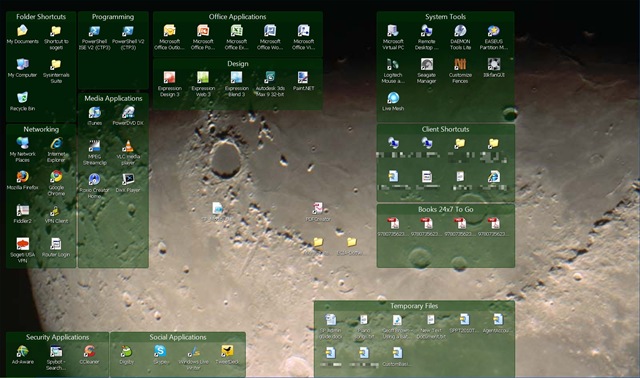
Organize Your Desktop With Fences™ From Stardock

Are you a presenter having to deal with your desktop getting jumbled while switching resolutions for a projector?  Are you an end user who has too many unorganized desktop icons?  I feel like Ron Popeil with lead ins like these, but really I just wanted to pass along a great FREE product I’ve been using the past few months to help me organize my desktop for multiple needs.

Stardock released their desktop management tool called Fences which a coworker referred me to a few months ago.  Essentially you can create groupings (fences) on your desktop and place your icons inside these groupings.  If you resize your desktop or adjust the individual fences, the tool will automatically adjust accordingly.

Fences1     Another nice feature is the ability to hide portions of your desktop to remove the clutter.  I really like this feature so that only the fences and icons that I’m currently using the most are displayed.  Other icons like a DVD burning program or rarely used shortcuts and applications can be hidden.  Just configure the fences or icons that will always display, then double click anywhere on the desktop to hide the rest.

Fences2

One last feature I like is taking snapshots of your desktop layout.  This allows you to create multiple configurations (home, work, just a backup, etc.) that can be restored at any time.  So check out this great tool and let me know how you like it.  I’ve seen a few minor updates over the past months I’ve used it.  At the time of this writing it’s just made it to a release candidate recently.  Hopefully it’ll remain a free product once it becomes a full product.  Enjoy.

And finally a video a Ron Popeil for those of you who know you know him but can’t quite put a face to the name.


-Frog Out