Windows Phone 7.5 “Mango” App Recommendations

WP7AppRecommend2

Disclaimer:, The views and opinions expressed in this post are solely my own and I’m not getting paid or compensated for anything.  I am also an employee of Microsoft but try not to drink the Kool-Aid too much.


[Update 2012-01-02: It appears posting Windows Phone app recommendations is making the rounds on the web today.  My friends Jeff Blankenburg and Sarah Dutkiewicz have also posted recommendations.  Also was referred to a posting on tested.com.  I’ve already downloaded a few apps based on these recommendations.  Enjoy the additional info.]


Over a year and a half ago I wrote a post about my Motorola Droid App Recommendations.  I was a very big fan of Android at the time.  I say “at the time” because after owning that phone for a year I soon experienced the Android upgrade / fragmentation issues.  What was once a snappy and very usable phone became a slow and unusable.  Even simple tasks like checking email and replying were bogged down as my phone wasn’t capable of running the latest Android OS version.

I happily switched from my Motorola Droid to my HTC HD7 early in 2011 (see more below) and haven’t looked back since.  Now that I have been using Windows Phone 7 for almost a year I thought I would post my app recommendations (I also got a nudge in the arm from a friend).  I also included links to the apps on the marketplace that you can view, buy, and install to your phone directly through a web browser.  I like that feature and have used it a few times already.

WP7AppRecommend1


My Phone

I currently use the Verizon HTC Trophy with an extended battery.  Some people question whether an extended battery is really necessary, but with the amount of travel that I do I love the fact that I can get 2+ days out of my phone with a decent amount of usage.  There’s also a funny (wasn’t funny at the time) story of getting lost in a major city on its metro bus line and my extended battery being the only thing that allowed me to call / use GPS to get back to where I needed to go.

I also have a deactivated T-Mobile HTC HD7 from when I worked at Sogeti.  I haven’t used the phone since it was deactivated about 6 months ago, but in theory I could use it for development or a WiFi only device.  Speaking of which I’m going to update it to Mango while I write this post.


Note: The below list does not include any internal Microsoft FTE applications that I also use on a regular basis.  It didn’t make sense to post them here as most won’t have access to them.


Productivity

  • GasBuddy – Curious which gas stations are near you and what the prices are?  This is the app for you.  I use this frequently when driving rental cars and needing to fill up just before drop off.
  • Key Ring – Replace all those bulky rewards cards on your key ring with this app.  Granted it may not work for your library card and some small businesses but it can alleviate quite a few you may have added over time.
  • List it! Do it! – This is a fairly simple and intuitive “to do” list app.  Even better it includes deadlines with reminders which was a big need for me.  Doesn’t integrate with calendar but I didn’t want that.
  • Lync 2010 – If your company has provisioned Lync in your environment and also configured it to allow Lync Mobile then this will be a big one.  You can forward Lync IMs and calls to your phone, change status, and check on contacts.  I’ll be using this quite a bit to keep in the loop with others.
  • My Trips – I use TripIt.com to share my travel itineraries with family or friends.  My Trips hooks into that and lets me check trips on the go.  I don’t use it too often but it has helped me on occasion.
  • SkyDrive – Access files stored in your SkyDrive from your phone.  I don’t use this often but I like knowing I can check something quickly if needed.
  • Timer Pack – Functions as both a stopwatch and a timer with audible alerts.  Simple and easy to use.
  • WeatherBug – Track the weather in multiple cities with a live tile update for one of them as well.


Social and Entertainment

  • 4th & Mayor – I actually haven’t used the official foursquare app on my phone yet.  When I first looked the best recommended app was this and I haven’t looked back since.  Perhaps I’ll try the official version at some point but for now this suits me fine.
  • Amazon Kindle – I carry my 3rd gen Kindle when I travel, but some times I don’t have it with me and want to read a couple pages.  With the automatic sync of last read page this makes it very handy despite the small screen size.
  • ESPN ScoreCenter – This is a good app for checking scores, upcoming games, and even which channel some games are showing on.  What it isn’t good at though is getting details on an individual game.  For whatever design decision reason the detailed game screen is set to the size of say a 7” tablet screen and you must scroll to all corners to get the pertinent info.  I really think they could’ve done a much better job with that aspect but otherwise a great app.  You can even enter your favorite teams / sports to track as well.
  • Flixster – This is almost identical to the Movies app I used on Android.  Define your favorite theaters, check movie times, and get more info on a movie.  Great for determining which movie to see with friends on short notice.
  • WP7applist – Check out the highest rated apps, recently released apps, current deals, and more.  I use this to keep updated on what is new or people are using.


Games

  • Puzzle Quest 2 – As mentioned numerous times I travel quite a bit so this gets frequent play time on airplanes or airports.  This game cost about $7 when I bought it.  This may seem like a big cost, but I can say I’ve been playing it for upwards of 40 hours and still not done with the game.  From a cost to enjoyment ratio that is a huge value.  If you don’t like “match 3” or dungeon crawler games this may not be for you, but I’m definitely getting my money’s worth.
  • Angry Birds – This game is a staple on any mobile device.  My girlfriend really enjoys playing this if we’re on a long car trip or waiting in line for an event.
  • Fruit Ninja – I enjoyed this better on my HTC HD7 due to its larger screen size, but it still works on my HTC Trophy.  Lots of furious swipes and competition for the high score makes this a good “pass back and forth” game.
  • Collapse – I found this game through a recommendation site and was very surprised at home much I enjoyed it.  It is a slight variation on the “match 3” game formula but adds in lots of different game types, bombs, powerups, and other modifications.  Once I beat the story mode I didn’t play the game much, but poured many hours into it to beat it.
  • Flight Control – Another mindless game that passes time in airports or on planes.  Drag and drag lines for planes to land on airstrips.  Worth the few bucks it cost.
  • geoDefense – Stylized tower defense game with lots of hours of gameplay.  Nice retro Tron look to it.
  • Wordament – It’s like Boggle but in real time with hundreds of other people and leaderboards.  My girlfriend and I enjoy playing together and seeing how many words we can get.


Out of the Box

These aren’t apps per say, but features or “included in the OS apps” that I use literally every day.  Thought I would at least mention them.

  • Zune – I listen to podcasts, music, and watch videos on my phone quite a bit.  The native Zune player may not track my podcasts after a reboot all the time, but it is a great inclusion.  Especially useful with my Zune Music pass to find, download, and play some mood music on the spot for parties or dinners with friends.
  • Me tile – Being able to get notifications about Twitter replies, FB status updates, and numerous other services directly on my phone without using an app is big.  You can even reply to all of those through the same interface.  The whole “glance and go” mentality is very much tied into this and appreciated.
  • Groups – You can create groups of contacts and then send emails or SMS messages to all of them with just a few simple touches.  Useful for me to keep track of friends / family and get updates from just that subset of people on different social networks.
  • Tellme – The “not so talked about” service where you hold down the Windows / Start button and speak commands to your phone.  I use this frequently to dictate quick text messages or call someone without needing to use my hands.  With my Voyager PRO UC bluetooth headset this is even easier.


Conclusion

This is just my quick list of apps I use on a frequent basis.  I may update it in the future after a few months or the next major OS release.  If you have any recommendations for apps that you use please feel free to share.


-Frog Out


Links

Windows Phone logo

Windows-Phone-Mango-Logo-Official.jpg


Jeff Blankenburg – What’s On Your Phone?

http://www.jeffblankenburg.com/2012/01/02/whats-on-your-phone/


Sarah Dutkiewicz – There’s an App for That!

http://codinggeekette.com/2012/01/02/theres-an-app-for-that


Tested.com Windows Phone 7 App Recommendations
http://www.tested.com/forums/phones/4/falcon-fish_face_mcgee-present-our-favorite-wp7-apps-of-2011/12625/#11

Goals for 2011 Retrospective

   Now that 2011 has come to a close I wanted to take a few minutes to review the year and the goals I had set at the beginning of the year (click here to see those goals).  I’ll follow up with new goals for new 2012 year soon.


Year in Review

   2011 was a big year in many ways.  This year included a change in employers, buying a condo, my oldest brother getting married, starting a new relationship with my girlfriend Sarah. helping plan 2 conferences, writing two chapters of a book, and numerous other activities.  Some of my activities from the past year (condo, new job, and book writing) were much more time consuming that originally thought.  I was able to accomplish many of my original goals set at the beginning of the year, but I also had major shifts in available time and focus.  I’m taking this into consideration for this upcoming year.  Perhaps I will only set goals for 6 months at a time or adjust numbers to provide more open time.  Always room for improvement as long as the desire and commitment is there.


Professional Goals

  • Blog – In 2011 I intended to blog at least twice a month.  I wasn’t able to keep up the pace that I had hoped (ended with 20 for the year, but many were in the first half).  Surprisingly though my statistics for visitors and site hits have steadily grown over this year.  Despite missing the mark on number of blog posts I consider this a success as I have helped a number of people (via comments or emails) and also met new contacts through my blog.
  • Speaking – I intended to slow down the number of conferences and user groups that I spoke at this past year.  I did accomplish that by “only” speaking at 6 conferences and 1 user group.  This pace was much more manageable.  Also with all of the travel I do for my job now I expect to slow down that pace further this coming year.
  • Open Source – I began a side project on CodePlex called SavePSToSP.  I did support it for a number of months, but not through June as I had planned (mostly due to new job and condo).  I continue to use this project as a demo during classes I teach and may return to develop it further in the future.  Overall this was a mild success.
  • Volunteering – I helped out with planning for the SharePoint Saturday Columbus and Stir Trek conferences as well as serving on the steering committee for Buckeye SPUG.  With my new work travel schedule my involvement with BuckeyeSPUG is not as high as it used to be, but I should have some more flexibility later this coming year.
  • Windows Phone 7 Development – I did receive a corporate Windows Phone 7 (both from Sogeti and Microsoft) but did not have the time to create an application for the platform.  I still have an idea that I would like to turn into an application so it is still a possibility to create that this coming year.  This was a missed goal though for 2011.
  • Portal and Collaboration Lead – At the beginning of the year I was still working at Sogeti as the Portal and Collaboration lead.  I had intended to learn two additional portal and collaboration solutions aside from SharePoint.  Due to switching jobs halfway through the year this goal changed a bit.  I did research into SharePoint alternatives during the first half of the year so I will call this halfway successful.


Personal Goals

  • Volunteering – My volunteering with both my parish’s high school youth group and Columbus GIves Back have slowed down due to my travel schedule keeping me out of town during most of the meetings or events.  I still helped out when I could though, so I will call this a partial success.
  • House / Condo – My apartment lease ended this summer and I bought a condo.  Part of the decision to go with a condo vs. house was the included upkeep of lawn, snow removal, etc.  I’m very happy with the added space, owning my own place, and neighborhood that I moved in to.  Now that I work from home when I’m not on the road it’s also nice to have a home office.


Conclusion

   Some will be quick to point out that my new job and travel schedule (40-70% on the road throughout year) has caused me to not fulfill many of my goals.  This is partially true, but it has also opened up a number of new opportunities and experiences that otherwise would have been impossible.  I’m getting more of a handle on my travel schedule coming into this new year and also hoping to build up more local customers so that I’m not on the road 3 out of 4 weeks a month.  It’s all about work / life balance and I’m learning the importance of that more and more as I get older.

   A big thanks to so many people who have made this past year successful and filled with happiness and great memories.  I look forward to the coming year continuing to help out SharePoint related communities, publishing of a book I helped write (more details as the release date firms up), and growing my career and personal life.  I hope all you readers have set and tracked your own goals for the year.  If not this is a great time to start.


      -Frog Out

Fixing “Failed to create field: Field type is not installed properly” Error on SharePoint 2010 List

Upgrading a SharePoint farm can reveal hidden issues that may not be causing any visible consequences in your current environment.  This was especially the case in a recent customer visit to assist with an upgrade from SharePoint 2007 to SharePoint 2010.  During the upgrade we encountered the error “Failed to create field: Field type <field name> is not installed properly” while attempting to upgrade hundreds of SharePoint lists and document libraries.  The issue my customer faced related to a single 3rd party company’s custom field which I have removed to keep confidentiality.  Below is a recap of what we encountered and how we worked around the issue.  I am also making available the PowerShell script I wrote to find all instances of a field name in a web application.

Problem

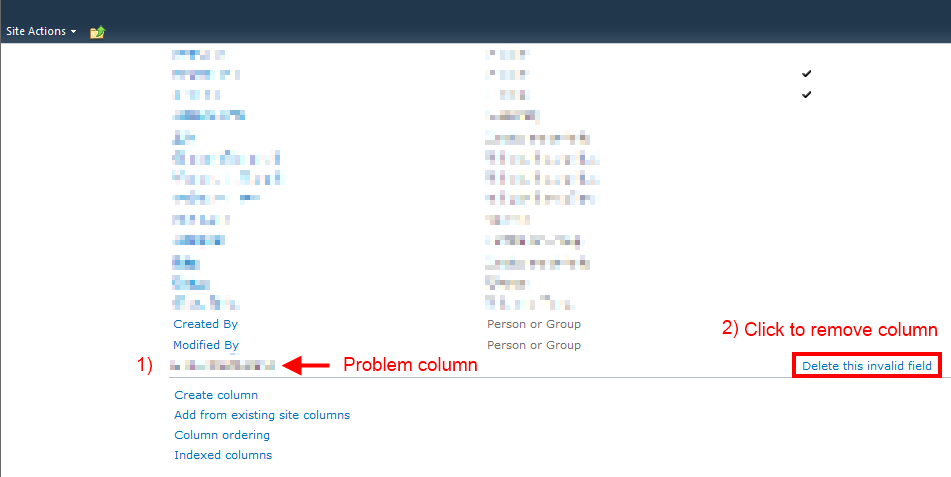
The field that was causing the issue was a hidden column (SPFIeld.Hidden = true, MSDN link) that was installed by a 3rd party solution the customer no longer wanted to use.  The customer had uninstalled the 3rd party WSP file, but the custom field still existed on hundreds of lists and document libraries.  Unfortunately because the column was hidden it didn’t show up in the list settings page.

When the customer tried to upgrade the environment they had an entry in the ULS logs with the below information.  The message is the key piece of information.

Area SharePoint Foundation
Category Fields
Event ID 8l1l
Level High
Message Failed to create field: Field type <field name removed> is not installed properly.  Go to the list settings page to delete this field.
Correlation ID <correlation ID>

As the error message stated we could go to the list settings page to delete the field.  Unfortunately the error message (and the next ULS entry with the stack trace) didn’t specify which lists contained the problematic field.  I thought it best to use PowerShell to traverse the thousands of lists and libraries in the environment to find which ones contained a field matching the problem field name.

In order to do this I repurposed an script I had written to display all site collection administrators in a web application.  I thought finding instance of the field name would be as easy as calling SPList.Fields.Contains(“field name looking for”) but I was wrong.  The problem was that the SPFieldCollection enumerator was not able to successfully enumerate the fields on any lists that contained the problematic field.  I received an error similar to what I saw in the ULS logs about the problematic field not installed properly.

Receiving an error was not entirely useless though.  I knew that receiving an exception while enumerating the list fields would point me to the lists that I needed to correct.  I decided to use the Try / Catch construct to capture the exception and add that list (and it’s parent SPWeb) to an array of results.  Below is a slightly modified version of the script that I ended up using.  You can download the script below as well.

###############################################################
#SP_Display-InstancesOfErroringFieldNameInWebApp4.ps1
#
#Author: Brian T. Jackett
#Last Modified Date: Dec. 7, 2011
#
#Traverse the entire web app site by site to display
# instances of a field name on lists.  Expectation is that
# enumeration of list will produce an error that can be
# captured.  Does not work against external lists at this time.
###############################################################

$url = read-host -Prompt "Enter a web application URL"

$result = @()

Start-SPAssignment -Global
$webApp = Get-SPWebApplication $url

foreach($site in $webApp.Sites)
{
    write-debug "Site: $($site.url)"
    foreach($web in $site.allwebs)
    {
        write-debug "   Web: $($web.name)"
        foreach($list in $web.lists)
        {
            try
            {
                #if an error occurs when enumerating through the list fields then a result
                $list.Fields | out-null
            }
            catch
            {
                write-debug "      List Error: $($list.title)"

                #disable allowing multiple content types on list (used later in blog post)
                $list.ContentTypesEnabled = $false
                $list.Update()

                #store the web URL and list title with the erroring field
                $result += @{$($web.url)=$($list.title)}
            }
        }
    }
}

write-output "****Results****"
$result

Stop-SPAssignment -Global

The output of the script showed that the customer had hundreds of lists and libraries that contained the problematic field.  Since this was affecting hundreds of lists I thought it would be more efficient to use PowerShell to loop through all lists that were experiencing this issues and remove the field using the server Object Model API for SPField.Delete().  Unfortunately when I used that API method I received an error message stating that it is not possible to remove a SharePoint field that is hidden.  Frustration ensued.

Solution

Since programmatic deletion of the field was not possible  I resorted to following the error message instructions of removing them by hand on the list settings page. I was able to delete the field from about 20% of the lists using this method (see following screenshot.)

DeleteInvalidSPListField1

The remaining 80% of the problematic lists I received an error page stating that the list settings page was not viewable because the problem field was not installed properly.  More frustration ensued.

At this point I looked for a pattern between lists that I could view the settings pages and those that I could not view.  One pattern did emerge.  Lists that I could view did not allow multiple content types.  Lists that I could not view had the setting for “Allow management of content types” set to Yes (see following screenshot.)

DeleteInvalidSPListField2

    Now because I was not able to view the list settings page I couldn’t turn off management of content types through the UI.  I was able to modify the setting using PowerShell and the server Object Model API for SPList.ContentTypesEnabled though.  I updated my above script to include the below lines.

$list.ContentTypesEnabled = $false

$list.Update()

After the lists were updated to disallow multiple content types I was then able to view the list settings page through the UI.  This allowed us to clean up an additional 75% of the lists.  Sadly there were a few dozen lists that were still unable to view the list settings page.  For those isolated list instances it was decided to either migrate content from the existing 2007 farm by hand (download and re-upload) or have users delete and recreate the content.

Conclusion

In order to fix the lists the contained the problematic field we had to go through the UI to manually remove the field.  To get a listing of the affected lists I used the PowerShell script above to find all lists that could not enumerate through their fields.  Additionally most lists required that I disabled multiple content types on the lists.  This may be an unacceptable option in your environment but that was an acceptable loss in this environment.  Beyond that there were still lists that were not able to be saved in their current form.

Whenever you install or use any 3rd party solutions know that there can be risks associated with them.  Despite my customer having uninstalled the solution and tested the migration previously this issue still occurred.  With all of the support staff involved we ended up losing days worth of time due to this problematic field.  Hopefully if you run into this same scenario you can use this audit script and processes to troubleshoot your issue more quickly.

-Frog Out

Speaking at SPS Cincinnati 2011

SharePointSaturdayCincinnati

On Saturday Oct 29th, 2011 I’ll be speaking at SharePoint Saturday Cincinnati.  My presentation is “PowerShell for the SharePoint 2010 Developer” which covers an introduction to PowerShell while focusing on integration with SharePoint and the .Net framework.  This presentation has a fair amount of demonstrations and sample code.  I’m excited to be attending SPSCincinnati as it is a short drive from Columbus and I also know a number of the other speakers and organizers.  It’s looking to be a great conference.  Click here for registration information.


Sessions

Where: SharePoint Saturday Cincinnati 2011

Title: PowerShell for the SharePoint 2010 Developer

Audience and Level: Developer, Intermediate

Abstract: PowerShell is not just for SharePoint 2010 administrators. Developers also get access to a wide range of functionality with PowerShell. In this session we will dive into using PowerShell with the .Net framework, web services, and native SharePoint commandlets. We will also cover some of the more intermediate to advanced techniques available within PowerShell that will improve your work efficiency. Not only will you learn how to automate your work but also learn ways to prototype solutions faster. This session is targeted to developers and assumes a basic familiarity with PowerShell.

Slides and Code download: click here


Title: The Expanding Developer Toolbox for SharePoint 2010

Audience and Level: Developer, Beginner

Abstract: PowerShell is not just for SharePoint 2010 administrators. Developers also get access to a wide range of functionality with PowerShell. In this session we will dive into using PowerShell with the .Net framework, web services, and native SharePoint commandlets. We will also cover some of the more intermediate to advanced techniques available within PowerShell that will improve your work efficiency. Not only will you learn how to automate your work but also learn ways to prototype solutions faster. This session is targeted to developers and assumes a basic familiarity with PowerShell.

Slides and Code download: click here

Note: This was a last minute added session that I was asked to present due to a speaker cancellation.


Conclusion

I had an excellent time at this SharePoint Saturday from the fun speaker dinner to meeting new and old friends at the conference to presenting my two sessions (one added due to a speaker cancellation).  I’m glad to see Cincinnati has a vibrant SharePoint community especially with their first SPS.  Good to see Ohio is going strong in multiple cities.


-Frog Out

PowerShell Script To Traverse All Sites In SharePoint 2010 (or 2007) Farm

    Over the past few years I’ve written a number of blog posts on performing various actions against a site collection or web application (display site collection admins, find all SPShell admins with database, find closed web parts).  Invariably with every post I get some comments along the lines of “this is great, how can I run this against every site in the farm”.  Well today you get your wish (sort of).  Below you will find a template script that traverses all sites within your local farm.  Isn’t that great!?!

    In it’s current state this script will simply output the title and URL of every site within the farm.  You may modify the function to perform your desired actions.  One stipulation is that you must have proper access to each of the web applications / site collections in order to actually traverse them.  Please leave any feedback that you have on this template in the comments.


Scripts

SharePoint 2010

Download the SharePoint 2010 template here.


Here is the source as well

function RecurseSiteAndDoSomething() {
    param([Microsoft.SharePoint.SPWeb]$SiteIdentity)

    Write-Output "Site: $($SiteIdentity.Url)"
    
    if($SiteIdentity.Webs.Count -gt 0)
    {
        foreach($subWeb in $SiteIdentity.Webs)
        {
            RecurseSiteAndDoSomething -SiteIdentity $subWeb
        }
    }
}

$contentWebAppServices = (Get-SPFarm).services |
 ? {$_.typename -eq "Microsoft SharePoint Foundation Web Application"}

foreach($webApp in $contentWebAppServices.WebApplications)
{
    Write-Output "Web Application: $($webApp.name)"
    foreach($siteColl in $webApp.Sites)
    {
        Write-Output "Site Collection: $($siteColl.Url)"
        RecurseSiteAndDoSomething -SiteIdentity $($siteColl.RootWeb)
    }
} 

SharePoint 2007

I am still ironing out a few things with the SharePoint 2007 version, but here is the current script.


function RecurseSiteAndDoSomething() {
    param([Microsoft.SharePoint.SPWeb]$SiteIdentity)

    Write-Output "Site: $($SiteIdentity.Url)"
    
    if($SiteIdentity.Webs.Count -gt 0)
    {
        foreach($subWeb in $SiteIdentity.Webs)
        {
            RecurseSiteAndDoSomething -SiteIdentity $subWeb
        }
    }
}

$contentWebAppServices = ([Microsoft.SharePoint.Administration.SPFarm]::Local).services | 
? {$_.typename -eq "Microsoft SharePoint Foundation Web Application"}

foreach($webApp in $contentWebAppServices.WebApplications)
{
    Write-Output "Web Application: $($webApp.name)"
    foreach($siteColl in $webApp.Sites)
    {
        Write-Output "Site Collection: $($siteColl.Url)"
        RecurseSiteAndDoSomething -SiteIdentity $($siteColl.RootWeb)
    }
} 


Conclusion

    In this post I presented a template script for recursively traversing each site within the local SharePoint farm.  This is just a first pass at this template.  If I make any updates in the future I will update this post to reflect.


      -Frog Out

Unable To Activate SharePoint 2010 Publishing Features If Create Subsites Is Disabled

Recently I was at a client that was experiencing an odd issue: they couldn’t activate the SharePoint Server Publishing Infrastructure site collection feature. In this post I’ll walkthrough some of the processes that we went through to diagnose the error. For those wanting the short version it turns out the web application policy for “Create Subsites” had been disabled.  You can jump to the Solution section jump to the solution section below.


Diagnose

To start we checked the ULS logs to see what showed for the correlation ID.  Results were inconclusive.  We found a whole host of errors, but nothing seemed definitive.  The most promising error was related to an “access denied” and failure to create site PressReleases (remember this point.)  The logged in user had full control access to the site, was a site collection administrator, and had no other warning signs of why it would get an access denied error.

We checked the web application policies applied to the permission levels (Full Control, Contributor, etc.) to see if any had denied any permissions.  All were showing as enabled.

We then tried to replicate the error in a different site collection in the same web application.  That attempt failed.  This verified that it wasn’t an issue with just that site collection so we went one level higher and created a new web application.  On the new web application we attempted to activate the feature in a new site collection which succeeded.  This led us closer to determining it was an issue with the web application.

In order to get more information about the above errors we turned verbose logging on for all options.  We then triggered the error and read through the ULS logs (now with verbose details).  After a bit of digging we found the following line that stuck out.

“PermissionMask check failed. asking for 0x00800000, have… <permission mask we had>”

I looked up the permissions masks within the SPRights class (click here) to find out the permission it was asking for.  It turns out 0x00800000 corresponds to the “ManageSubwebs” right.  Looking back this validated our error for failure to create site PressReleases.

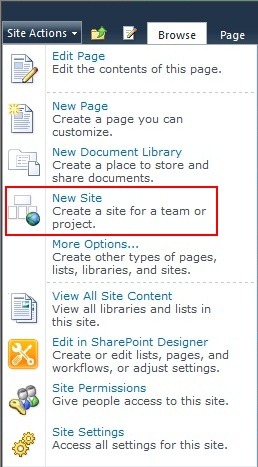
We then decided to create a blank subsite to see if that also had an issue.  This is where we really honed in on the issue: the menu option to create a subsite was missing!  The create list, page, and other options were available but not create subsite.

CreateSubSites2

    Here is a screenshot of the out of the box action menu for comparison.  Notice that “New Site” is an available option.

CreateSubSites3


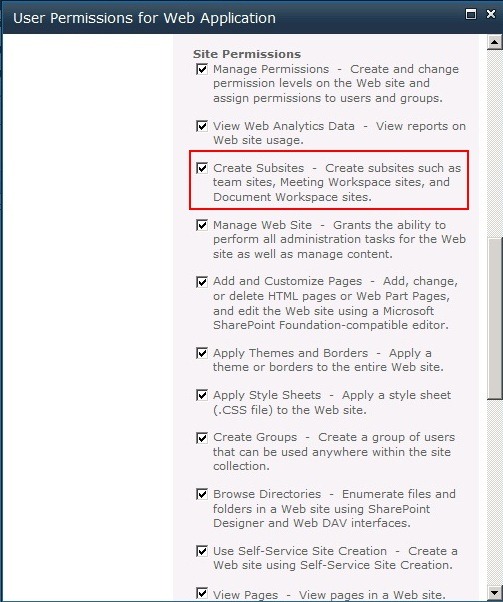
Now that we found we couldn’t create subsites we returned again to Central Administration for the web application policy.  The previous time we checked the policies applied to permission levels but not the overall policy.  As we scrolled down the allowed permissions lo and behold we found something disabled: Create Subsites.


Solution

Navigate to Central Administration and click Manage Web Applications.  Click the picture of a person with a key in front.  Scroll down until you see the Create Subsites permission.  Check the box for this permission.


CreateSubSites4

CreateSubSites1


Conclusion

In summary the client was experiencing issues with activating the publishing infrastructure features.  A side issue we noticed was that we couldn’t create subsites which also turned out to be the root cause.  Although we took a few twists and turns while troubleshooting this issue I hope you see some of the common areas and thought processes to go through.


-Frog Out


Links

SPRights permissions masks

http://technet.microsoft.com/en-us/query/dd585419