Slides from SPTechCon Boston 2013 Evolution of Social in SharePoint Presentation

   Below are my slides for my SPTechCon Boston 2013 session for “The Evolution of Social in SharePoint 2013”.  I made some last minute updates that will make their way over to the SPTechCon site as well, but for now here they are.  If you attended thanks for coming and I’d love to hear any feedback.  It was a great time presenting at SPTechCon again, sharing knowledge, and connecting with folks..


      -Frog Out

Speaking at SPTechCon Boston 2013 and Call for Speakers SharePoint Saturday Columbus 2013

   Dual purpose blog post this time.  I wanted to announce a presentation I’m giving at SPTechCon Boston 2013 next week as well as pass along info on the call for speakers at the upcoming SharePoint Saturday Columbus 2013.


SPTechCon Boston 2013

   I have the honor of speaking at SPTechCon Boston for another year.  This will make it 4 times now.  The folks at BZ Media always put on a great show with high quality speakers and involvement from the community.  There will even be two different user groups (SharePoint and Project Server) meeting during one night of the conference.  If you haven’t yet registered you still have some time.  If you’ll be attending stop by my session or find me in the halls.


Title: The Evolution of Social in SharePoint

Audience and Level: IT Pro / Architect, Intermediate

Abstract: Activities, newsfeed, community sites, following… these are just some of the big changes introduced to the social experience in SharePoint 2013. This class will discuss the evolution of the social components since SharePoint 2010, the architecture (distributed cache, microfeed, etc.) that supports the social experience, and proper planning considerations when deploying social capabilities (personal sites, SkyDrive Pro and distributed cache). This class will include demos of the social newsfeed, community sites and mentions. Attendees should have an intermediate knowledge of SharePoint 2010 or 2013 administration.


SharePoint Saturday Columbus 2013

   On Sept 14th, 2013 Columbus will be hosting the next SharePoint Saturday Columbus.  This is a bit of a late announcement, but the call for speakers is still open until midnight on Monday Aug 5th, 2013.  That’s tomorrow as of the time of writing.  If you have a topic you’d like to talk about relating in any form to SharePoint we’d love to have you submit.  You can send speaker submissions (click here) to BuckeyeSPUG@live.com if interested.  One of the first conferences I spoke at was a SharePoint Saturday up in Cleveland and it led to so many great opportunities and networking contacts.


      -Frog Out

PowerShell Script to Enumerate SharePoint 2010 or 2013 Permissions and Active Directory Group Membership

   In this post I will present a script to enumerate SharePoint 2010 or 2013 permissions across the entire farm down to the site (SPWeb) level.  As a bonus this script also recursively expands the membership of any Active Directory (AD) group including nested groups which you wouldn’t be able to find through the SharePoint UI.


History

    Back in 2009 (over 4 years ago now) I published one my most read blog posts about enumerating SharePoint 2007 permissions.  I finally got around to updating that script to remove deprecated APIs, supporting the SharePoint 2010 commandlets, and fixing a few bugs.  There are 2 things that script did that I had to remove due to major architectural or procedural changes in the script.

  1. Indenting the XML output
  2. Ability to search for a specific user

   I plan to add back the ability to search for a specific user but wanted to get this version published first.  As for indenting the XML that could be added but would take some effort.  If there is user demand for it (let me know in the comments or email me using the contact button at top of blog) I’ll move it up in priorities.

   As a side note you may also notice that I’m not using the Active Directory commandlets.  This was a conscious decision since not all environments have them available.  Instead I’m relying on the older [ADSI] type accelerator and APIs.  It does add a significant amount of code to the script but it is necessary for compatibility.  Hopefully in a few years if I need to update again I can remove that legacy code.


Solution

   Below is the script to enumerate SharePoint 2010 and 2013 permissions down to site level.  You can also download it from my SkyDrive account or my posting on the TechNet Script Center Repository.

SkyDrive

TechNet Script Center Repository

http://gallery.technet.microsoft.com/scriptcenter/Enumerate-SharePoint-2010-35976bdb

########################################################### 
#DisplaySPWebApp8.ps1 
# 
#Author: Brian T. Jackett 
#Last Modified Date: 2013-07-01 
# 
#Traverse the entire web app site by site to display 
# hierarchy and users with permissions to site. 
########################################################### 

function Expand-ADGroupMembership 
{ 
    Param 
    ( 
        [Parameter(Mandatory=$true, 
                   Position=0)] 
        [string] 
        $ADGroupName, 
        [Parameter(Position=1)] 
        [string] 
        $RoleBinding 
    ) 
    Process 
    { 
        $roleBindingText = “” 
        if(-not [string]::IsNullOrEmpty($RoleBinding)) 
        { 
            $roleBindingText = ” RoleBindings=`”$roleBindings`”” 
        } 
        Write-Output “<ADGroup Name=`”$($ADGroupName)`”$roleBindingText>” 
        $domain = $ADGroupName.substring(0, $ADGroupName.IndexOf(“”) + 1) 
        $groupName = $ADGroupName.Remove(0, $ADGroupName.IndexOf(“”) + 1) 
                            
        #BEGIN – CODE ADAPTED FROM SCRIPT CENTER SAMPLE CODE REPOSITORY 
        #http://www.microsoft.com/technet/scriptcenter/scripts/powershell/search/users/srch106.mspx 
        #GET AD GROUP FROM DIRECTORY SERVICES SEARCH 
        $strFilter = “(&(objectCategory=Group)(name=”+($groupName)+“))” 
        $objDomain = New-Object System.DirectoryServices.DirectoryEntry 
        $objSearcher = New-Object System.DirectoryServices.DirectorySearcher 
        $objSearcher.SearchRoot = $objDomain 
        $objSearcher.Filter = $strFilter 
        # specify properties to be returned 
        $colProplist = (“name”,“member”,“objectclass”) 
        foreach ($i in $colPropList) 
        { 
            $catcher = $objSearcher.PropertiesToLoad.Add($i) 
        } 
        $colResults = $objSearcher.FindAll() 
        #END – CODE ADAPTED FROM SCRIPT CENTER SAMPLE CODE REPOSITORY 
        foreach ($objResult in $colResults) 
        { 
            if($objResult.Properties[“Member”] -ne $null) 
            { 
                foreach ($member in $objResult.Properties[“Member”]) 
                { 
                    $indMember = [adsi] “LDAP://$member” 
                    $fullMemberName = $domain + ($indMember.Name) 
                    
                    #if($indMember[“objectclass”] 
                        # if child AD group continue down chain 
                        if(($indMember | Select-Object -ExpandProperty objectclass) -contains “group”) 
                        { 
                            Expand-ADGroupMembership -ADGroupName $fullMemberName 
                        } 
                        elseif(($indMember | Select-Object -ExpandProperty objectclass) -contains “user”) 
                        { 
                            Write-Output “<ADUser>$fullMemberName</ADUser>” 
                        } 
                } 
            } 
        } 
        
        Write-Output “</ADGroup>” 
    } 
} #end Expand-ADGroupMembership 
# main portion of script 
if((Get-PSSnapin -Name microsoft.sharepoint.powershell) -eq $null) 
{ 
    Add-PSSnapin Microsoft.SharePoint.PowerShell 
} 
$farm = Get-SPFarm 
Write-Output “<Farm Guid=`”$($farm.Id)`”>” 
$webApps = Get-SPWebApplication 
foreach($webApp in $webApps) 
{ 
    Write-Output “<WebApplication URL=`”$($webApp.URL)`” Name=`”$($webApp.Name)`”>” 
    foreach($site in $webApp.Sites) 
    { 
        Write-Output “<SiteCollection URL=`”$($site.URL)`”>” 
        
        foreach($web in $site.AllWebs) 
        { 
            Write-Output “<Site URL=`”$($web.URL)`”>” 
            # if site inherits permissions from parent then stop processing 
            if($web.HasUniqueRoleAssignments -eq $false) 
            { 
                Write-Output “<!– Inherits role assignments from parent –>” 
            } 
            # else site has unique permissions 
            else 
            { 
                foreach($assignment in $web.RoleAssignments) 
                { 
                    if(-not [string]::IsNullOrEmpty($assignment.Member.Xml)) 
                    { 
                        $roleBindings = ($assignment.RoleDefinitionBindings | Select-Object -ExpandProperty name) -join “,” 
                        # check if assignment is SharePoint Group 
                        if($assignment.Member.XML.StartsWith(‘<Group’) -eq “True”) 
                        { 
                            Write-Output “<SPGroup Name=`”$($assignment.Member.Name)`” RoleBindings=`”$roleBindings`”>” 
                            foreach($SPGroupMember in $assignment.Member.Users) 
                            { 
                                # if SharePoint group member is an AD Group 
                                if($SPGroupMember.IsDomainGroup) 
                                { 
                                    Expand-ADGroupMembership -ADGroupName $SPGroupMember.Name 
                                } 
                                # else SharePoint group member is an AD User 
                                else 
                                { 
                                    # remove claim portion of user login 
                                    #Write-Output “<ADUser>$($SPGroupMember.UserLogin.Remove(0,$SPGroupMember.UserLogin.IndexOf(“|”) + 1))</ADUser>” 
                                    Write-Output “<ADUser>$($SPGroupMember.UserLogin)</ADUser>” 
                                } 
                            } 
                            Write-Output “</SPGroup>” 
                        } 
                        # else an indivdually listed AD group or user 
                        else 
                        { 
                            if($assignment.Member.IsDomainGroup) 
                            { 
                                Expand-ADGroupMembership -ADGroupName $assignment.Member.Name -RoleBinding $roleBindings 
                            } 
                            else 
                            { 
                                # remove claim portion of user login 
                                #Write-Output “<ADUser>$($assignment.Member.UserLogin.Remove(0,$assignment.Member.UserLogin.IndexOf(“|”) + 1))</ADUser>” 
                                
                                Write-Output “<ADUser RoleBindings=`”$roleBindings`”>$($assignment.Member.UserLogin)</ADUser>” 
                            } 
                        } 
                    } 
                } 
            } 
            Write-Output “</Site>” 
            $web.Dispose() 
        } 
        Write-Output “</SiteCollection>” 
        $site.Dispose() 
    } 
    Write-Output “</WebApplication>” 
} 
Write-Output “</Farm>” 

   The output from the script can be sent to an XML which you can then explore using the [XML] type accelerator.  This lets you explore the XML structure however you see fit.  See the screenshot below for an example.
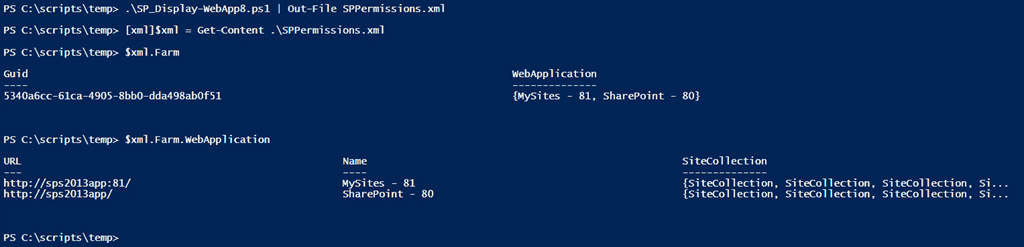
SP20102013Permissions1


   If you do view the XML output through a text editor (Notepad++ for me) notice the format.  Below we see a SharePoint site that has a SharePoint group Demo Members with Edit permissions assigned.  Demo Members has an AD group corpdevelopers as a member.  corpdevelopers has a child AD group called corpDevelopersSub with 1 AD user in that sub group.  As you can see the script recursively expands the AD hierarchy.
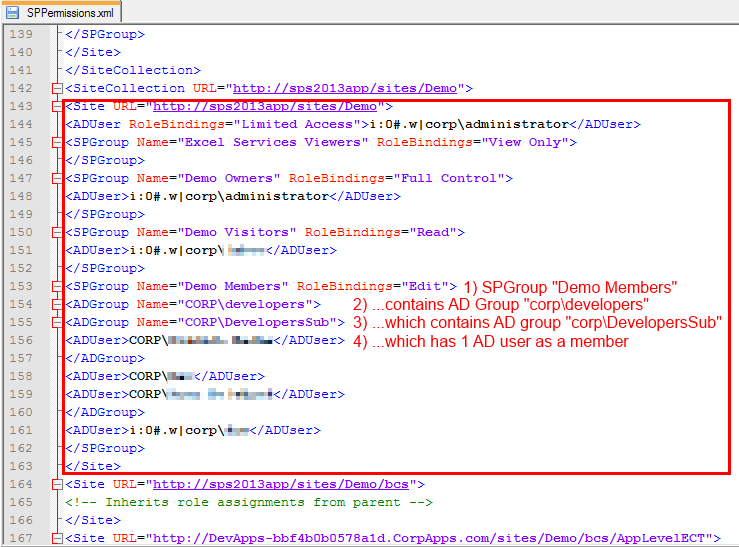
SP20102013Permissions2


Conclusion

   It took me 4 years to finally update this script but I‘m happy to get this published.  I was able to fix a number of errors and smooth out some rough edges.  I plan to develop this into a more full fledged tool over the next year with more features and flexibility (copy permissions, search for individual user or group, optional enumerate lists / items, etc.).  If you have any feedback, feature requests, or issues running it please let me know.  Enjoy the script!


      -Frog Out

PowerShell Script to Determine Number of Files in SharePoint 2010 or 2013 Document Libraries

   Recently my fellow SharePoint PFE and teammate Jim Matson (@jamesmatson3) was looking for a way to display the number of documents inside each document library on a SharePoint 2010 / 2013 farm.  Below is the script that we came up with.


Problem

   It is not too difficult to find all of the document libraries and their item count in a given SharePoint 2010 or 2013 site collection, web application, or farm.  What can be difficult is finding all of that along with the full URL of the site that contains the list and exporting in one object..


Solution

   I used a trick I learned from my previous post on getting Exchange Online mailbox size in GB to use the add-member commandlet to add metadata to a variable or object.  By gathering the site URL and then adding it to a variable of the document library title and item count I had the information Jim needed.  At the end simply output this to a CSV file and then use as needed.  Feel free to download the script from my SkyDrive public folder link below.

Note: I am not testing to see if the output folder exists.  Handle that as you wish if you use this script.


Add-PSSnapin Microsoft.SharePoint.PowerShell 

Start-SPAssignment -Global 
$OutputFile = “C:tempDocCount.csv” 
$results = @() 
$webApps = Get-SPWebApplication 
foreach($webApp in $webApps) 
{ 
    foreach($siteColl in $webApp.Sites) 
    { 
        foreach($web in $siteColl.AllWebs) 
        { 
            $webUrl = $web.url 
            $docLibs = $web.Lists | Where-Object {$_.baseType -eq “DocumentLibrary”} 
            $docLibs | Add-Member -MemberType ScriptProperty -Name WebUrl -Value {$webUrl} 
            $results += ($docLibs | Select-Object -Property WebUrl, Title, ItemCount) 
        } 
    } 
} 
$results | Export-Csv -Path $OutputFile -NoTypeInformation 
  
Stop-SPAssignment -Global

   Here is an example screenshot of the output from the script.

NumberDocsInSPDocLib1


Conclusion

   This script was fairly easy to come up with.  I was happy to be able to combine some previous knowledge learned from another script along with traversing all sites in a farm.  Hopefully if you have need of this script (or something similar) you will find this helpful.


      -Frog Out

I Finished My First 5k Run

   This post is a bit more personal than most.  Two weekends ago my fiancé and I (along with two friends) completed our first 5k run.  To many people this may not sound like a big deal, but to me it was a very significant event.  Below is the story why.


History

   When I was a junior in high school I started to have pain in my right hip when I ran or was on my feet for extended periods of time.  At the time I was in track doing shot put and discus which are very demanding on your leg joints and muscles.  When the pain didn’t go away for days and was uncomfortable just walking or sitting I decided to get it looked at by a doctor.  The doctor took a number of X-rays and performed various mobility tests.  Upon reviewing the X-rays it was clear what the problem was.  My right hip joint was not properly formed.  Specifically the socket portion of the “ball and socket” connection was under-formed and thus the ball portion slipped around causing inflammation.  To the best of my memory he called it hip dysplasia.

   This is a somewhat common issue with newborn babies where the hip joints aren’t properly aligned or the ball remains out of the socket.  In most cases some quick tests and manual adjustments pop the hip back into place.  Apparently this wasn’t the case for me.  At the time the doctor told me that I would need a hip replacement by the time I was 40-45, but to continue exercising and avoid any activities that caused pain.  For me that meant no more running or climbing large amounts of stairs.


Run Training

   Fast forward to a few years ago, I read an article discussing different running styles.  One that stood out to me was toe running.  Instead of landing on the heel (and absorbing all the shock with your bones) you focus on running on the ball or toes of your feet (and thus absorb the shock in your muscles).  For a year I started to walk on the balls of my feet rather than the traditional heel to toe stride.  I noticed a decrease in my hip pain as well as increased calf muscle strength.  I then tried running on my toes and found it to be much easier than expected.

   I joined my fiancé’s gym at the beginning of this year intending to lift weights and do some minimal cardio.  I started out with running half a mile and worked my way up to 2 miles.  In Feb I found out the gym was holding a 5k run / walk for charity.  I thought this would be a great opportunity to see if I could run the full race and not have hip pain.  Sarah and I trained over the next few months increasing our distance and lowering our pace per mile.


The Race

   On April 27th, 2013 Sarah and I ran our 5K.  I finished with a time of 32:59 (just under 33 mins 🙂 ) and Sarah finished at 34:56.  I’m very proud of both of our times and for completing.  The icing on the cake was that I had very minimal hip pain after the race (and even the days following the race).  The below picture was taken just before our race.

WP_20130427_002


Conclusion

   When my doctor told me that I wouldn’t be able to do many things that I enjoyed when I was younger it was discouraging.  Thankfully through changing the way that I walk, run, and get around I’ve found ways to cope with my hip issue.  I may still have to have an early hip replacement, but the fact that I could complete a 5K (with Sarah’s help and motivation) was a big boost to my confidence that I won’t let that keep me down.  Now to find the next race and continue on!


      -Frog Out

Speaking at SharePoint Cincy 2013

SP-speaker-image

   I will be speaking at SharePoint Cincy 2013 on Friday Apr 19th.  This will be my 2nd time speaking at SharePoint Cincy.  I always enjoy getting to speak at local conferences as it is a great chance to connect with customers, meet new and old friends, and give back in a more intimate venue.  I’ll be presenting one topic which I have delivered a similar presentation internally to Microsoft but this is slightly altered and for public consumption.  Registration is still open.  If you attend feel free to stop by and say hi.  I’ll be bringing a copy of my previous book to sign and give away.

Title: Integrating SharePoint with Office Web Apps (WAC) Server

Audience and Level: IT Pro / Architect, Intermediate

Abstract: WAC? WOPI? These are some of the new acronyms for Office Web Apps (WAC) Server 2013. This session will highlight what has changed since the 2010 version, what is new for the 2013 version, and how to administrate WAC. We will also cover considerations for capacity planning, installation, high availability, and common pitfalls when deploying WAC. This session will include demos of how to configure WAC server with SharePoint 2013 and how to enable user license enforcement for editing documents through WAC. Attendees need not have prior experience with Office Web Apps but should have an introductory knowledge of SharePoint 2013 administration.


      -Frog Out