PowerShell Script To Determine If SharePoint List Uses InfoPath Forms

   Recently I had a request from a customer to find which SharePoint 2010 / 2013 lists are using InfoPath forms for their data entry (also known as enterprise forms for a SharePoint list).  In this post I will show you a PowerShell script to determine if a SharePoint list is using InfoPath forms.


Problem

  As you may have heard, InfoPath as a product will not be receiving any future releases (see InfoPath roadmap update blog post).  Being able to find SharePoint lists using InfoPath forms may be useful to you now.


Solution

   Special thanks goes out to Joe Rodgers (fellow PFE at Microsoft) who helped me narrow down the specific properties to look at.  The property that we want is not at the base of the SPList properties nor on the SPList.Forms properties like I had hoped.  Instead you will need to dig a few levels down.  I found the property at SPList.ContentTypes[0].ResourceFolder.Properties[“_ipfs_infopathenabled”].  If this setting is true then your list is using InfoPath forms for data entry.  If it is false then it is using out of the box SharePoint forms.


Add-PSSnapin microsoft.sharepoint.powershell 
$webURL = <Your Site URL> 
$documentLibraryName = <name of document library> 

$web = Get-SPWeb 
$list = $web.Lists[“$documentLibraryName”] 
$isUsingInfoPath = $list.ContentTypes[0].ResourceFolder.Properties[“_ipfs_infopathenabled”] 
Write-Output $isUsingInfoPath 


Conclusion

   This script will determine if a single SharePoint list is using InfoPath forms or not.  You could easily expand this to work with multiple lists or sites (similar to my PowerShell Script to Determine Number of Files in SharePoint 2010 or 2013 Document Libraries).  Feel free to adapt the above snippet in this post to your needs but please attribute rights if you republish.


      -Frog Out
PowerShell Script to Limit SharePoint Site Templates Available

   I had a customer request recently to limit the which site templates were available to end users to create subsites.  Below is a short PowerShell script to do just that.


Problem

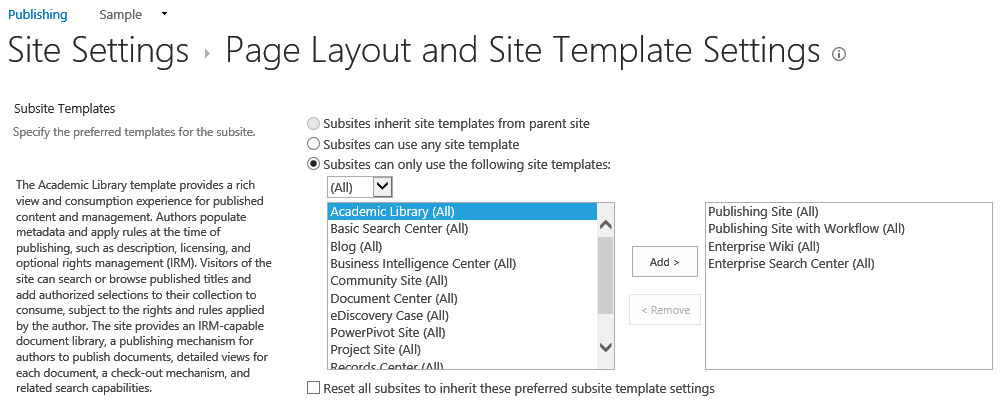
   If you are using a Publishing Site you can restrict the available site templates by going to Site Settings –> Look & Feel and clicking on Page Layouts and Site Templates (see following screenshot).  If you are not on a Publishing Site then there is not an easy (supported) way to accomplish this through out of the box means.

LimitSPSiteTemplates1


Solution

   The SPWeb class has methods GetAvailableWebTemplates and SetAvailableWebTemplates that can be used in conjunction with each other to get the current list of templates and then filter down to only the desired templates.  The filtered down results can then be set and updated on the SPWeb.  A version of this script can be downloaded from the TechNet Script Repository: Limit available web templates for a SharePoint site.

Note:  Be sure to modify the “<URL of site>” to your site’s URL and also change which templates to keep (line 2).


# array of template names (not titles) to keep 
$templateNamesToKeep = “STS#0”,“PROJECTSITE#0”,“BLOG#0” 

Start-SPAssignment -Global 
$web = Get-SPWeb <URL of site> 
# get the existing web templates from the site that will be filtered down 
# 1033 is the locale id for English US (en-us), be sure to change to your locale 
$existingWebTemplates = $web.GetAvailableWebTemplates(1033) 
$newWebTemplates = New-Object “System.Collections.ObjectModel.Collection[Microsoft.SharePoint.SPWebTemplate]” 
# filter existing web templates and only keep if in the list of template names to keep 
$newWebTemplates = $existingWebTemplates | Where-Object {$_.name -in $templateNamesToKeep} 
$web.SetAvailableWebTemplates($newWebTemplates, 1033) 
$web.Update() 
Stop-SPAssignment -Global 

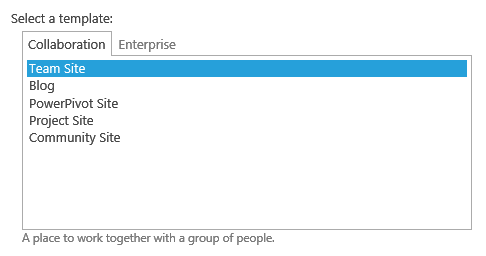
   Before you run the script you will see the original list of available web templates when creating a subsite.

LimitSPSiteTemplates2


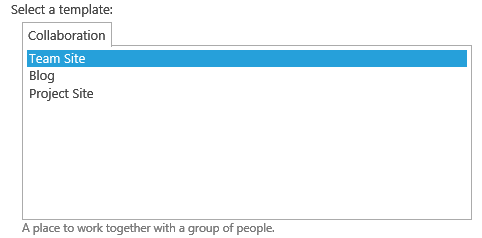
   After you run the script you will now see only the templates which you listed in the templates to keep.

LimitSPSiteTemplates3


   If you need to reset the list of available web templates you can execute the AllowAllWebTemplates method on the SPWeb object.


Conclusion

   I had run across a few other samples for limiting web templates that involved modifying out of the box SharePoint files (changes which may be overwritten by future updates or patches, and thus not recommended).  This process of using the SetAvailableWebTemplates() method appears to be a bit more safe and supported.


      -Frog Out

Goals for 2014

   This is getting published a little bit late (month and a half into 2014 already) but I still wanted to get this posted.  Once again I’m setting some goals for myself for the year and posting them here publicly.  You can read my past years goals (2010, 2011, 2012, 2013) and retrospectives (2010, 2011, 2012, 2013) as well.  So with that let’s dive in.


Professional

  • Blogging – I’m coming up on 5 years of blogging in a few months.  Hard to believe it has been that long but as long as I have things to share I’ll continue blogging.  It is great when I meet people in person that have been helped by tips, scripts, or other content I have blogged about.  This year I know will be busy with a number of work projects but I plan to post at least one post of substance each month.
  • Publish a productivity tool – When I started blogging back in 2009 the second blog post I ever posted was about how to enumerate SharePoint permissions from SharePoint 2007 with PowerShell.  Last year in 2013 I posted an update for enumerating SharePoint 2010 or 2013 permissions with PowerShell.  I would like to take the updated script and turn it into a tool that works for SharePoint Online as well since I see this as a gap area in tools / reports currently available for SharePoint Online.


Personal

  • Continue taking annual vacations – This may seem like an odd goal, but taking some time off and disconnecting from work for a few days away from home is good at least once or twice a year.  I also try to disconnect from technology while I’m away so minimal or no email, TV, video games, computers, etc.  The next two goals help with sticking to that.
  • Running – In 2013 my wife (then fiancé) and I ran our first 5K.  You can read the backstory on why that was such a big deal for me.  This year I plan to run a quarter marathon (6.55 miles) and at least one other race (length undetermined).  I’m already signed up to run a quarter marathon in May and I”d like to do one other race, perhaps something like Warrior Dash.
  • Read books – As I mentioned in my 2013 retrospective I’ve really gotten into reading (physical, not just digital) books lately.  I plan to read at least 3-4 books, many which I got as Christmas presents last year (see below).  I’m really loving science fiction books (especially Isaac Asimov) lately and looking forward to finishing up the Foundation series.

WP_20131228_002

  • Buy a house – My wife and I are looking to move into something a little larger so we have room to expand our family in the coming years.  We’re also preparing our condo for selling it by completing some home projects.  Will be fun to break out some power tools.


Conclusion

   As I said with last year’s goals I like publicly posting my goals to hold myself more accountable but also to help inspire others to also create / post their own goals.  If you decide to post your own goals feel free to send me a link as I would love to read.  Here’s to a good 2014 year!


      -Frog Out

Goals for 2013 Retrospective

   This is my fourth year of setting goals publicly on my blog (2010, 2011, 2012, 2013) and going through a retrospective at the end of the year (2010, 2011, 2012).  So without further ado here is my recap of 2013 goals.


Year in Review

   2013 will probably be the biggest year in my life as it is the year I got married to my wonderful wife Sarah.  Other notable events include getting promoted to Senior Premier Field Engineer at Microsoft, two of my sister-in-laws having babies, and helping out with some local conferences (including the return of SharePoint Saturday Columbus).


Professional Goals

  • Work local more – For the majority of 203 I was still on the road for a good portion of it.  Thankfully towards the end of the year (just before my wedding) I was able to work out arrangements to do more local and remote work.  I now have a few dedicated customers that are local or I work with remotely.  That fills over half my schedule while the other portion of my time is doing a mix of remote and traveling engagements.  Overall I’m (and my wife is) much happier with me being able to be home more.
  • Mentor / Mentee – I started out the year with 2 unofficial mentees at work.  Over the course of the year they have dropped off and we don’t meet regularly anymore.  I still talk with one on an infrequent basis when questions arise.  I’m ok with where things are at on this topic as a mentor / mentee relationship is only beneficial while both sides are willing to put something into it and also get something out of it.  In these cases both are now moving along from the hurdles they originally faced.
  • Blogging – I planned to blog at least 20 posts last year.   Unfortunately I only wrote 18 posts.  Part of this is due to my daily schedule changing quite a bit between work and personal life and part of it is due to not keeping a regular rhythm of writing down blog ideas that I flesh out.  Currently I have a number of topics that I “haven’t had time” to write out.  What that really means is I haven’t made the time for it.  Something to work on for next year.

Personal Goals

  • Get married – As I mentioned above this was the big year I tied the knot with Sarah.  Three months in and married life is great.  We are both growing into our new relationship with each other and with God.
  • Stay Fit – In 2012 I was able to lose and keep off 10+ pounds.  In 2013 with the help of my FitBit One, going to the gym with my wife, practicing portion control during meals, and getting into running I took off another 5 pounds.  I would’ve liked to lose a few more pounds but I’m finding that I’m adding muscle weight which I’m ok with.
  • Read Books – 2013 was the year that I discovered science fiction books.  I had listened to some audio books (most of the Robot series) by Isaac Asimov a few years ago.  This year I found the first five books of the Foundation series at a local used book store.  I’ve already read through the first 4 and have books 5-7 lined up to be read.  I also read The Gods themselves by Asimov, Daemon and FreedomTM by Daniel Suarez, and Dance with Dragons by George R. R. Martin.  That is more books / pages than I read when I was back in school.  I asked for (and got as presents) a number of other science fiction and technology thriller books for Christmas so my reading list for 2014 is already stocked.  I’m finding that I really like owning physical books rather than digital lately, similar to my new fascination with board / card / dice games (I’ll talk more about in my goals for 2014).


Conclusion

   I changed the focus of many of my goals for 2013 compared to 2012.  I’m happy with the change in focus to more family and personal health type goals.  I was able to meet and exceed most goals with only a few that were not met completely.  After reflecting back on this past year I’ve already brainstormed some goals for 2014.

   I hope you had a good 2013 and that you set and stuck to some goals.  If you’d like to share any feel free to put them in the comments below.  Here’s to the start of a great 2014!

Guest Blog Post on Hey Scripting Guy Blog – STSADM Replacement

   Quick blog post here to let you know that I wrote a guest blog post for Ed Wilson (The Microsoft Scripting Guy) over on the Hey Scripting Guy blog.  The post is titled “Weekend Scripter: Using PowerShell to Replace STSADM” and covers some research I did into replacing the functionality of the “STSADM –o enumallwebs” command with PowerShell.  Feel free to give it a read and let me know if you have any feedback or comments.   Have a great end of this 2013 year.


      -Frog Out


Links

Weekend Scripter: Using PowerShell to Replace STSADM

http://blogs.technet.com/b/heyscriptingguy/archive/2013/12/29/weekend-scripter-using-powershell-to-replace-stsadm.aspx