PowerShell Script: Find All SharePoint Features Installed On Farm

     Determining all of the SharePoint features installed on a farm CAN be a very labor intensive process, but it doesn’t have to be.  If you’ve ever used the STSADM command line tool you may be aware that there is an “stsadm –o enumsolutions” command to determine all solutions on the farm, but there is no “stsadm –o enumfeatures” command.  At a client of mine I was doing wrap up documentation and detailing all of our custom WSP solutions (over 20 now) and the associated features (over 70 it turns out.)  Rather than dig through SharePoint admin screens or the numerous Visual Studio projects for hours documenting this information, I decided to fire up my trusty friend PowerShell and see if I couldn’t write a quick script to find the information I was looking for.

     Sure enough, using PowerShell and the SharePoint API I was able to write a script in 5 minutes that saved me over an hour of work.  I created 2 version of the script for different possible needs.

  1. Version 1 – simple output of all features in table format sorted by solutionId then featureName
  2. Version 2 – output of all features in table grouped by solutionId, then solutionId is replaced by actual solution name with a separate lookup (very minor performance loss due solution name replacement)

    Additionally, all out of the box features (solutionId is all 0’s) are ignored so only custom features are returned.  Run the below commands making sure to fill in the appropriate URL for your farm.  Additionally you can download both from my SkyDrive here: Version 1 and Version 2

Version 1
$url = "Your site URL here"


$site= new-Object Microsoft.SharePoint.SPSite($url)


$site.WebApplication.Farm.FeatureDefinitions `

| where-object {$_.solutionid -ne '00000000-0000-0000-0000-000000000000'} `

| Sort-Object solutionid,displayname `

| ft -property solutionid,displayname,scope -auto > features.txt


$site.Dispose()


Version 2
$url = "Your site URL here"


$site= new-Object Microsoft.SharePoint.SPSite($url)


#send all features to output file features.txt

$site.WebApplication.Farm.FeatureDefinitions `

| where-object {$_.solutionid -ne '00000000-0000-0000-0000-000000000000'} `

| Sort-Object solutionid,displayname `

| ft -property displayname,scope -auto -groupBy solutionid > features.txt


#replace solutionId in features.txt with solution name

foreach($s in $site.WebApplication.Farm.Solutions)

{

    (Get-Content features.txt) `

    | Foreach-Object {$_ -replace $s.solutionid.ToString(), $s.Name} `

    | Set-Content features.txt    

}


$site.Dispose()


    Feel free to leave feedback if you find these useful.  I’m starting to build up some more PowerShell + SharePoint scripts for some talks later this fall and it’s always good to know what others are looking to get out of PowerShell scripting.  Thanks for reading.


      -Frog Out
A Tale of the SharePoint Timer Service Repeatedly Crashing

SharePoint WSP deployment jobs failing due to a faulty timer job can be a difficult problem to track down.  I’ll walk you through the scenario I faced at a client recently with all of the issues I faced due to the SharePoint Timer Service repeatedly crashing.

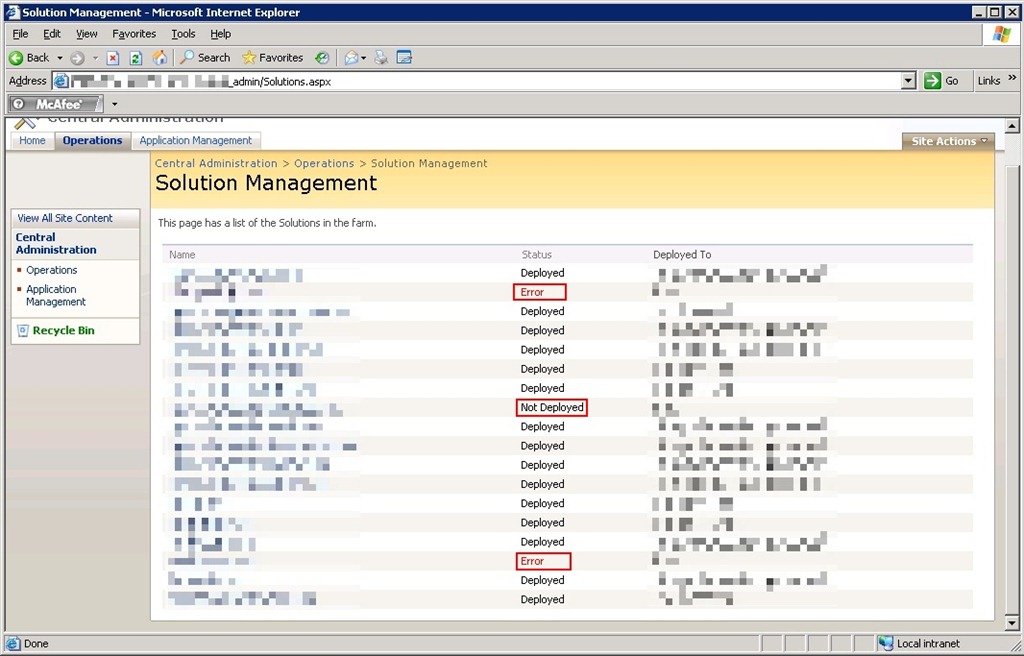
At this client we have close to 20 custom and 3rd party WSPs that are deployed to the primary farm.  During a routine rebuild one day we noticed that 3 jobs were consistently failing or listing as “not deployed” (see below.)  After quickly digging into the event viewer on the 3 web front end (WFE) servers we noticed that one them had the below error.


TimerJobFail3

WSP deployment jobs failing

TimerJobFail2

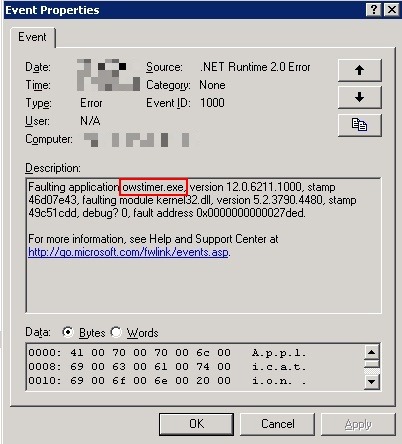
“Faulting application owstimer.exe” error

The error suggested that the owstimer.exe (SharePoint Timer Service responsible for running deployment jobs on each server) process was crashing on that server but with no clear explanation.  We restarted the Windows SharePoint Timer Service on that server and retried the deployment.  Thankfully the deployment succeeded on the trouble server.  Unfortunately the deployment failed on a different WFE.  The cause: owstimer.exe crashed on the other server now.  Hmm, one step forward then one step back, not a good sign.

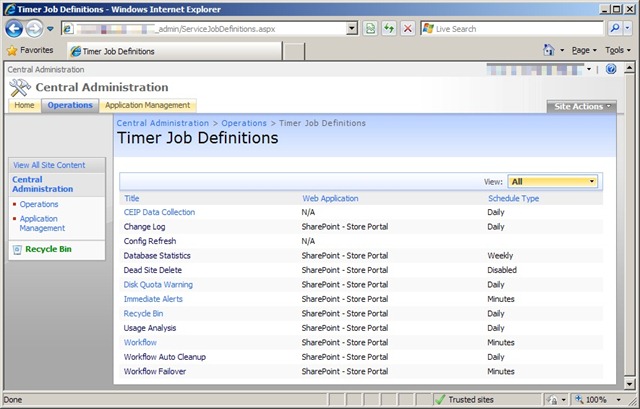
Fast forward a few more failed deployment attempts and owstimer.exe crashes on 1 or 2 of the servers each deployment attempt.  We then decided to fully remove the faulty deployment jobs that lingered on the failing servers.  This can be accomplished a few different ways.  First is running the “stsadm –o canceldeployment –id <guid>” command as seen here with the <guid> value coming from running “stsadm –o enumdeployments.”  Another (I feel slightly more risky) option is deleting the timer jobs through the Central Admin interface as seen below.  I say more risky because Central Admin usually presents a much easier interface for clicking the wrong button or choosing the wrong option (just my personal opinion.)  You can view deployment job status through “Operations –> Timer Job Status” and cancel them through “Operations –> Timer Job Definitions.”  Inside time job definitions click the specific job and then Delete from the following screen.

TimerJobFail4

Timer Job Definitions

Once we had completely cancelled, retracted, and removed all of the failing solutions then restarted the timer service on all WFEs we were able to successfully deploy all solutions on all WFEs.  There are times when you are working with SharePoint that you just need to back up your process and start back over from a clean slate to get successful results.  Knowing when to completely back up or when to forge ahead with your current direction is something I continually learn the more I work with SharePoint.  The biggest take-away from this experience is that when the timer job fails on one server there is a chance it is a farm wide issue and not just isolated to that server.  I can’t say that is always the case, but know the chance exists.  Until next time boys and girl happy SharePointing.


-Frog Out

“Requested registry access is not allowed” error on .Net / SharePoint application

    The error message “Requested registry access is not allowed” coming from a .Net / SharePoint application can be slightly misleading as I will explain in this post.  Today I ran into this error message while trying to log into a Forms Based Authentication (FBA) SharePoint site at my client.  The hosting web front end (WFE) server was recently rebuilt from scratch (re: fresh OS) so first thoughts pointed towards a permissions error relating to IIS and the registry.  Sadly that started to take me down the wrong path.  Luckily my coworker Kelly Jones overheard me talking about this error and pointed me to an article he remembered from a previous project with the same error.  Read this Microsoft support article for info about the true error with the event log.

    As part of the custom applications we are hosting on SharePoint we also built a logging component that writes out to the event log when errors occur.  In order to distinguish our event log entries we created a new event log source under the Application event log.  The code to do add this event log source is very simple (see below) but it must be executed as a user with administrative access because it requires writing to the registry.  Ahh, so our old friendly but misleading error message from above about the registry did have a hand in our problem, but that wasn’t readily apparent at first.

if (!EventLog.SourceExists("MyNewEventLogSource"))

{

    EventLog.CreateEventSource("MyNewEventLogSource", "EventLog");

}


     Here’s the long explanation of why this error occurred in the first place.  Typically our custom event log source is created during installation of the WSP that handles our logging, or just before a new event log entry is written if it doesn’t already exist.  When we rebuilt the primary WFE we rebuilt the entire server from scratch (re: blank OS).  When that WFE rejoined the farm it didn’t contain the custom event log source.  The WSP for logging wasn’t reinstalled (because it was already installed on the farm) so it didn’t fire the code to add the custom event log source back to the primary WFE.  After the primary WFE took back hosting duties and encountered the login warning the application pool identity attempted to write out to our custom event log source.  Our application pool identity doesn’t have local admin permissions on that server so it failed to created the event log source.  Consequently that failed attempt at event log source creation throws an exception that wasn’t properly handled (can’t write out the exception leading to a chicken and egg scenario) so it bubbled up to the user.

     Long story short, I wrote a very simplistic console app to run on any WFE that may be affected by this situation in the future.  Below is a bare bones version of the method but you’ll get the idea.  We are looking into a more permanent solution on how to avoid this situation in the future, but the need to be run as a local admin account adds some extra kinks.  For now this console app will get us through.

static public void MyEventLogInstaller(string EventSourceName)

{

    if (!EventLog.SourceExists(EventSourceName))

    {

        Console.WriteLine("Source doesn't exist, attempting create");


        try

        {

            EventLog.CreateEventSource(EventSourceName, "Application");

        }

        catch (Exception ex)

        {

            Console.WriteLine("Error creating event log source: " + ex.Message);

        }

    }

    else

    {

        Console.WriteLine("Source already exists, not performing any actions");

    }

}

     Hopefully this post sheds some light into the partially cryptic error message I saw and saves you from wasting time looking into registry permissions as I did at first.  Enjoy.


    -Frog Out

“Server Application Unavailable” Error on SharePoint (or .Net) Web Application

KISS = “Keep it Simple, Stupid.”  Remember that acronym as you continue reading.  Today I received StackOverflowException errors when deploying custom solutions to a new SharePoint environment at my client.  Previously I was under the impression that all of our environments were configured as identical to each other as possible, but as I will explain later that was not the case.  Technically speaking this error could happen to any .Net web application, not just a SharePoint one.

Little back story, we are migrating a custom solution (series of multiple applications) packaged as WSPs through various environments at my client.  We have made it through all but a few environments with no major problems deploying our custom solution.  So the fact that we saw this major error in a later environment (and none previous) was reason for concern.  At first I was worried that variations to this environment (load balanced WFEs, new AD domain, etc) were to blame.  That was not the case.  Next I thought deploying our custom code was somehow breaking this environment.  We are using a fairly methodical process for deployments between environments which you can read about here.  The environment threw StackOverflowExceptions when activating a feature on almost any deployed solutions, but strangely that was not the real cause either.  Finally I decided to go back to the KISS principle which ended up isolating the real issue.

For starters I tried deploying a plain vanilla web application with a blank site collection.  The web app and site collection created successfully which was good news.  I then tried to navigate to the newly created site and was greeted by the wonderful “Server Application Unavailable” error seen below along with the 2 event log errors.

Server Unavailable1

Server Application Unavailable

Server Unavailable2

Event 1334 – Failed to initialize AppDomain…Could not load file or assembly “System.Web”…

Server Unavailable3

Event ID 1088 – Failed to execute request because the App-Domain could not be created

Considering I was getting this error with a blank site and no custom code installed I ruled out our custom solutions as the root cause (sigh of relief for myself and the rest of the development team.)  Upon closer inspection of the event log error id 1334, I saw that there was an access denied error when trying to read System.Web from the GAC.  Strange that IIS was having trouble reading a standard .Net assembly from the GAC.  A quick tour of the interwebs and a few hits pointed to possibly needing to run “aspnet_regiis –i” to register ASP.Net with IIS on the server.  Typically I run that command as a pre-requisite for installing SharePoint, but I was not present for the installation of this environment so assumed it had been completed.  I have also heard some say it depends on which order you install IIS and .Net on your server if you need to run it.  Please leave feedback if you can clarify that for me.  So I decide to try running the command in the off chance it fixes things.

Server Unavailable4

aspnet_regiis.exe -i

As luck would have it, running that command fixed my issues.  I was then able to successfully pull up the blank site.  In a random turn of fate we did have to re-install SharePoint in that farm as service packs and other upgrades had been deployed prematurely to the farm without proper testing.  We are still clearing up those items of the re-install, but early indications suggest we are in the clear with our deployments.

For my part I made a few assumptions that proved faulty.  These included that a) SharePoint was properly installed and configured b) someone had previously verified basic site functionality existed and c) that the problem lay with the most complex pieces of the puzzle.  So in closing, sometimes it’s necessary to step back and start from the beginning…KISS as they say.  Hopefully this post can save someone a headache of troubleshooting.  Leave feedback if you have any questions, comments, or suggestions.


-Frog Out

Selected for COSPUG Member Spotlight of the Month

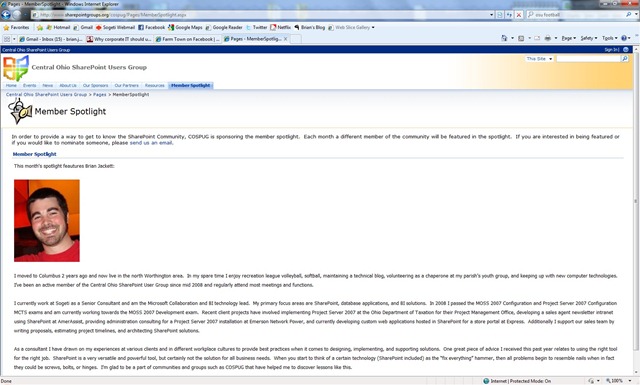
Recently I was honored to hear that I had been nominated and selected for the Central Ohio SharePoint User Group (COSPUG) Member Spotlight of the Month.  I’ve been attending COSPUG regularly for over a year and a half now and recently been getting more involved with the steering committee.  Earlier this summer I gave a presentation on “The Power of PowerShell and SharePoint” during a Show-N-Tell event.  As an aside, I’m tentatively giving an updated version of that presentation at the SharePoint Saturday Cleveland on Nov 14th, more details on that event forthcoming.  I was asked to write up a quick bio of myself which went live over this past weekend.  If you are sometimes a lazy clicker like myself I’ve included what was posted below.

In regards to this recognition I want to highlight something I picked up from a few speakers I’ve seen recently (especially Mike Eaton and Jeff Blankenburg).  What they taught me is that it’s a good thing to pass along instances of recognition to you manager/superiors/higher-ups when you receive it.  You shouldn’t feel like you are “tooting your own horn” or “gloating” if you forward them an email when a client praises you or a group of your peers honors you with an award.  Rather you should take the opportunity to let them know “yes I am a worthwhile employee and I see value in what I do” in so many words.  Hopefully in turn they also see your value and are rewarding you accordingly.  This doesn’t always mean monetarily, there are other forms of rewards and compensation to be given/received.

All in all I want to thank everyone that has gotten me involved with SharePoint, COSPUG, and Sogeti over the past 2+ years.  I hope to continue contributing to COSPUG, to my coworkers, and especially to the community at large as they’ve already given me much so far.

Member Spotlight article:

I moved to Columbus 2 years ago and now live in the north Worthington area. In my spare time I enjoy recreation league volleyball, softball, maintaining a technical blog, volunteering as a chaperone at my parish’s youth group, and keeping up with new computer technologies. I’ve been an active member of the Central Ohio SharePoint User Group since mid 2008 and regularly attend most meetings and functions.

I currently work at Sogeti as a Senior Consultant and am the Microsoft Collaboration and BI technology lead. My primary focus areas are SharePoint, database applications, and BI solutions. In 2008 I passed the MOSS 2007 Configuration and Project Server 2007 Configuration MCTS exams and am currently working towards the MOSS 2007 Development exam. Recent client projects have involved implementing Project Server 2007 at the Ohio Department of Taxation for their Project Management Office, developing a sales agent newsletter intranet using SharePoint at AmerAssist, providing administration consulting for a Project Server 2007 installation at Emerson Network Power, and currently developing custom web applications hosted in SharePoint for a store portal at Express. Additionally I support our sales team by writing proposals, estimating project timelines, and architecting SharePoint solutions.

As a consultant I have drawn on my experiences at various clients and in different workplace cultures to provide best practices when it comes to designing, implementing, and supporting solutions. One great piece of advice I received this past year relates to using the right tool for the right job. SharePoint is a very versatile and powerful tool, but certainly not the solution for all business needs. When you start to think of a certain technology (SharePoint included) as the “fix everything” hammer, then all problems begin to resemble nails when in fact they could be screws, bolts, or hinges. I’m glad to be a part of communities and groups such as COSPUG that have helped me to discover lessons like this.


COSPUGMemberSpotlight

-Frog Out

Enumerating SharePoint Site Templates for Site Collection with PowerShell

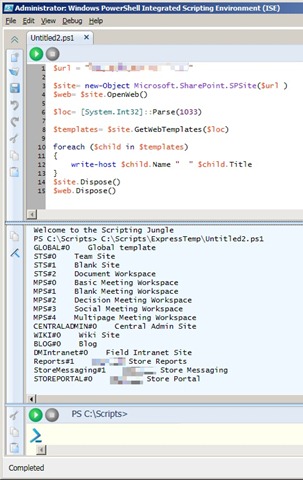
As part of my automated deployment post last week, one step of my deployment script called for creating a SharePoint site collection using the “STSADM –o createsite” command with the –sitetemplate option used for a specific site template.  If you have never had to create a site collection from a template at the command line you may not know what to put (or know what is available to you) for the –sitetemplate option.  To remedy this I created a very simple PowerShell script that opens a site collection and enumerates the usable site templates.

EnumerateSiteTemplates1

Note: The results listed will be specific to the site collection queried and will most likely be different from the templates in the global site template catalog listed when running STSADM –o enumtemplates.  Also note that some results (ex. STS and MPS) have multiple listings with a different # following them.  These are the same site template just with different build configurations specified.  Using this knowledge we can see that for instance the blank site and team site use the same template just with different components added or activated.  You can use this same capability in your own custom site templates if you are making multiple variations of a template.

Code Snippet:

$url = "http://hq.devone.local"

$site= new-Object Microsoft.SharePoint.SPSite($url )
$loc= [System.Int32]::Parse(1033)
$templates= $site.GetWebTemplates($loc)

foreach ($child in $templates)
{
    write-host $child.Name "  " $child.Title
}
$site.Dispose()

Enjoy the script and happy SharePointing adventures.

-Frog Out