The One Thing: Brian Jackett and SharePoint 2010

Last weekend at SharePoint Saturday Virginia Beach (website) I was asked by Christian Buckley (twitter) from Axceler (website) to do a short video for his “The One Thing You Need To Know About SharePoint 2010” video series.  Below is the video.

Background

When Christian asked me to do this video I was in a time crunch to make it to the airport for my flight home.  I was literally running out the door right after we finished.  As a result I was rushed in my response which led to my funny line at the end about “being a better person.”  If I had more time I would’ve talked about how PowerShell now gives SharePoint admins native support for installing, configuring, and managing a 2010 farm with commandlets.  Also mentioning the benefits of PowerShell over STSADM such as being object oriented, having a consistent syntax, including a better help system, and integrating with other systems.  Since I wasn’t able to fit those in, at least I was funny right?

The Video

The One Thing: Brian Jackett and SharePoint 2010


-Frog Out

Slides, Materials, and Pictures from SharePoint Saturday Virginia Beach 2011

This past weekend I presented “Managing SharePoint 2010 Farms with PowerShell” and “SharePoint 2010 and Integrating Line of Business Applications” SharePoint Saturday Virginia Beach.  A big thanks to everyone who attended my sessions.  I had a great time presenting, getting to meet new folks, and exploring a little bit of the local life.  Below are slides, materials, and pictures from the event.  Let me know if you have any comments, questions, or feedback.  Thanks.

Slides and Materials

Managing SharePoint 2010 Farms with PowerShell

SharePoint 2010 and Integrating Line of Business Applications

Photos

Pictures on Facebook

Click Here

Pictures on Windows Live (higher res)

Side Note: SavePSToSP CodePlex Project

During my “Managing SharePoint 2010 Farms with PowerShell” I made mention of a CodePlex project I am working on called SavePSToSP.  Click here for the link to that project.  I have been pushing out updates roughly once a month or more.  If you have any feedback or find it helpful feel free to let me know.


-Frog Out

SharePoint 2010 PowerShell Script to Find All SPShellAdmins with Database Name

<Update 2011-29-06: Modify script to handle multiple admins per database>

Problem

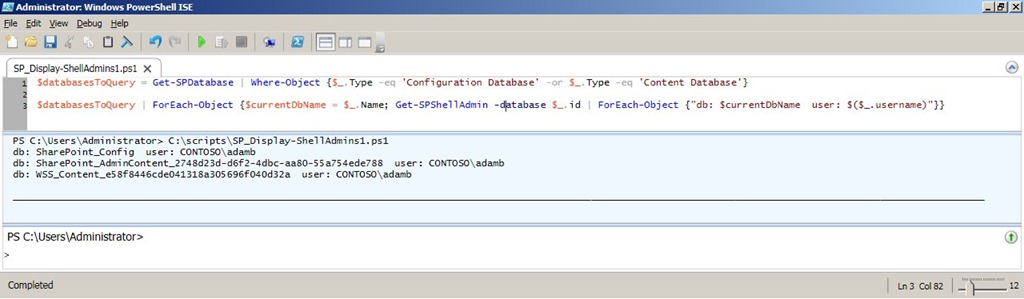
Yesterday on Twitter my friend @cacallahan asked for some help on how she could get all SharePoint 2010 SPShellAdmin users and the associated database name.  I spent a few minutes and wrote up a script that gets this information and decided I’d post it here for others to enjoy.

Twitter q1Twitter q2


Background

The Get-SPShellAdmin commandlet returns a listing of SPShellAdmins for the given database Id you pass in, or the farm configuration database by default.  For those unfamiliar, SPShellAdmin access is necessary for non-admin users to run PowerShell commands against a SharePoint 2010 farm (content and configuration databases specifically).  Click here to read an excellent guest post article my friend John Ferringer (twitter) wrote on the Hey Scripting Guy! blog regarding granting SPShellAdmin access.

Solution

Below is the script I wrote (formatted for space and to include comments) to provide the information needed.

Click here to download the script (updated script to handle multiple admins per database and sort them alphabetically).

# declare an array to store results

$results = @()


# fetch databases (only configuration and content DBs are needed)

$databasesToQuery = Get-SPDatabase |

    Where-Object {$_.Type -eq 'Configuration Database' -or $_.Type -eq 'Content Database'} |
    Sort-Object –Property Name


# for each database get spshelladmins and add db name and username to result

$databasesToQuery |

    ForEach-Object {$dbName = $_.Name;

                    Get-SPShellAdmin -database $_.id |
                        Sort-Object $_.username |

                        ForEach-Object {$results += @{$dbName=$($_.username)}}}


# sort results by db name and pipe to table with auto sizing of col width

$results.GetEnumerator() | ft -AutoSize
ScriptRun1


Conclusion

In this post I provided a script that outputs all of the SPShellAdmin users and the associated database names in a SharePoint 2010 farm.  Funny enough it actually took me longer to boot up my dev VM and PowerShell (~3 mins) than it did to write the first working draft of the script (~2 mins).  Feel free to use this script and modify as needed, just be sure to give credit back to the original author.  Let me know if you have any questions or comments.  Enjoy!

-Frog Out

Links

PowerShell Hashtables

http://technet.microsoft.com/en-us/library/ee692803.aspx

SPShellAdmin Access Explained

http://blogs.technet.com/b/heyscriptingguy/archive/2010/07/06/hey-scripting-guy-tell-me-about-permissions-for-using-windows-powershell-2-0-cmdlets-with-sharepoint-2010.aspx

Slides and Scripts from Metalogix Webcast Master Your SharePoint Migration With PowerShell

Thanks to everyone who attended the Metalogix webcast “Master Your SharePoint Migration with PowerShell” I guest presented on today.  We had great attendance and no technical hitches which is always a plus.  A number of attendees asked for my slide deck which you can find at the link below.  As a bonus I am including a set of demo scripts that I typically use with the longer version of this presentation.  If you have any questions or comments please feel free to reach out to me.  A big thanks once again to Metalogix for giving me the opportunity to work with them.

Scripts and Slidedeck

Click Here

-Frog Out

Guest Presenter with Metalogix for SharePoint 2010 Migration Webinar on PowerShell

    On Thursday Dec 9th, 2010 at 11:30am EDT I will be a guest presenter with Stephen Cawood (@cawood) from Metalogix as part of an ongoing webinar series titled Migrating to SharePoint 2010.  This specific webinar will be focused on Master your SharePoint 2010 Migration with PowerShell.  During the webinar I’ll be presenting a brief overview of how and why to use PowerShell to administrate your SharePoint 2010 farm.  I’ve known Stephen through various interactions at conferences, events, and Twitter so I’m very excited to be working with him on this.  Registration is going strong so be sure to sign up today (register here).  Look forward to you joining us.


Event title:
Master your SharePoint 2010 Migration with PowerShell
(click here for registration)

Date and time:
Thursday, December 9, 2010 11:30 am
Eastern Standard Time (New York, GMT-05:00)
Duration:
1 hour

Description:

The addition of PowerShell support, Microsoft’s highly customizable scripting language, for SharePoint 2010 was widely applauded by the global SharePoint community as it would provide administrators and system integrators with a valuable tool to enhance their ability to manage and deploy SharePoint environments . With SSMM PowerShell can be used to auto-generates scripts that can be easily customized to accommodate complex migration tasks and provide more fine grained control over all aspects of a SharePoint project. During this webinar Brian Jackett from Sogeti and Steve Cawood, SharePoint MVP and Metalogix Director of Support and Community will discuss and demonstrate how PowerShell combined with Metalogix Migration Manager products can be used to scale and customize various tasks in order to easily address complex migration scenarios.


      -Frog Out

PowerShell Script To Find All Closed Web Parts On SharePoint Site

Are your SharePoint pages loading slowly because you have numerous closed web parts eating up valuable resources?  Are you an admin tasked with tracking down those closed web parts?  Recently my friend Brian Gough asked me a fairly simple question: “Is it possible to use PowerShell to find all ‘closed’ webparts in a site collection?”  In this post I’ll show you a short PowerShell script that will identify all closed web parts on a site and it’s sub-sites.

Solution

The script below uses an advanced function (requires PowerShell V2) to search within a SharePoint and it’s sub-sites for all instances of closed web parts on all pages.  I use the SPLimitedWebPartManager associated with each page within the SPWeb object to get a reference to the web parts.  Since I am using the SharePoint API (loaded in the Begin block) directly you can run this against both SharePoint 2007 and 2010 (Note: only tested against SharePoint 2007 so far).  If you are running PowerShell V1 you can run just the code inside the function by itself and provide a site URL manually.

Click here to download the script.

function Search-SPClosedWebParts

{

<# 

 .Synopsis

  Finds instances of closed web parts on SharePoint site and sub-sites.

 .Description

  Finds instances of closed web parts on SharePoint site and sub-sites.

 .Parameter

  SiteUrl

  SiteUrl to search for closed web parts

 .Example

  Search-SPClosedWebParts

  Finds instances of closed web parts on SharePoint site and sub-sites.

#>

[CmdletBinding()]

param(

    [Parameter(Mandatory = $true, valueFromPipeline=$true)]

    [String]

    $SiteUrl

)#end param

    Begin

    {

        [void][System.Reflection.Assembly]::LoadWithPartialName("Microsoft.SharePoint")

    }

    Process

    {

        $site = new-Object Microsoft.SharePoint.SPSite($SiteUrl)


        $site.AllWebs | ForEach-Object {

            $currentWeb = $_

            $pages = $currentWeb.Files | Where-Object {$_.Name -match ".aspx"}


            $pages | ForEach-Object {

                $currentPage = $_

                $webPartManager = $currentWeb.GetLimitedWebPartManager($currentPage.ServerRelativeUrl, `

                    [System.Web.UI.WebControls.WebParts.PersonalizationScope]::Shared)


                $webPartManager.WebParts | ForEach-Object {

                    if($_.IsClosed)

                    {

                        Write-Host "'$($_.Title)' on $($currentPage.ServerRelativeUrl) is closed"

                    }

                }

            }


            $currentWeb.Dispose()

        }


        $site.Dispose()

    }

} #end Search-SPClosedWebParts


$siteUrlToSearch = Read-Host -Prompt "Enter site URL to check for closed web parts"


Search-SPClosedWebParts -SiteUrl $siteUrlToSearch

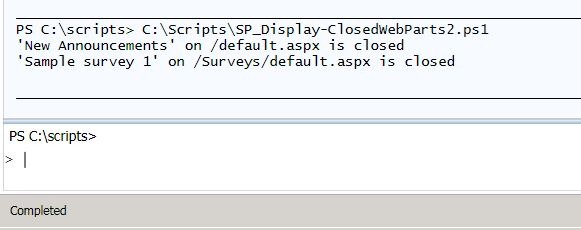
FindClosedWebPart1

Screenshot output from calling script

Conclusion

Using the SharePoint API and some basic looping structures I demonstrated a short script that can quickly and easily identify web parts that have been closed.  If desired you could modify the script to also automatically delete these closed web parts.  Since we are only concerned with finding instances of closed web parts I have left that functionality out for now.  Feel free to use and adapt this script as you like, but please attribute the original source if you re-publish or distribute a modified version.  Now go enjoy all that extra time you’ll have from not having to manually track down all those closed web parts.

-Frog Out

Links

Display closed web parts PowerShell Script

http://cid-9137d132751b949f.office.live.com/self.aspx/.Public/Blog%20files/SP%5E_Display-ClosedWebParts2.ps1