PowerShell Script To Find Where SharePoint 2010 Features Are Activated

   The script on this post will find where features are activated within your SharePoint 2010 farm.


Problem

   Over the past few months I’ve gotten literally dozens of emails, blog comments, or personal requests from people asking “how do I find where a SharePoint feature has been activated?”  I wrote a script to find which features are installed on your farm almost 3 years ago.  There is also the Get-SPFeature PowerShell commandlet in SharePoint 2010.  The problem is that these only tell you if a feature is installed not where they have been activated.  This is especially important to know if you have multiple web applications, site collections, and /or sites.


Solution
   The default call (no parameters) for Get-SPFeature will return all features in the farm.  Many of the parameter sets accept filters for specific scopes such as web application, site collection, and site.  If those are supplied then only the enabled / activated features are returned for that filtered scope.  Taking the concept of recursively traversing a SharePoint farm and merging that with calls to Get-SPFeature at all levels of the farm you can find out what features are activated at that level.  Store the results into a variable and you end up with all features that are activated at every level.

   Below is the script I came up with (slight edits for posting on blog).  With no parameters the function lists all features activated at all scopes.  If you provide an Identity parameter you will find where a specific feature is activated.  Note that the display name for a feature you see in the SharePoint UI rarely matches the “internal” display name.  I would recommend using the feature id instead.  You can download a full copy of the script by clicking on the link below.

   Note: This script is not optimized for medium to large farms.  In my testing it took 1-3 minutes to recurse through my demo environment.  This script is provided as-is with no warranty.  Run this in a smaller dev / test environment first.


function Get-SPFeatureActivated 
{ 
# see full script for help info, removed for formatting 
[CmdletBinding()] 
param( 
  [Parameter(position = 1, valueFromPipeline=$true)] 
  [Microsoft.SharePoint.PowerShell.SPFeatureDefinitionPipeBind] 
  $Identity 
)#end param 
  Begin 
  { 
    # declare empty array to hold results. Will add custom member ` 
    # for Url to show where activated at on objects returned from Get-SPFeature. 
    $results = @() 
    
    $params = @{} 
  } 
  Process 
  { 
    if([string]::IsNullOrEmpty($Identity) -eq $false) 
    { 
      $params = @{Identity = $Identity 
            ErrorAction = “SilentlyContinue” 
      } 
    } 
  
    # check farm features 
    $results += (Get-SPFeature -Farm -Limit All @params | 
             % {Add-Member -InputObject $_ -MemberType noteproperty ` 
                -Name Url -Value ([string]::Empty) -PassThru} | 
             Select-Object -Property Scope, DisplayName, Id, Url) 

    # check web application features 
    foreach($webApp in (Get-SPWebApplication)) 
    { 
      $results += (Get-SPFeature -WebApplication $webApp -Limit All @params | 
               % {Add-Member -InputObject $_ -MemberType noteproperty ` 
                  -Name Url -Value $webApp.Url -PassThru} | 
               Select-Object -Property Scope, DisplayName, Id, Url) 
      # check site collection features in current web app 
      foreach($site in ($webApp.Sites)) 
      { 
        $results += (Get-SPFeature -Site $site -Limit All @params | 
                 % {Add-Member -InputObject $_ -MemberType noteproperty ` 
                    -Name Url -Value $site.Url -PassThru} | 
                 Select-Object -Property Scope, DisplayName, Id, Url) 
                 
        $site.Dispose() 
        # check site features in current site collection 
        foreach($web in ($site.AllWebs)) 
        { 
          $results += (Get-SPFeature -Web $web -Limit All @params | 
                   % {Add-Member -InputObject $_ -MemberType noteproperty ` 
                      -Name Url -Value $web.Url -PassThru} | 
                   Select-Object -Property Scope, DisplayName, Id, Url) 
          $web.Dispose() 
        } 
      } 
    } 
  } 
  End 
  { 
    $results 
  } 
} #end Get-SPFeatureActivated 
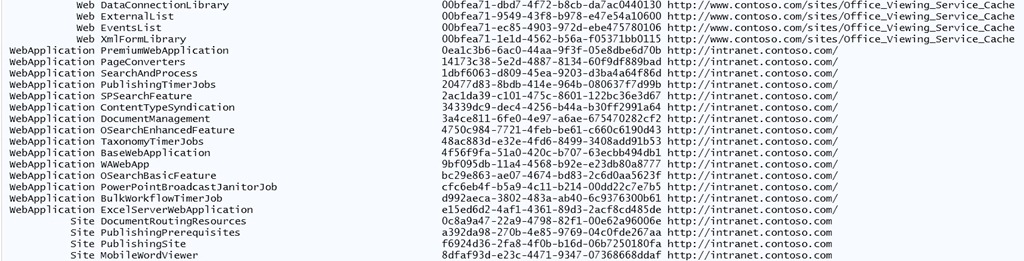
SPFeatureActivatedOutput1

Snippet of output from Get-SPFeatureActivated


Conclusion

   This script has been requested for a long time and I’m glad to finally getting a working “clean” version.  If you find any bugs or issues with the script please let me know.  I’ll be posting this to the TechNet Script Center after some internal review.  Enjoy the script and I hope it helps with your admin / developer needs.


      -Frog Out

Get Exchange Online Mailbox Size in GB

   As mentioned in my previous post I was recently working with a customer to get started with Exchange Online PowerShell commandlets.  In this post I wanted to follow up and show one example of a difference in output from commandlets in Exchange 2010 on-premises vs. Exchange Online.


Problem

   The customer was interested in getting the size of mailboxes in GB.  For Exchange on-premises this is fairly easy.  A fellow PFE Gary Siepser wrote an article explaining how to accomplish this (click here).  Note that Gary’s script will not work when remoting from a local machine that doesn’t have the Exchange object model installed.  A similar type of scenario exists if you are executing PowerShell against Exchange Online.  The data type for TotalItemSize  being returned (ByteQuantifiedSize) exists in the Exchange namespace.  If the PowerShell session doesn’t have access to that namespace (or hasn’t loaded it) PowerShell works with an approximation of that data type.

   The customer found a sample script on this TechNet article that they attempted to use (minor edits by me to fit on page and remove references to deleted item size.)


Get-Mailbox -ResultSize Unlimited |
   Get-MailboxStatistics |
   Select DisplayName,StorageLimitStatus, `
   @{name="TotalItemSize (MB)"; expression={[math]::Round( `
   ($_.TotalItemSize.Split("(")[1].Split(" ")[0].Replace(",","")/1MB),2)}}, `
   ItemCount |
   Sort "TotalItemSize (MB)" -Descending |
   Export-CSV "C:My DocumentsAll Mailboxes.csv" -NoTypeInformation


  The script is targeted to Exchange 2010 but fails for Exchange Online.  In Exchange Online when referencing the TotalItemSize property though it does not have a Split method which ultimately causes the script to fail.


Solution

   A simple solution would be to add a call to the ToString method off of the TotalItemSize property (in bold on line 5 below).


Get-Mailbox -ResultSize Unlimited |
   Get-MailboxStatistics |
   Select DisplayName,StorageLimitStatus, `
   @{name="TotalItemSize (MB)"; expression={[math]::Round( `
   ($_.TotalItemSize.ToString().Split("(")[1].Split(" ")[0].Replace(",","")/1MB),2)}}, `
   ItemCount |
   Sort "TotalItemSize (MB)" -Descending |
   Export-CSV "C:My DocumentsAll Mailboxes.csv" -NoTypeInformation


   This fixes the script to run but the numerous string replacements and splits are an eye sore to me.  I attempted to simplify the string manipulation with a regular expression (more info on regular expressions in PowerShell click here).  The result is a workable script that does one nice feature of adding a new member to the mailbox statistics called TotalItemSizeInBytes.  With this member you can then convert into any byte level (KB, MB, GB, etc.) that suits your needs.  You can download the full version of this script below (includes commands to connect to Exchange Online session).

$UserMailboxStats = Get-Mailbox -RecipientTypeDetails UserMailbox `
   -ResultSize Unlimited |
   Get-MailboxStatistics
$UserMailboxStats |
   Add-Member -MemberType ScriptProperty -Name TotalItemSizeInBytes `
   -Value {$this.TotalItemSize -replace "(.*()|,| [a-z]*)", ""}
$UserMailboxStats |
   Select-Object DisplayName,@{Name="TotalItemSize (GB)"; `
   Expression={[math]::Round($_.TotalItemSizeInBytes/1GB,2)}}


Conclusion

   Moving from on-premises to the cloud with PowerShell (and PowerShell remoting in general) can sometimes present some new challenges due to what you have access to.  This means that you must always test your code / scripts.  I still believe that not having to physically RDP to a server is a huge gain over some of the small hurdles you may encounter during the transition.  Scripting is the future of administration and makes you more valuable.  Hopefully this script and the concepts presented help you be a better admin / developer.


      -Frog Out


Links

The Get-MailboxStatistics Cmdlet, the TotalitemSize Property, and that pesky little “b”

http://blogs.technet.com/b/gary/archive/2010/02/20/the-get-mailboxstatistics-cmdlet-the-totalitemsize-property-and-that-pesky-little-b.aspx


View Mailbox Sizes and Mailbox Quotas Using Windows PowerShell

http://technet.microsoft.com/en-us/exchangelabshelp/gg576861#ViewAllMailboxes


Regular Expressions with Windows PowerShell

http://www.regular-expressions.info/powershell.html


“I don’t always test my code…” image

http://blogs.pinkelephant.com/images/uploads/conferences/I-dont-always-test-my-code-But-when-I-do-I-do-it-in-production.jpg


The One Thing: Brian Jackett and SharePoint 2010

http://www.youtube.com/watch?v=Sg_h66HMP9o

Links for Getting Started with PowerShell for Office 365 and Exchange Online

   This past week I worked with some customers who were getting started with using PowerShell against Exchange Online as part of their new Office 365 solution.  As you may know Exchange is not my primary focus area but since these customers’ needs centered around PowerShell I thought this would be a good opportunity to learn more.  What soon became apparent to me was a few things:

  • The output / objects returned from Exchange Online vs. on-premises commandlets sometimes differ (mainly due to Exchange Online output needing to be serialized across the wire)
  • Some of the community scripts posted on TechNet Script Center or PoSH Code Repository that work for on-premises won’t work against Exchange Online due to the above
  • I went to multiple resources to get an introduction of using the Exchange Online commandlets


   In light of the last item I would like to share some resources I gathered for getting started with the Exchange Online commandlets.  I will address the first two items in a follow up post that shows one sample script that I helped a customer fix.


Links

Using PowerShell with Office365

http://blah.winsmarts.com/2011-4-Using_PowerShell_with_Office365.aspx


Administering Microsoft Office 365 using WIndows PowerShell

http://blog.powershell.no/2011/05/09/administering-microsoft-office-365-using-windows-powershell/


Reference to Available PowerShell Cmdlets in Exchange Online

http://help.outlook.com/en-us/140/dd575549.aspx


Windows PowerShell cmdlets for Office 365

http://onlinehelp.microsoft.com/en-us/office365-enterprises/hh125002.aspx


Role Based Access Control in Exchange Online

http://help.outlook.com/en-us/140/dd207274.aspx


Exchange Online and RBAC

http://blogs.technet.com/b/ilvancri/archive/2011/05/16/exchange-online-office365-and-rbac.aspx


Conclusion

   Office 365 is being integrated into more and more customers’ environments.  While your PowerShell skills can still be used to manage certain portions of Office 365 (Exchange Online as of the time of this writing) there are a few differences in how data is passed back and forth.  Hopefully the links above will get you started on scripting against  cloud based services.


      -Frog Out

Speaking at SPTechCon Boston 2012

   I will be speaking at SPTechCon Boston 2012.  This will be my 3rd time speaking at SPTechCon and 4th time attending.  The conference has steadily been growing over the past few years and is one of the biggest non-Microsoft run conferences for SharePoint in the US.  I’ll be presenting two topics which I have given before but this time around with some updated content.  Registration is currently open and you can save $200 (on top of the current early bird discount of $400) by using the code “JACKETT” during registration.  I highly recommend joining for valuable learning and networking.


Where: SPTechCon Boston 2012

Title: PowerShell for the SharePoint 2010 Developer

Audience and Level: Developer, Intermediate

Abstract: PowerShell is not just for SharePoint 2010 administrators. Developers also get access to a wide range of functionality with PowerShell. In this session we will dive into using PowerShell with the .Net framework, web services, and native SharePoint commandlets. We will also cover some of the more intermediate to advanced techniques available within PowerShell that will improve your work efficiency. Not only will you learn how to automate your work but also learn ways to prototype solutions faster. This session is targeted to developers and assumes a basic familiarity with PowerShell.

Slides and Code download: see this blog post


Title: Integrating Line-of-Business Applications with SharePoint 2010

Audience and Level: Developer, Intermediate

Abstract: One of the biggest value-adding enhancements in SharePoint 2010 is the Business Connectivity Services (BCS). In this session, we will overview the BCS, demonstrate connecting line-of-business applications and external systems to SharePoint through external content types, and walk through surfacing that data with external lists.
This session is targeted at developers. No prior experience with the BCS is required, but a basic understanding of SharePoint Designer 2010 and SharePoint solutions is suggested.

Slides and Code download: see this blog post


      -Frog Out

Slides and Pictures from PowerShell Saturday Columbus 2012

On March 10th, 2012 the first ever PowerShell Saturday conference took place in Columbus, OH and I couldn’t be happier with the outcome.  We had 100 attendees from 10 different states (the biggest surprise to me) come to see 6 speakers present on a variety of PowerShell topics: introduction, WMI, SharePoint, Active Directory, Exchange, 3rd party products and more.


WP_000158

A big thank you also goes out to a number of people.

Planning committee

Speakers

Volunteer

  • Lisa Gardner, fellow Microsoft PFE volunteered her time on a Saturday to assist with smooth operation of the day

Facility Coordination

  • Debbie Carrier, facilities coordinator for the Columbus Microsoft Office and helped us out greatly with the venue


Slides and Script Samples

I presented my session on “PowerShell for the SharePoint 2010 Developer”.  Below you can download the slides and script samples.


Photos

I wasn’t able to take took many pictures (only 3) as I was busy doing my presentation, answering questions, and taking care of random items throughout the day.


Pictures on Facebook

click here

Pictures on SkyDrive (higher res)

Conclusion

I’m very happy that this first ever PowerShell Saturday was a success.  My fellow PFE and speaker Ashley McGlone also has a short write-up on his blog about the event (click here).  I have heard rumors that there are other cities starting to plan their own local events.  When I hear more details I’ll spread the word here and on Twitter.


-Frog Out

Announcing PowerShell Saturday Columbus

    The first ever PowerShell Saturday will be taking place at the local Microsoft office in Columbus, OH on March 10, 2012.  This is a little bit of a delayed announcement as the event has already sold out (yes, sold out a month before the event.)  This will be a one day conference with speakers from around Ohio and a few from further away.  The schedule and speaker lineup has not been officially announced but will be soon.  If you were lucky enough to get one of the 100 registrations you’ll be able to attend sessions (pending any last minute changes) covering topics such as PowerShell for beginners, using PowerShell with various server products, and some advanced topics.  There will also be a script club room where you can collaborate on scripts and network with others.

    It’s been great working with the others on the planning committee (Wes Stahler, Ed “The Scripting Guy” Wilson, Teresa “The Scripting Wife” Wilson, Ashley McGlone, and myself) the past few months to pull this together.  The idea started when I was talking with Ed Wilson at a Microsoft internal training event called GeekReady.  I was discussing with Ed how it would be great to have a PowerShell Saturday conference along the lines of SharePoint Saturdays and SQL Saturdays that Ed and I have both planned and spoken at.  Ed jumped at the idea and now roughly 4 months later it has become a reality.

    I look forward to meeting those that will be joining.  For those that were unable to register this year, depending on how this year goes and if we decide to have another next year we may look into expanding our capacity.  For now we’re focused on making this year’s conference the best it can be.


      -Frog Out