Guest Presenter with Metalogix for SharePoint 2010 Migration Webinar on PowerShell

    On Thursday Dec 9th, 2010 at 11:30am EDT I will be a guest presenter with Stephen Cawood (@cawood) from Metalogix as part of an ongoing webinar series titled Migrating to SharePoint 2010.  This specific webinar will be focused on Master your SharePoint 2010 Migration with PowerShell.  During the webinar I’ll be presenting a brief overview of how and why to use PowerShell to administrate your SharePoint 2010 farm.  I’ve known Stephen through various interactions at conferences, events, and Twitter so I’m very excited to be working with him on this.  Registration is going strong so be sure to sign up today (register here).  Look forward to you joining us.


Event title:
Master your SharePoint 2010 Migration with PowerShell
(click here for registration)

Date and time:
Thursday, December 9, 2010 11:30 am
Eastern Standard Time (New York, GMT-05:00)
Duration:
1 hour

Description:

The addition of PowerShell support, Microsoft’s highly customizable scripting language, for SharePoint 2010 was widely applauded by the global SharePoint community as it would provide administrators and system integrators with a valuable tool to enhance their ability to manage and deploy SharePoint environments . With SSMM PowerShell can be used to auto-generates scripts that can be easily customized to accommodate complex migration tasks and provide more fine grained control over all aspects of a SharePoint project. During this webinar Brian Jackett from Sogeti and Steve Cawood, SharePoint MVP and Metalogix Director of Support and Community will discuss and demonstrate how PowerShell combined with Metalogix Migration Manager products can be used to scale and customize various tasks in order to easily address complex migration scenarios.


      -Frog Out
Reduced Blogging For A Few Weeks

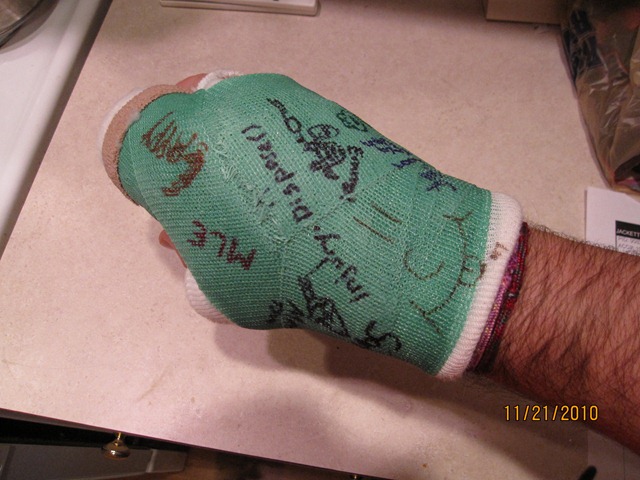
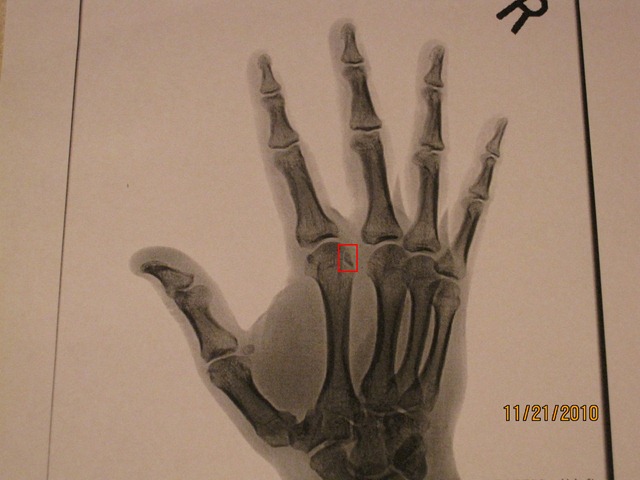
I typically post technical content on this blog, but I have a personal note this time around.  As some of you who follow me on Twitter or Facebook may know, last week I found out I fractured my right index knuckle and strained a ligament between my index and middle finger.  In order to heal this injury I’ll be wearing a cast for the next 3 1/2 weeks.  This is day 4 and I’m starting to get used to it, but my typing speed is still reduced and causes pain over long usage.  As such I am cutting back on a few side activities such as this blog, the SavePSToSP CodePlex project, and general research I do at nights.  I’ll still be responding to comments on this blog as they come up, but new content will be most likely be on hold until mid December when I get my fracture re-examined and hopefully can get rid of this cast for good.  Below is a copy of one x-ray showing the fracture and the other a shot of my cast today with some of the signatures I’ve collected.  I look forward to my hand healing and getting back to normal.  Have a fun and safe Thanksgiving holiday to all those that celebrate.

IMG_2174_adj IMG_2175


-Frog Out

PowerShell Script To Find All Closed Web Parts On SharePoint Site

Are your SharePoint pages loading slowly because you have numerous closed web parts eating up valuable resources?  Are you an admin tasked with tracking down those closed web parts?  Recently my friend Brian Gough asked me a fairly simple question: “Is it possible to use PowerShell to find all ‘closed’ webparts in a site collection?”  In this post I’ll show you a short PowerShell script that will identify all closed web parts on a site and it’s sub-sites.

Solution

The script below uses an advanced function (requires PowerShell V2) to search within a SharePoint and it’s sub-sites for all instances of closed web parts on all pages.  I use the SPLimitedWebPartManager associated with each page within the SPWeb object to get a reference to the web parts.  Since I am using the SharePoint API (loaded in the Begin block) directly you can run this against both SharePoint 2007 and 2010 (Note: only tested against SharePoint 2007 so far).  If you are running PowerShell V1 you can run just the code inside the function by itself and provide a site URL manually.

Click here to download the script.

function Search-SPClosedWebParts

{

<# 

 .Synopsis

  Finds instances of closed web parts on SharePoint site and sub-sites.

 .Description

  Finds instances of closed web parts on SharePoint site and sub-sites.

 .Parameter

  SiteUrl

  SiteUrl to search for closed web parts

 .Example

  Search-SPClosedWebParts

  Finds instances of closed web parts on SharePoint site and sub-sites.

#>

[CmdletBinding()]

param(

    [Parameter(Mandatory = $true, valueFromPipeline=$true)]

    [String]

    $SiteUrl

)#end param

    Begin

    {

        [void][System.Reflection.Assembly]::LoadWithPartialName("Microsoft.SharePoint")

    }

    Process

    {

        $site = new-Object Microsoft.SharePoint.SPSite($SiteUrl)


        $site.AllWebs | ForEach-Object {

            $currentWeb = $_

            $pages = $currentWeb.Files | Where-Object {$_.Name -match ".aspx"}


            $pages | ForEach-Object {

                $currentPage = $_

                $webPartManager = $currentWeb.GetLimitedWebPartManager($currentPage.ServerRelativeUrl, `

                    [System.Web.UI.WebControls.WebParts.PersonalizationScope]::Shared)


                $webPartManager.WebParts | ForEach-Object {

                    if($_.IsClosed)

                    {

                        Write-Host "'$($_.Title)' on $($currentPage.ServerRelativeUrl) is closed"

                    }

                }

            }


            $currentWeb.Dispose()

        }


        $site.Dispose()

    }

} #end Search-SPClosedWebParts


$siteUrlToSearch = Read-Host -Prompt "Enter site URL to check for closed web parts"


Search-SPClosedWebParts -SiteUrl $siteUrlToSearch

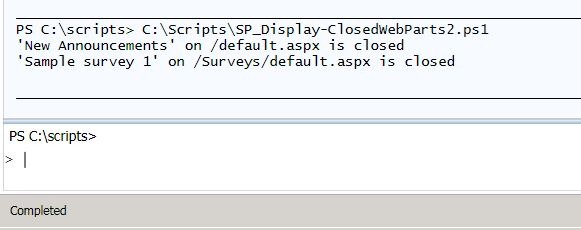
FindClosedWebPart1

Screenshot output from calling script

Conclusion

Using the SharePoint API and some basic looping structures I demonstrated a short script that can quickly and easily identify web parts that have been closed.  If desired you could modify the script to also automatically delete these closed web parts.  Since we are only concerned with finding instances of closed web parts I have left that functionality out for now.  Feel free to use and adapt this script as you like, but please attribute the original source if you re-publish or distribute a modified version.  Now go enjoy all that extra time you’ll have from not having to manually track down all those closed web parts.

-Frog Out

Links

Display closed web parts PowerShell Script

http://cid-9137d132751b949f.office.live.com/self.aspx/.Public/Blog%20files/SP%5E_Display-ClosedWebParts2.ps1

Slides from Dog Food Conference 2010

    At the Dog Food Conference 2010 I presented a session titled “SharePoint 2010 and Integrating Line of Business Applications”.  In this session we covered the basics of the Business Connectivity Service (BCS) in SharePoint 2010 and went through a number of demos on how to develop against it.  Click here for my slides.  Thanks to all who attended and had some great questions and interactions.  If you would like more BCS resources or have any feedback on this presentation feel free to leave comments.


      -Frog Out


Links

“SharePoint 2010 and Integrating Line of Business Applications” Presentation slides

http://cid-9137d132751b949f.office.live.com/view.aspx/.Public/Presentation%20Files/Dog%20Food%20Con%202010/SP2010%20Integrating%20LOB%20Apps.pptx

Slides, Scripts, and Photos from SPTechCon Boston 2010

A big thank you to everyone who attended my “Real-World Deployment of SharePoint 2010 Solutions” at SPTechCon Boston 2010 this week.  I hope you learned some things and can take them back to improve your farms.  This was my first time speaking at SPTechCon and second one attended.  It was great to catch up with countless old friends I haven’t seen in awhile as well as meet new friends.  I’m looking forward to speaking at SPTechCon San Francisco 2011 in Feb, so if you’re attending feel free to stop by one of my sessions.  Registration has already begun, but you can get a discount for registering early.  Based on Boston selling out this year I would recommend registering sooner rather than later to ensure your spot.

On a side note, special thanks to a few of my attendees who after hearing that I really like frogs recommended I stop by Frog Pond at Boston Commons while in town.  Thankfully I was able to swing by on my way to the airport for a few minutes.  Unfortunately the pond was closed for maintenance, but I was able to get my picture taken with a few of the frog statues in the area (see album below).  Yet another unique experience to have while traveling to different cities.


Slides and Scripts: click here


Photos

Facebook link (with tagging): click here

Live Photos link (higher res):

-Frog Out

Speaking at Columbus Dog Food Conference 2010

DF2010-LOGO     On Thursday Nov 4th I will be speaking at the Columbus Dog Food Conference 2010.  My presentation will be on integrating line of business applications with SharePoint 2010.  Click here for registration information.  Be sure to register soon as spots are limited and fill up quickly.  Hope to see you there.


Where: Columbus Dog Food Conference 2010

Title: SharePoint 2010 and Integrating Line of Business Applications

Audience and Level: Developer, Beginner/Intermediate

Abstract: “One of the biggest value adding enhancements in SharePoint 2010 is the Business Connectivity Services (BCS).  In this session we’ll overview the BCS, demonstrate connecting line of business applications and external systems to SharePoint through external content types, and walk through surfacing that data with external lists.”


-Frog Out