Goals for 2011

    Recently I posted a recap of my goals from 2010.  Now it’s time to post my goals and focus areas for 2011.  Just as I did in 2010 I’m splitting goals between professional and personal.

Professional

  • Blog – I intended to continue blogging at least twice a month, sometimes more frequently when time and motivation allows.  I have begun looking at other platforms or distribution methods for my blogging and will continue to investigate those.  I’ll post details on here if anything changes.
  • Speaking – In 2010 I spoke at a conference, user group, or other venue about once a month.  While I gained much from those opportunities it was also very time consuming, expensive (many times paid out of my own pocket), and emotionally draining.  This year I already have 3 engagements lined up in the first 2 months.  In 2011, if given the opportunity, I will probably limit myself to speak at 6 total events outside of Columbus / Ohio and then do 1-2 locally.
  • Open Source – Last year I started an open source project on CodePlex called SavePSToSP.  You can read about the origins of that project here.  The idea has been implemented into a PowerShell module which assists with saving script files to a SharePoint document library.  I plan to support this project with monthly builds at least through June of this year.
  • Volunteering – Last year I helped out with SharePoint Saturday Columbus and Stir Trek conferences as well as serving on the steering committee for Buckeye SPUG.  I’m already helping the volunteer board for the next Stir Trek conference and the steering committee for Buckeye SPUG.  Nothing official has started with SharePoint Saturday so nothing to report on that front.
  • Windows Phone 7 Development – Sometime in Feb this year I should be getting a corporate Windows Phone 7 device.  I’m really looking forward to this so that I can develop on real hardware.  I plan to develop at least one application by year end.  Most likely it will have hooks into SharePoint or PowerShell.  I don’t know if it’s something I will submit to the marketplace yet.
  • Portal and Collaboration Lead – This year with the Sogeti Columbus office I have a more official role of Portal and Collaboration Lead within the new Application Development and Integration practice.  This new role means that I will be expanding my scope of knowledge outside just Microsoft products to include IBM and other open source solutions for portal and collaboration solutions.  This will be an interesting challenge, but I hope to learn about at least 2 other solutions aside from SharePoint.

Personal

  • Volunteering – I plan to continue volunteering at my parish’s high school youth group with weekly meetings and side events.  I also plan to continue doing an event once every other month with the Columbus Gives Back organization (website).
  • House/Condo – I plan to buy a house or condo this summer when my apartment lease runs out.  I’ve already begun the search and talked to a realtor and lender so it is quickly becoming a reality.

Conclusion

    Once again I’ve outlined some goals for myself this year.  Many are similar to ones from last year but I have a few new ones.  All of these along with work, social, and other commitments will keep me busy as always.  If you have any goals for 2011 that you’d like to share feel free to leave a comment.  Thanks and good luck fulfilling your goals as well.


      -Frog Out

Slides, Materials, and Pictures from SharePoint Saturday Virginia Beach 2011

This past weekend I presented “Managing SharePoint 2010 Farms with PowerShell” and “SharePoint 2010 and Integrating Line of Business Applications” SharePoint Saturday Virginia Beach.  A big thanks to everyone who attended my sessions.  I had a great time presenting, getting to meet new folks, and exploring a little bit of the local life.  Below are slides, materials, and pictures from the event.  Let me know if you have any comments, questions, or feedback.  Thanks.

Slides and Materials

Managing SharePoint 2010 Farms with PowerShell

SharePoint 2010 and Integrating Line of Business Applications

Photos

Pictures on Facebook

Click Here

Pictures on Windows Live (higher res)

Side Note: SavePSToSP CodePlex Project

During my “Managing SharePoint 2010 Farms with PowerShell” I made mention of a CodePlex project I am working on called SavePSToSP.  Click here for the link to that project.  I have been pushing out updates roughly once a month or more.  If you have any feedback or find it helpful feel free to let me know.


-Frog Out

SharePoint 2010 PowerShell Script to Find All SPShellAdmins with Database Name

<Update 2011-29-06: Modify script to handle multiple admins per database>

Problem

Yesterday on Twitter my friend @cacallahan asked for some help on how she could get all SharePoint 2010 SPShellAdmin users and the associated database name.  I spent a few minutes and wrote up a script that gets this information and decided I’d post it here for others to enjoy.

Twitter q1Twitter q2


Background

The Get-SPShellAdmin commandlet returns a listing of SPShellAdmins for the given database Id you pass in, or the farm configuration database by default.  For those unfamiliar, SPShellAdmin access is necessary for non-admin users to run PowerShell commands against a SharePoint 2010 farm (content and configuration databases specifically).  Click here to read an excellent guest post article my friend John Ferringer (twitter) wrote on the Hey Scripting Guy! blog regarding granting SPShellAdmin access.

Solution

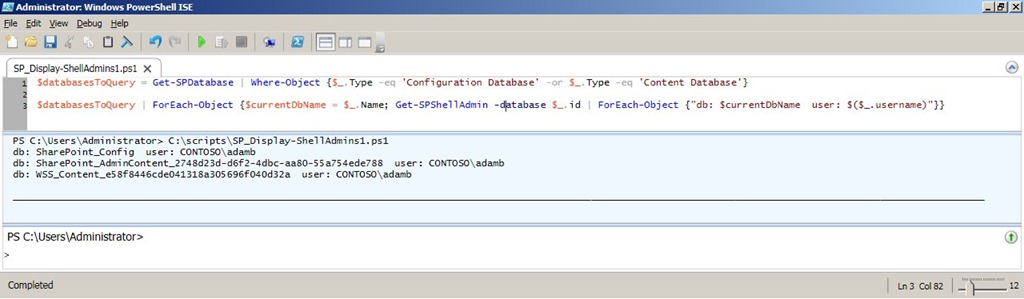
Below is the script I wrote (formatted for space and to include comments) to provide the information needed.

Click here to download the script (updated script to handle multiple admins per database and sort them alphabetically).

# declare an array to store results

$results = @()


# fetch databases (only configuration and content DBs are needed)

$databasesToQuery = Get-SPDatabase |

    Where-Object {$_.Type -eq 'Configuration Database' -or $_.Type -eq 'Content Database'} |
    Sort-Object –Property Name


# for each database get spshelladmins and add db name and username to result

$databasesToQuery |

    ForEach-Object {$dbName = $_.Name;

                    Get-SPShellAdmin -database $_.id |
                        Sort-Object $_.username |

                        ForEach-Object {$results += @{$dbName=$($_.username)}}}


# sort results by db name and pipe to table with auto sizing of col width

$results.GetEnumerator() | ft -AutoSize

ScriptRun1


Conclusion

In this post I provided a script that outputs all of the SPShellAdmin users and the associated database names in a SharePoint 2010 farm.  Funny enough it actually took me longer to boot up my dev VM and PowerShell (~3 mins) than it did to write the first working draft of the script (~2 mins).  Feel free to use this script and modify as needed, just be sure to give credit back to the original author.  Let me know if you have any questions or comments.  Enjoy!

-Frog Out

Links

PowerShell Hashtables

http://technet.microsoft.com/en-us/library/ee692803.aspx

SPShellAdmin Access Explained

http://blogs.technet.com/b/heyscriptingguy/archive/2010/07/06/hey-scripting-guy-tell-me-about-permissions-for-using-windows-powershell-2-0-cmdlets-with-sharepoint-2010.aspx

Goals for 2010 Retrospective

    As we approach the end of 2010 I’d like to take a  few minutes to reflect back on this past year and revisit the goals that I set for myself at the beginning of the year (click here to see those goals).  I feel it is important to track your goals not only to see if you accomplished them but also to see what new directions in life you pursued.  Once we enter into 2011 I’ll follow up with a new post on goals for the new year.

Professional

  • Blog – This year I intended to write at least 2 posts a month.  Looking back I far surpassed that goal by writing 47 posts (this one being my 48th).  As with many things in life, quantity does not mean quality.  A good example is a number of my posts announcing upcoming speaking engagements and providing links to presentation slides and scripts.  That aside, I like to at least keep content relatively fresh on this blog  which I was able to accomplish.  At the same time I’ve gotten much more comfortable in my blogging style and it has become much easier to write.
  • Speaking – I didn’t define a clear goal for speaking engagements, but had a rough idea of wanting to speak at 2-3 events.  Once again I far exceeded that number by speaking at 10 separate events and delivering 12+ presentations.  I’m very thankful for all of the opportunities that I was given and all of the wonderful people I have met as a result.
  • Volunteering – This year I intended to help out with the COSPUG (now Buckeye SPUG) steering committee and Stir Trek conference.  I fulfilled both goals and as well as taking on lead organizer duties for the first ever SharePoint Saturday Columbus.  Each of these events and groups turned out to be successful and I was glad to be a part of them all.  I look forward to continuing to volunteer with each next year in some capacity.
  • Android Development – My goal for getting into Android development was a late addition, but one I didn’t necessarily fulfill.  I spent a couple nights downloading the tools, configuring my environment, and going through some “simple” tutorials.  I say “simple” because in my opinion the tutorials were not laid out very well, took a long time to get running properly, and confused me more than helped.  After about a week I was frustrated with the process and didn’t think it was a good use of my time.  On a side note, I’ve dabbled in Windows Phone 7 development over the past few months and have been very excited by how easy and intuitive it was to get started and develop some proof of concepts.

Personal

  • Getting in Shape – I had intended to play on recreational sports leagues and work out on a semi-regular basis.  For the most part I fulfilled this goal by playing on various softball and volleyball leagues as well as using the gym.  At the same time I had some major setbacks.  In the spring I badly sprained my ankle and got hit in the knee with a softball which kept me inactive for almost 2 months.  More recently I broke my knuckle (click here to read about it) which I am still recovering from.
  • Volunteering – On the volunteering front I kept my commitments at my parish’s high school youth group.  As for other volunteering opportunities I got involved with a great organization called Columbus Gives Back (website).  I’ve volunteered with them a few times and really enjoy their goal to provide opportunities to people with busy schedules.  They  offer a variety of events typically after work hours and spread out around Columbus with no set commitments on time you need to put in.  If you have the time or motivation I highly recommend them.
  • House/Condo – I had been thinking of buying a house or condo this past summer, but decided to extend my apartment lease for another year instead.  I have begun the search for a place in the past few weeks and am excited begin the process of owning a home.

Conclusion

    This year I was able to set and achieve many of my goals.  For next year I’ll try to put more specific numbers to all of my goals.  If any of you readers set goals for 2011 feel free to send me a link as I’d love to see what you are aiming to accomplish.  Have a great end of 2010 and best wishes for the start of 2011!

      -Frog Out

Slides and Scripts from Metalogix Webcast Master Your SharePoint Migration With PowerShell

Thanks to everyone who attended the Metalogix webcast “Master Your SharePoint Migration with PowerShell” I guest presented on today.  We had great attendance and no technical hitches which is always a plus.  A number of attendees asked for my slide deck which you can find at the link below.  As a bonus I am including a set of demo scripts that I typically use with the longer version of this presentation.  If you have any questions or comments please feel free to reach out to me.  A big thanks once again to Metalogix for giving me the opportunity to work with them.

Scripts and Slidedeck

Click Here

-Frog Out

Guest Post: Instantiate SharePoint Workflow On Item Deleted

In this post, guest author Lucas Eduardo Silva will walk you through the steps of instantiating a workflow using an item event receiver from a custom list.  The ItemDeleting event will require approval via the workflow.

Foreword

As you may have read recently, I injured my right hand and have had it in a cast for the past 3 weeks.  Due to this I planned to reduce my blogging while my hand heals.  As luck would have it, I was actually approached by someone who asked if they could be a guest author on my blog.  I’ve never had a guest author, but considering my injury now seemed like as good a time as ever to try it out.

About the Guest Author

Lucas Eduardo Silva (email) works for CPM Braxis, a sibling company to my employer Sogeti in the CapGemini family.  Lucas and I exchanged emails a few times after one of my  recent posts and continued into various topics.  When I posted that I had injured my hand, Lucas mentioned that he had a post idea that he would like to publish and asked if it could be published on my blog.  The below content is the result of that collaboration.

The Problem

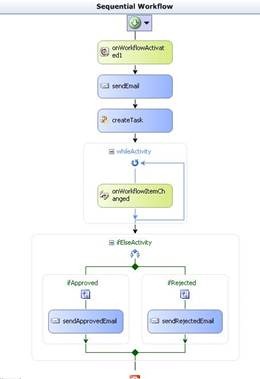
Lucas has a big problem.  He has a workflow that he wants to fire every time an item is deleted from a custom list. He has already created the association in the “item deleting event”, but needs to approve the deletion but the workflow is finishing first. Lucas put an onWorkflowItemChanged wait for the change of status approval, but it is not being hit.

The Solution

Note: This solution assumes you have the Visual Studio Extensions for Windows SharePoint Services (VSeWSS) installed to access the SharePoint project templates within VIsual Studio.

1 – Create a workflow that will be activated by ItemEventReceiver.

clip_image002

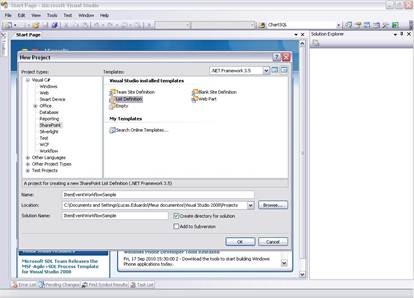
2 – Create the list by Visual Studio clicking in File -> New -> Project. Select SharePoint, then List Definition.

clip_image004

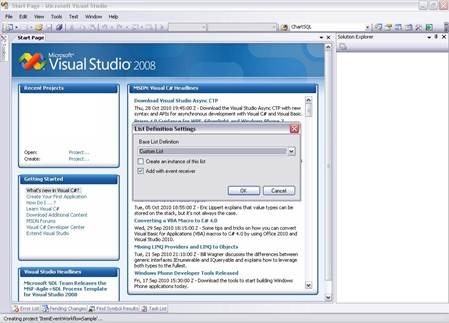
3 – Select the type of document to be created. List, Document Library, Wiki, Tasks, etc..

clip_image006

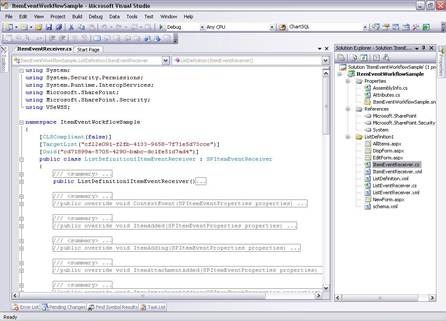
4 – Visual Studio creates the file ItemEventReceiver.cs with all possible events in a list.

clip_image008

5 – In the workflow project, open the workflow.xml and copy the ID.

6 – Uncomment the ItemDeleting and insert the following code by replacing the ID that you copied earlier.

//Cancel the Exclusion 

properties.Cancel = true;


//Activating Exclusion Workflow

SPWorkflowManager workflowManager = properties.ListItem.Web.Site.WorkflowManager;


SPWorkflowAssociation wfAssociation =

    properties.ListItem.ParentList.WorkflowAssociations.

    GetAssociationByBaseID(new Guid("37b5aea8-792a-4ded-be25-d283d9fe1f9d"));


workflowManager.StartWorkflow(properties.ListItem, wfAssociation, wfAssociation.AssociationData, true);


properties.Status = SPEventReceiverStatus.CancelNoError;

7 – properties.Cancel cancels the event being activated and executes the code that is inside the event. In the example, it cancels the deletion of the item to start the workflow that will be active as an association list with the workflow ID.

8 – Create and deploy the workflow and the list for SharePoint.
9 – Create a list through the model that was created.
10 – Enable the workflow in the list and Congratulations!

Every time you try to delete the item the workflow is activated.

TIP: If you really want to delete the item after the workflow is done you will have to delete the item by the workflow.

this.workflowProperties.Site.AllowUnsafeUpdates = true;

this.workflowProperties.Item.Delete();

this.workflowProperties.List.Update();

Conclusion

In this guest post Lucas took you through the steps of creating an item deletion approval workflow with an event receiver.  This was also the first time I’ve had a guest author on this blog.  Many thanks to Lucas for putting together this content and offering it.  I haven’t decided how I’d handle future guest authors, mostly because I don’t know if there are others who would want to submit content.  If you do have something that you would like to guest author on my blog feel free to drop me a line and we can discuss.  As a disclaimer, there are no guarantees that it will be published though.  For now enjoy Lucas’ post and look for my return to regular blogging soon.

-Frog Out

<Update 1> If you wish to contact Lucas you can reach him at luesilva1102@gmail.com </Update 1>