Changes Planned for Blog

   A big thank you goes out to all of your who have at one point or another read my blog.  It has come to my attention over the course of the past few months that a few things I took for granted on my blog are no longer functioning as expected.  These include:

  • No longer receiving email notifications when comments are submitted
  • RSS feed is duplicating items multiple times after posting new content
  • Categories disappear in the navigation
  • Split search engine SEO between custom domain URL and blog hosting default URL


   This is not a negative against my current blog hosting provider.  They have done a great job since I started blogging back in 2009.  However it is time for me to find a new platform and update various parts of my blog.  I’m currently looking at Orchard CMS as the primary option for a new platform. I first heard about Orchard CMS from a fellow SharePoint technologist Andrew Connell who migrated his blog from Subtext to Orchard as well (see his posts on the matter here).  I am still testing out various tools and migration strategy but hoping this won’t take more than a month or two of planning and execution.  It will not be a quick and easy migration but it will be worth the time and effort.

   In the meantime you will probably notice my go quiet on blogging.  I’ve also disabled RSS feed syndication due to the duplication issue mentioned above.  I hope you’ll enjoy the re-launch when things are migrated.


      -Frog Out

SharePoint 2016 Configuration Change to Support AppFabric Background Garbage Collection

!Note: This post is written as of the SharePoint 2016 Release Candidate.  Pre-release software is subject to change prior to release.  I will update this post once SharePoint 2016 hits RTM or the related information has changed!

   In this post I’ll walk through the steps to enable background garbage collection for AppFabric 1.1 which is used by  the SharePoint 2016 Distributed Cache service.  I also provide a sample PowerShell script to automate the change.  Skip down to the Solution section for specific changes and a script to automate implementing the change.


Background

   The change that I describe is not a new one.  It was first introduced during SharePoint 2013’s lifecycle when Microsoft AppFabric 1.1 Cumulative Update 3 (CU3) was released.  CU3 allowed for a non-blocking garbage collection to take place but in order to take advantage of this capability an administrator needed to update a Distributed Cache configuration file (described below in the Solution section).  Later Microsoft AppFabric cumulative updates also require this same change to the configuration file.

   Fast forward to SharePoint 2016 which continues to use Microsoft AppFabric 1.1 for the Distributed Cache service.  As of the release candidate (RC) SharePoint 2016 ships with Microsoft AppFabric 1.1 Cumulative Update 7.  Since this cumulative update builds upon CU3 it also requires the same configuration file change to enable background garbage collection.


Problem

  Depending on server configuration, hardware, workloads being run, and more factors a SharePoint farm may or may not experience any issues with the Distributed Cache service if the background garbage collection change has not been applied.  In my lab environment I simulated load (10-50 requests / sec) against the SharePoint Newsfeed.  After a few minutes I began to experience issues with Newsfeed posts not appearing and eventually the Distributed Cache service instances crashed on the two servers hosting that service.  A restart of the AppFabric service allowed the Distributed Cache to recover and function normally again.


Solution

   The configuration change to allow for background garbage collection in Microsoft AppFabric 1.1 is outlined in Cumulative Update 3.  An administrator who has access to the SharePoint server(s) hosting the Distributed Cache service will need to perform the following actions.

  1. Upgrade the Distributed Cache servers to the .NET Framework 4.5 (as of the publishing of this blog .Net 4.5 is no longer supported and .Net 4.5.2 will need to be installed.)
  2. Install the cumulative update package (already installed for SharePoint 2016 Release Candidate).
  3. Enable the fix by adding / updating the following setting in the DistributedCacheService.exe.config file:
    <appSettings><add key="backgroundGC" value="true"/></appSettings>
  4. Restart the AppFabric Caching service for the update to take effect.

Note: By default, the DistributedCacheService.exe.config file is located under the following directory:

”%ProgramFiles%AppFabric 1.1 for Windows Server” where %ProgramFiles% is the folder where Windows Program Files are installed.


   While it is possible to modify this file by hand it is preferred to automate this process especially when multiple servers need to be updated.  The below script leverages the System.Configuration.ConfigurationManager class to make the necessary changes on an individual server running the Distributed Cache service.

Note: This script must be run from each server running the Distributed Cache service.  For an automated way to run on all Distributed Cache servers in a SharePoint farm see the PowerShell snippet following this script.


THIS SAMPLE CODE AND ANY RELATED INFORMATION ARE PROVIDED “AS IS” WITHOUT WARRANTY OF ANY KIND, EITHER EXPRESSED OR IMPLIED, INCLUDING BUT NOT LIMITED TO THE IMPLIED WARRANTIES OF MERCHANTABILITY AND/OR FITNESS FOR A PARTICULAR PURPOSE.


Download link:

https://gallery.technet.microsoft.com/SharePoint-update-7816fa74

[system.reflection.assembly]::LoadWithPartialName(“System.Configuration”) | Out-Null 

# intentionally leave off the trailing “.config” as OpenExeConfiguration will auto-append that 
$configFilePath = “$env:ProgramFilesAppFabric 1.1 for Windows ServerDistributedCacheService.exe” 
$appFabricConfig = [System.Configuration.ConfigurationManager]::OpenExeConfiguration($configFilePath) 
# if backgroundGC setting does not exist add it, else check if value is “false” and change to “true” 
if($appFabricConfig.AppSettings.Settings.AllKeys -notcontains “backgroundGC”) 
{ 
    $appFabricConfig.AppSettings.Settings.Add(“backgroundGC”, “true”) 
} 
elseif ($appFabricConfig.AppSettings.Settings[“backgroundGC”].Value -eq “false”) 
{ 
    $appFabricConfig.AppSettings.Settings[“backgroundGC”].Value = “true” 
} 
# save changes to config file 
$appFabricConfig.Save() 


   Optionally the following snippet can be run from any machine in a SharePoint farm that has the SharePoint commandlets available.  This will identify each Distributed Cache server and remotely run the previous script to implement the Distributed Cache configuration change.

Note: Update $UpdateDistributedCacheScriptPath with the path of the above script.  Also ensure that  PowerShell remoting is enabled and the account running the script has access to the target machines.


$UpdateDistributedCacheScriptPath = “C:ScriptsUpdateDistributedCacheBackgroundGCSetting.ps1” 

$serversRunningDistributedCache = Get-SPServiceInstance | where typename -eq “Distributed Cache” | select server | %{$_.Server.ToString().Split(‘=’)[1]} 
foreach($server in $serversRunningDistributedCache) 
{ 
    Write-Verbose “Modifying config file on server: $server” 
    Invoke-Command -FilePath $UpdateDistributedCacheScriptPath -ComputerName $server 
    Write-Verbose “Script completed on server: $server” 
} 


Conclusion

   In this post I walked through the update required to enable background garbage collection in Microsoft AppFabric 1.1 Cumulative Update 3 and higher.  This configuration change is required for SharePoint 2013 or SharePoint 2016 (as of Release Candidate).  I also provided a script for automating the process of implementing this configuration change.  I’m told a future update may automatically apply this change for SharePoint 2016.  If and when that change is released I’ll update this post to reflect that change.


      -Frog Out

Slides and Scripts from SPTechCon Austin 2016

   Thanks to all of the attendees at my SPTechCon Austin 2016 sessions.  On this blog post I’ll share my slides and demo scripts (and update it with future slide decks as I give the presentations).  Note that all scripts are provided as-is with no warranty.  Run them in a non-production environment first.


PowerShell for Your SharePoint Tool Belt

Slides


Demo scripts


Running Your Dev / Test VMs in Azure for Cheap

Slides


Scripts


PowerApps Enterprise Integration and Demos

Slides (not yet posted while PowerApps is still in preview)


      -Frog Out

Speaking at SPTechCon Austin 2016

   I’m honored to be accepted to speak at SPTechCon Austin 2016 next week.  It has been a few years since I’ve been able to attend / present at an SPTechCon with many life and work changes in the past 2 years.  The organizers for this event put on a great conference with top name speakers, educated attendees, and a nice venue from the previous ones I’ve attended.  Below are the sessions that I will be presenting along with a call out to another session by Jen Mason you should see before my PowerApps session.


Sessions

When: Mon Feb 22, 2:00pm-3:15pm

Title: PowerShell for Your SharePoint Tool Belt

Abstract: PowerShell is becoming the command line interface for all Microsoft server products, including SharePoint. If you haven’t started using PowerShell you will want to add it to your set of tools in your tool belt.  In this demo-heavy session we will show tips and tricks for using the PowerShell console and ISE, traverse through all sites in a farm, create reports, and create a secure remote connection with whitelisted commands through constrained endpoints.  We will also cover some of the more intermediate to advanced techniques available within PowerShell that will improve your work efficiency.  This session is targeted to administrators and developers and assumes a basic familiarity with PowerShell.


(Jen Mason’s session on PowerApps for O365 which you should attend prior to my PowerApps integration session)

When: Wed Feb 24, 8:30am-9:45am

Title: An Inside Look at PowerApps on Office 365

Abstract: Microsoft has ​unveiled PowerApps, an innovative and compelling new service for building mobile-first business applications. PowerApps empowers ​information workers to connect to data sources in the cloud and on-prem, and to create no-code, targeted mobile applications that can be shared with users on any device. PowerApps let users take advantage of pre-configured templates to do tasks like:
·       Use simple logic flows and create an email notification if a new tweet appears
·       Create a lead in Salesforce if an email arrives
·       Create an approval process email when a button is clicked in an app
…and more. PowerApps can connect to Office 365, OneDrive, Dropbox, Salesforce, Oracle, SAP, Twitter, SQL and more. In this session we will explore this new tool and show some demos. You don’t want to miss this great opportunity to hear about the new PowerApps features.


When: Web, Feb 24, 11:00am-12:15pm
Title: PowerApps Enterprise Integration and Demos

Abstract: PowerApps is an enterprise service (currently in preview) that allows power users and developers to build scalable applications that connect with numerous consumer and enterprise sources using PowerPoint and Excel-like tools.  In this session we will overview the integration points for PowerApps with various sources such as OneDrive, Twitter, Azure, and more.  We will also talk about the developer story for integrating with on-prem sources such as SQL Server and SharePoint.  Lastly we will demo a number of scenarios to give you a feel for how quickly and easily apps for Windows, iOS, Android, and web can be created once and consumed on all platforms.  This session is targeted to information workers, power users, and developers.  General experience working with Excel / PowerPoint data is helpful but not required.


When: Wed Feb 24, 1:30pm-2:45pm

Title: Running Your Dev/Test Virtual Machines in Azure for Cheap

Abstract: With an MSDN subscription you can run your dev / test SharePoint environment in Azure IaaS for less than the cost of a cup of coffee each day. In this session we will overview the basics of Azure IaaS (Infrastructure as a Service), the pieces you will use to be successful deploying SharePoint in Azure (including the new Azure Resource Manager templates), and how to use resources as efficiently as possible to reduce your costs and boost your farm performance. This session is targeted to SharePoint developers and administrators. Prior knowledge of Azure is helpful but not a requirement.


Conclusion

   There is still time to register for SPTechCon Austin 2016.  You can use code JACKETT to save $200 but the early bird pricing is already over.  If you are attending please come say hi and I look forward to meeting you.


      -Frog Out

Retrospective for 2015

In past years I set goals at the beginning of the year and then recapped my progress on them the following year (see my retrospectives from 2010, 2011, 2012, 2013).  Unfortunately I posted my goals for 2014 but then never followed up (as I came to realize last week).  As such I felt that this might be a good time to switch things up.  Personally I found that my goals were either repeating themselves or becoming too formulaic.  Instead I’ll be focusing more on writing about my past year’s accomplishments and share out a few things I’m interested in.


Retrospective

2015 was a big year.  It was the first full year with our daughter Clara and first full year living in our new house.  We also completed a number of home projects including a new patio (previous one starting to sink in places) and remodeled our master bath.  Glad to have both of those behind us but already finding new things that need to be fixed  / replaced for 2016.  The joys of home ownership.

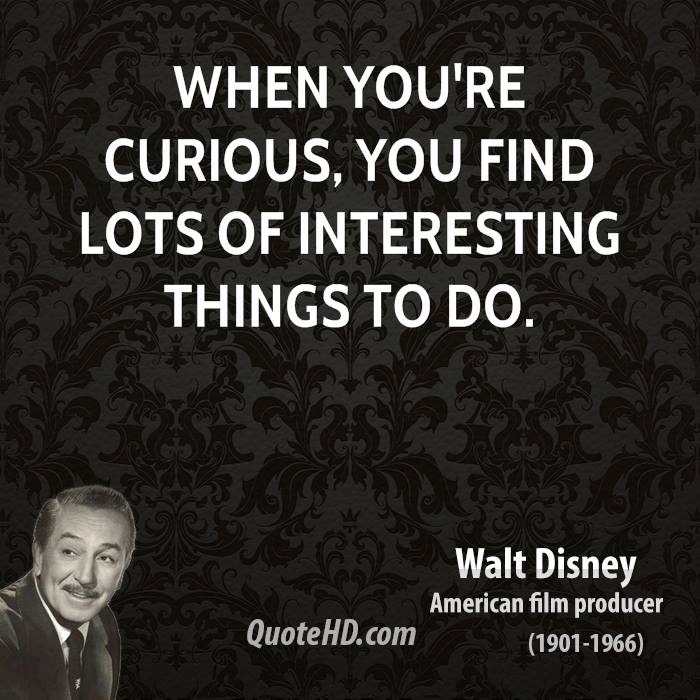
On the technology side I’ve been digging into Azure Infrastructure as a Service (IaaS) and given a number of internal and external presentations on this topic.  Additionally I’ve been following along the progression of PowerApps (read my Start Learning About PowerApps post here).  SharePoint 2016 will be releasing in 2016 and I’ve been lucky to have access to early bits to put them through their paces.  This is all part of my process to continue learning new things and also partially my natural desire to tinker with cool technology.  Walt Disney put it best when he said “[w]hen you’re curious, you find lots of interesting things to do.”

walt-disney-curious-quote


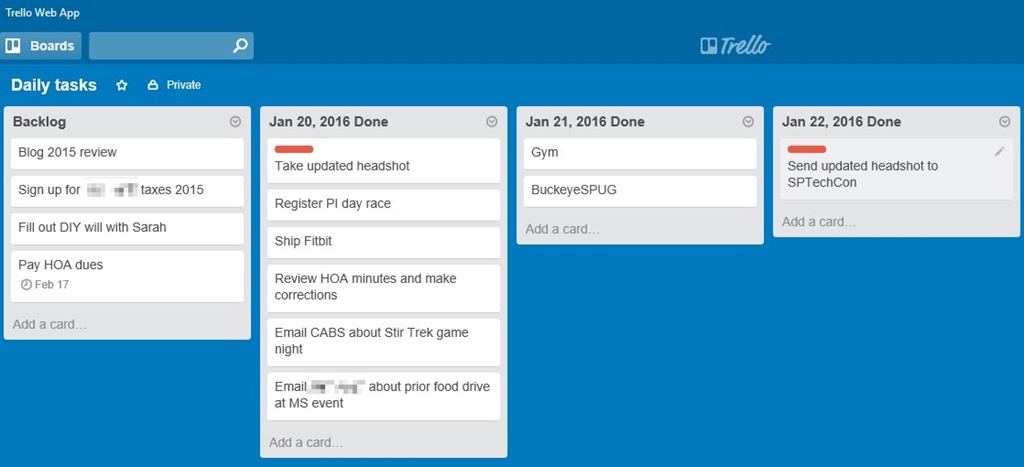
One side interest of mine has always been personal productivity and ways to track it.  Many systems exist such as Getting Things Done (which I’ve read David Allen’s book Getting Things Done a few years ago), Kanban, and more.  Recently I’ve taken up using Trello as my personal (non-work) task tracking system.  I like the concept of being able to create columns / lists for my daily tasks.  I have a backlog and 2-4 days (columns) of lists.  I move cards from my backlog to my daily column once they are completed.  I can quickly and easily archive a daily list to keep things tidy but also see prior days for a quick retrospective.  My target is to complete at least 2 tasks each day.  It is a work in progress but so far after 2+ weeks it is working better than any prior system I’ve tried.  See below for an example of my recent tasks.

TrelloBoard


Sharing Interests


Books

Over the past 6+ years I’ve started getting back into reading pretty heavily.  At first it started with audiobooks during the 30-45 min commute to various customers when I was a consultant with Sogeti.  I listened to some excellent audiobooks including The Lord of the Rings trilogy, the Asimov Robot series, and more.  I chose to get my audiobooks from the local library which while it had a number of excellent choices was still limited.

When I joined Microsoft I was traveling at least 2-5 times a month, usually driving or flying anywhere from 1-7 hours.  At this point my reading started shifting more towards physical books.  There is something about holding a physical book in your hands that resonates with me.  Perhaps it harkens back to my grade school days and summers reading.  Either way there are a number of used books stores and libraries that provide plenty of options.

A few of the recommendations from the last year or two:


Podcasts

During a summer vacation in 2009 (I distinctly remember the occasion) my oldest brother turned me on to a podcast called Stuff You Should Know.  I had started listening to audiobooks not too long before this so I was getting used to audio content but wasn’t fully ingrained in it as a medium.  Things changed after I started listening to this podcast.  Josh and Chuck (after a brief stint with a different starting duo) mix a blend of information, entertainment, inside jokes, and levity to a huge variety of topics (they have amassed over 700 episodes).  My wife also enjoys listening to them during car trips.

Over time I added other podcasts to during long drives, workouts, or relaxing at home.  Some podcasts haven’t kept my interest and I’ve stopped listening but these current shows are a mix of entertainment and technology information.


Conclusion

Hopefully by reading this retrospective and sharing of interests you are inspired to reflect on your own past year.  I find it invigorating and recharging looking back at the past year’s progress while looking forward to what can be accomplished the next year.  If you have any recommendations on books, podcasts, or other technology feel free to share.  Thanks for reading.


Note: Amazon links are referral links on my blog and go towards paying for hosting, domain registration, and writing this blog which is done on my own time.


-Frog Out

Start Learning About PowerApps

   In this post I’ll talk about PowerApps, a new enterprise service for building enterprise applications and share resources on where to find out more information.

   Note: PowerApps is currently in private preview and is subject to change after this article is posted.  As such this article may contain out of date information by the time you read this.  Additionally I am a Microsoft employee but the views and opinions expressed in this article are my own and not reflective of Microsoft or the PowerApps product group.


Background

   On Nov 30th, 2015 at the European Convergence conference Microsoft unveiled a new enterprise service for building enterprise applications called PowerApps.  At a high level PowerApps allows power users and developers to build scalable applications that connect to numerous services (Office 365, SalesForce, OneDrive, Dropbox, etc.) using PowerPoint and Excel-like tools to be consumed on Windows, iOS, and Android.  These applications can be built once and then consumed on any platform.  No need to re-compile, design separate UIs per platform, etc. like you see with the current state of most mobile or web development.


Components

   I’ll briefly walk through some of the highlights for different components or aspects of which to be aware.


Tools and client player

   Currently it is possible to create and consume PowerApps apps on Windows and iOS.  I can’t speak to the final plans but it is my understanding that it is on the roadmap to be able to create and consume on all platforms including Windows (PC and mobile), iOS, Android, and web.  You will not be limited to only consuming from the platform that you created on though.


Design language

   PowerApps is designed to be able to author apps using Excel and PowerPoint type skills.  There is no need to code your solution.  That said if you are a developer and wish to code backend interactions or create a custom API to connect to that is available (with the Enterprise plan, more on that below).


Connectors

   Out of the box PowerApps ships with a dozen or so connectors for pulling or pushing data to the following sources.  By configuring a connector to these services you can perform simple CRUD (create, read, update, and delete) operations on data in these sources.

  • Dropbox
  • Dynamics CRM Online
  • Google Drive
  • Microsoft Translator
  • Office 365 Outlook
  • Office 365 Users
  • OneDrive [consumer version]
  • Salesforce
  • SharePoint Online
  • Twitter

   Establishing a connection to these services is as simple as logging into the service.  Once you establish a connection it is persisted to the PowerApps cloud and will be available on any device that you log into your account.


Authentication

   Speaking of logging into accounts, authentication for PowerApps is handled by Azure Active Directory.  As such you will need to have an Azure Active Directory identity / domain in order to utilize PowerApps.  Thus you can view PowerApps as an enterprise solution more than a consumer solution even though you do have access to consumed focused connections (e.g. Twitter, OneDrive, etc.).


PowerFlows

   PowerFlows (also called Logic Flows) are still a work in progress but the goal is to provide simple yet robust workflows for data.  Think along the lines of If This Then That (IFTTT, www.ifttt.com) which is a popular website for connecting data from disparate sources and taking action when specific triggers are met.  Ex. when the forecast is predicting rain tomorrow send me a text message and put a calendar entry on my calendar to bring an umbrella to work.  IFTTT also integrates with home automation software, smartphone devices, design websites, and more.

   On the PowerFlows side you can define a triggers and then take actions based on that incoming trigger.  Ex. when a new tweet from Twitter contains specific data create a new entry in a SharePoint list, send me an email, and then create a case in Salesforce.  When used in conjunction with apps from PowerApps this can be a powerful complimentary toolset.


Sharing

   When it comes time to share your PowerApps app with others you can simply type in their email address and share it with them.  No need to worry about downloading the application, incompatibility of the OS, or other traditional blockers for enterprise applications.  In the enterprise plan it is possible to restrict access to the app so that only specific users are able to view and access your app.


Plans

   Speaking of plans there are 3 plan levels.  They are as follows.

  • Free – create and use unlimited apps, 2 connections to SaaS data per user, shared infrastructure
  • Standard – create and use unlimited apps, unlimited connections to SaaS data per user, shared infrastructure
  • Enterprise – create and use unlimited apps, unlimited connections to SaaS data per user, dedicated infrastructure, app governance, API management

   The last piece of the Enterprise plan is interesting to me.  This allows an organization to package up an API to line of business (LOB) or other data (i.e. SQL Server, on-prem SharePoint, etc.) and publish it to Azure.  That data source can then be consumed by PowerApps apps.


Sign up for preview

   PowerApps is currently in private preview but I encourage everyone to request an invite to gain access at the following URL.  Note that you may not be accepted in right away but you will be added to the list for future inclusion.


Request invite to PowerApps

https://powerapps.microsoft.com/en-us/signup/


Conclusion

   I am very excited to see PowerApps finally come to private preview.  I have been following Project Siena (precursor to PowerApps) for over a year now and tinkering around with the alpha and beta builds of both.  There is no release date yet for PowerApps but I encourage you and your organization to sign up for the preview and take a look at the videos and tutorials linked below.

   Lastly a few parting thoughts.  Think of all of the LOB apps that exist in your company or organizations and all of the time, effort, and money that goes into developers and / or designers creating and maintaining those applications.  Many of these applications are simple data entry, approval workflow, or similar type applications.  By exposing enterprise data in a structured and secure manner you can empower end users to create those types of applications much more quickly while freeing up resources and people for other business needs.


      -Frog Out


Additional Resources

Introducing Microsoft PowerApps
https://powerapps.microsoft.com/en-us/blog/introducing-microsoft-powerapps/

Microsoft PowerApps main site (and registration)
https://powerapps.microsoft.com/en-us/


Microsoft PowerApps tutorials

https://powerapps.microsoft.com/en-us/tutorials/


Microsoft PowerApps videos on Channel 9 

https://channel9.msdn.com/Events/Microsoft-Azure/PowerApps


Microsoft takes the wraps off PowerApps
http://www.zdnet.com/article/microsoft-takes-wraps-off-powerapps-mobile-app-creation-service/