Links for Getting Started with PowerShell for Office 365 and Exchange Online

   This past week I worked with some customers who were getting started with using PowerShell against Exchange Online as part of their new Office 365 solution.  As you may know Exchange is not my primary focus area but since these customers’ needs centered around PowerShell I thought this would be a good opportunity to learn more.  What soon became apparent to me was a few things:

  • The output / objects returned from Exchange Online vs. on-premises commandlets sometimes differ (mainly due to Exchange Online output needing to be serialized across the wire)
  • Some of the community scripts posted on TechNet Script Center or PoSH Code Repository that work for on-premises won’t work against Exchange Online due to the above
  • I went to multiple resources to get an introduction of using the Exchange Online commandlets


   In light of the last item I would like to share some resources I gathered for getting started with the Exchange Online commandlets.  I will address the first two items in a follow up post that shows one sample script that I helped a customer fix.


Links

Using PowerShell with Office365

http://blah.winsmarts.com/2011-4-Using_PowerShell_with_Office365.aspx


Administering Microsoft Office 365 using WIndows PowerShell

http://blog.powershell.no/2011/05/09/administering-microsoft-office-365-using-windows-powershell/


Reference to Available PowerShell Cmdlets in Exchange Online

http://help.outlook.com/en-us/140/dd575549.aspx


Windows PowerShell cmdlets for Office 365

http://onlinehelp.microsoft.com/en-us/office365-enterprises/hh125002.aspx


Role Based Access Control in Exchange Online

http://help.outlook.com/en-us/140/dd207274.aspx


Exchange Online and RBAC

http://blogs.technet.com/b/ilvancri/archive/2011/05/16/exchange-online-office365-and-rbac.aspx


Conclusion

   Office 365 is being integrated into more and more customers’ environments.  While your PowerShell skills can still be used to manage certain portions of Office 365 (Exchange Online as of the time of this writing) there are a few differences in how data is passed back and forth.  Hopefully the links above will get you started on scripting against  cloud based services.


      -Frog Out
Speaking at SPTechCon Boston 2012

   I will be speaking at SPTechCon Boston 2012.  This will be my 3rd time speaking at SPTechCon and 4th time attending.  The conference has steadily been growing over the past few years and is one of the biggest non-Microsoft run conferences for SharePoint in the US.  I’ll be presenting two topics which I have given before but this time around with some updated content.  Registration is currently open and you can save $200 (on top of the current early bird discount of $400) by using the code “JACKETT” during registration.  I highly recommend joining for valuable learning and networking.


Where: SPTechCon Boston 2012

Title: PowerShell for the SharePoint 2010 Developer

Audience and Level: Developer, Intermediate

Abstract: PowerShell is not just for SharePoint 2010 administrators. Developers also get access to a wide range of functionality with PowerShell. In this session we will dive into using PowerShell with the .Net framework, web services, and native SharePoint commandlets. We will also cover some of the more intermediate to advanced techniques available within PowerShell that will improve your work efficiency. Not only will you learn how to automate your work but also learn ways to prototype solutions faster. This session is targeted to developers and assumes a basic familiarity with PowerShell.

Slides and Code download: see this blog post


Title: Integrating Line-of-Business Applications with SharePoint 2010

Audience and Level: Developer, Intermediate

Abstract: One of the biggest value-adding enhancements in SharePoint 2010 is the Business Connectivity Services (BCS). In this session, we will overview the BCS, demonstrate connecting line-of-business applications and external systems to SharePoint through external content types, and walk through surfacing that data with external lists.
This session is targeted at developers. No prior experience with the BCS is required, but a basic understanding of SharePoint Designer 2010 and SharePoint solutions is suggested.

Slides and Code download: see this blog post


      -Frog Out

SharePoint 2007 Content Deployment Job Error “Specified argument was out of the range of valid values”

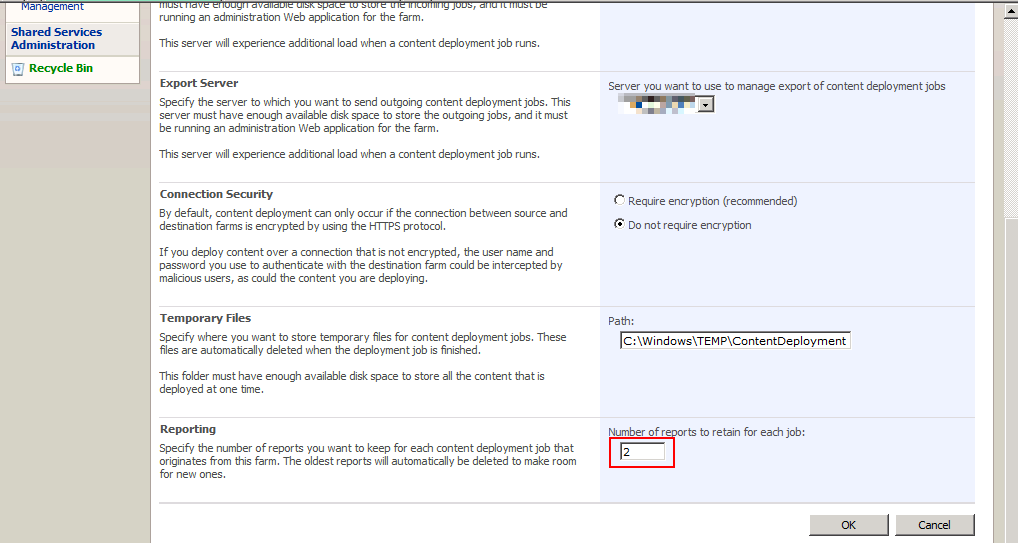
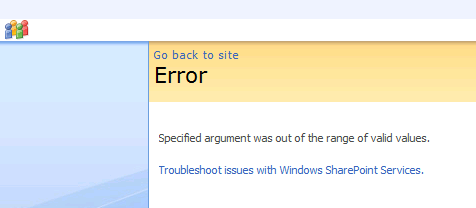
   This week I ran into an interesting error with a customer.  The customer has defined a SharePoint 2007 content deployment path to push content from one SharePoint 2007 farm to another SharePoint 2007 farm.  They can complete 1 full deploy and 1 incremental deploy, but then all incremental deploys error with the following message: “Specified argument was out of the range of valid values”.

ContentDeploymentFailure1r


Cause

   In order to get more insight into the error I used ULSViewer to inspect the ULS logs on the server (ULSViewer is not required to read the ULS logs, it just makes it easier to sort through them).  Looking at the selected log message there was an error when attempting to clean up the content deployment job reports list.

ContentDeploymentFailure2r


Solution

   The solution to this issue is fairly simple.  On the customer farm they had set the number of reports to keep at 1.  The default value is 20 but they had changed to 1 to conserve space which was limited on this server.  Apparently this caused an issue in which the timer job would error when attempting to clean up the reports list.  We changed the value to 2 and tried to re-run the job.  The job completed successfully for all that we tried.  Problem solved. ContentDeploymentFailure3r


SharePoint 2010 Consideration

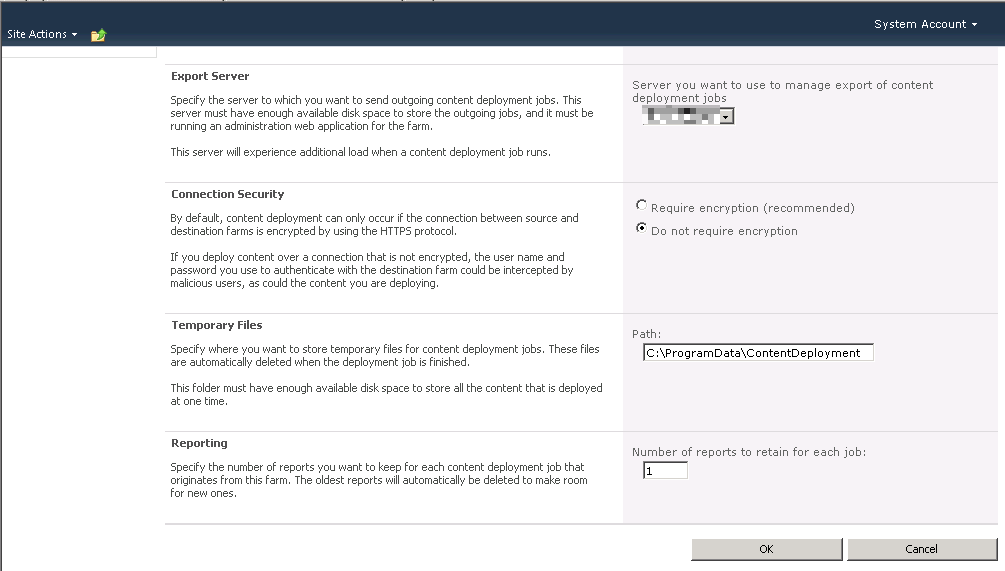
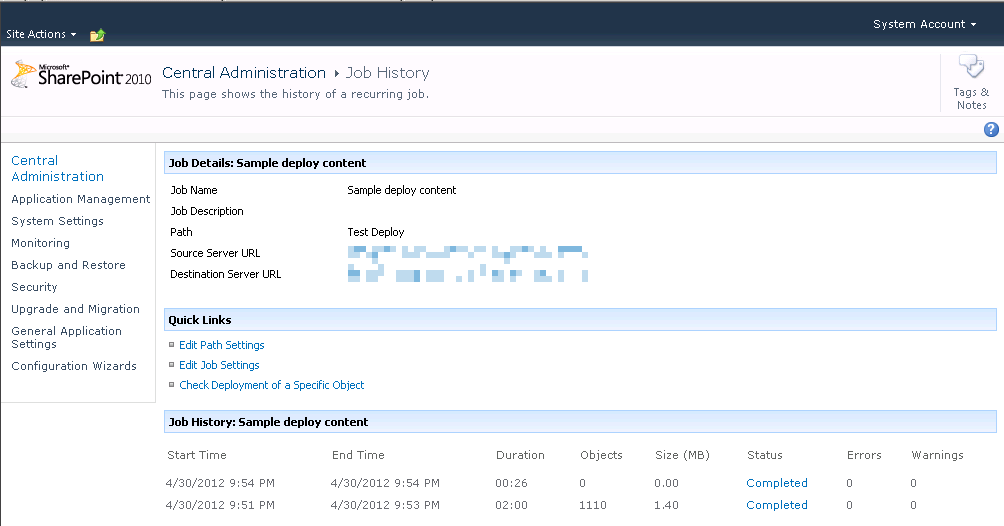
   After testing this out in SharePoint 2007 I decided to try this in SharePoint 2010.  Thankfully it appears this has been corrected in 2010.  I set the number of reports to 1 and was able to execute the job multiple times.

ContentDeploymentFailure5r


ContentDeploymentFailure4r


Conclusion

   If you are using content deployment jobs in SharePoint 2007 be sure that you set the number of reports to keep to a number greater than 1.  Apparently there is a issue with a value of 1 where the timer job cannot clean up the reports list due to an out of range exception.  This does not appear to be an issue in SharePoint 2010.


      -Frog Out

Slides and Pictures from PowerShell Saturday Columbus 2012

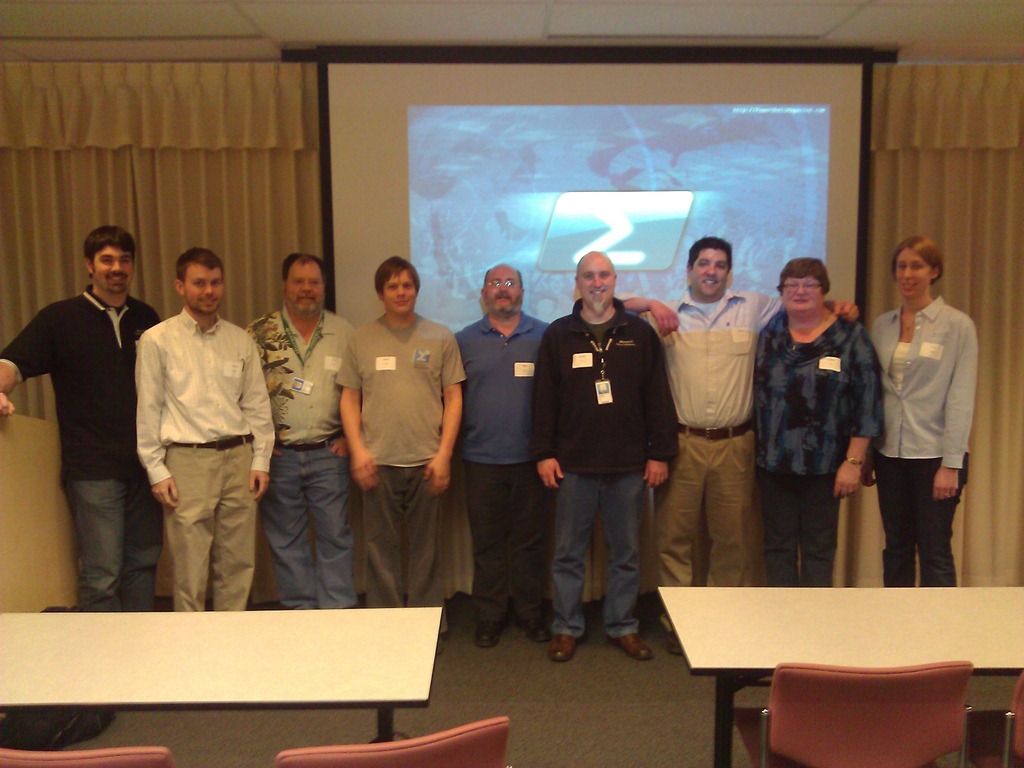
On March 10th, 2012 the first ever PowerShell Saturday conference took place in Columbus, OH and I couldn’t be happier with the outcome.  We had 100 attendees from 10 different states (the biggest surprise to me) come to see 6 speakers present on a variety of PowerShell topics: introduction, WMI, SharePoint, Active Directory, Exchange, 3rd party products and more.


WP_000158

A big thank you also goes out to a number of people.

Planning committee

Speakers

Volunteer

  • Lisa Gardner, fellow Microsoft PFE volunteered her time on a Saturday to assist with smooth operation of the day

Facility Coordination

  • Debbie Carrier, facilities coordinator for the Columbus Microsoft Office and helped us out greatly with the venue


Slides and Script Samples

I presented my session on “PowerShell for the SharePoint 2010 Developer”.  Below you can download the slides and script samples.


Photos

I wasn’t able to take took many pictures (only 3) as I was busy doing my presentation, answering questions, and taking care of random items throughout the day.


Pictures on Facebook

click here

Pictures on SkyDrive (higher res)

Conclusion

I’m very happy that this first ever PowerShell Saturday was a success.  My fellow PFE and speaker Ashley McGlone also has a short write-up on his blog about the event (click here).  I have heard rumors that there are other cities starting to plan their own local events.  When I hear more details I’ll spread the word here and on Twitter.


-Frog Out

Speaking at SharePoint Cincy and SharePoint Saturday Twin Cities

I have a few conferences I’ll be speaking at in the next few weeks.  The first is SharePoint Cincy in Cincinnati, OH on Friday March 16th.  The other is SharePoint Saturday Twin Cities in Minneapolis, MN on April 14th.  Below are the details for each.  Assuming copies of my book arrive in time for either conference I’ll be giving away a book or two and signing them.  Stop by and see me if you’ll be attending either conference.


Sessions

SharePointCincy2012

Where: SharePoint Cincy 2012

Title: PowerShell for the SharePoint 2010 Developer

Audience and Level: Developer, Intermediate

Abstract: PowerShell is not just for SharePoint 2010 administrators. Developers also get access to a wide range of functionality with PowerShell. In this session we will dive into using PowerShell with the .Net framework, web services, and native SharePoint commandlets. We will also cover some of the more intermediate to advanced techniques available within PowerShell that will improve your work efficiency. Not only will you learn how to automate your work but also learn ways to prototype solutions faster. This session is targeted to developers and assumes a basic familiarity with PowerShell.

Slides and Code download:


2012_SPSTwinCities_Logo_300

Where: SharePoint Saturday Twin Cities 2012

Title: SharePoint 2010 and Integrating Line of Business Applications

Audience and Level: Developer, Intermediate

Abstract: PowerShell is not just for SharePoint 2010 administrators. Developers also get access to a wide range of functionality with PowerShell. In this session we will dive into using PowerShell with the .Net framework, web services, and native SharePoint commandlets. We will also cover some of the more intermediate to advanced techniques available within PowerShell that will improve your work efficiency. Not only will you learn how to automate your work but also learn ways to prototype solutions faster. This session is targeted to developers and assumes a basic familiarity with PowerShell.

Slides and Code download:


-Frog Out

My First Published Book Is Out

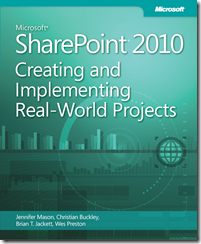
BookCover

   Wow, today is an exciting day for me: I’m officially an author of a published book.  The book is titled Microsoft SharePoint 2010: Creating and Implementing Real-World Projects.  Here is the blurb from the back cover:

Build effective solutions for real-world business scenarios—using out-of-the-box tools in Microsoft SharePoint Server, SharePoint Foundation, and Office 365.  Each chapter in this hands-on book focuses on a single business project, using a standard approach to guide you through the solution-building process from start to finish.  Apply your skills as a SharePoint power user or site administrator—and get started now.

The book is the result of numerous hours of effort and dedication with my great co-authors Jennifer Mason, Wes Preston, and Christian Buckley along with our publisher Microsoft Press.  You can purchase it on O’Reilly and Amazon as well as other retailers that are stocking it.  There are both eBook and print versions available to suit your reading preference.  I’m starting to hear of people receiving their copies of their book and I’m looking forward to hearing any feedback you have on the book.  If / when you pick up a copy please leave some comments or drop me a line.  We’ll be doing book signings at various events so look out for a chance to get a signed copy.


-Frog Out