<Update: 2015-06-15> My colleague Joe Rodgers pointed out that the below steps do not work in SharePoint 2013 style workflows. As it turns out there was an issue with the link that was generated for the “Workflow Context: Current Item Url”. This issue is addressed in the SharePoint 2013 June 2014 CU (requires Service Pack 1 or the March 2013 PU). See below for more details.
</Update>
In this post I’ll walk you through the process of sending an email that contains a link to the current item from a SharePoint Designer 2010 workflow. This is a process that has been published on many other forums and blogs, but many that I have seen are more complex than seems necessary.
Problem
A common request from SharePoint users is to get an email which contains a link to review/approve/edit the workflow item. SharePoint list items contain an automatic property for Url Path, but unfortunately that Url is not properly formatted to retrieve the item if you include it directly on the message body. I tried a few solutions suggested from other blogs or forums that took a substring of the Url Path property, concatenated the display form view Url, and mixed in some other strings. While I was able to get this working in some scenarios I still had issues in general.
Solution
My solution involved adding a hyperlink to the message body. This ended up being far easier than I had expected and fairly intuitive once I found the correct property to use. Follow these steps to see what I did.
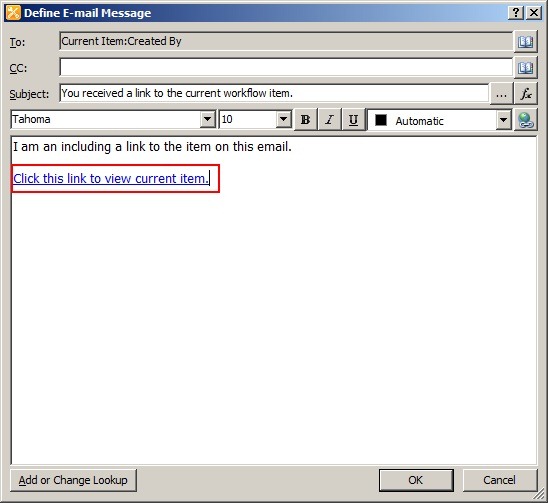
First add a “Send an Email” action to your workflow. Edit the action to pull up the email configuration dialog. Click the “Add hyperlink” button seen below.

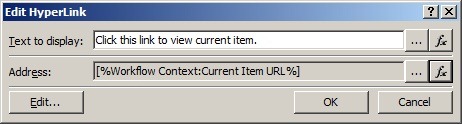
When prompted for the address of the link click the fx button to perform a lookup. Choose Workflow Context from the “data source” dropdown. Choose Current Item URL from the “field from source” dropdown. Click OK.

Your Edit Hyperlink dialog should now look something like this.
The end result will be a hyperlink added to your email pointing to the current workflow item. Note: this link points to the non-modal dialog display form (display form similar to what you had in 2007).
SharePoint 2013 Considerations (update 2015-06-15)
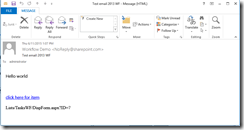
If you attempt to use this process for SharePoint 2013 style workflows (based on Workflow Manager and not the out of the box SharePoint 2010 workflow engine) you will notice that the URL generated is incorrect (ex. “Lists/MyList/1_.00”). It will look something like the following.
![EmailLinkWFItem2013_3_thumb[1]](https://btjblogstorage.blob.core.windows.net/bjackett/SharePoint-Designer-2010-Workflow-Email-_A65C/EmailLinkWFItem2013_3_thumb%5B1%5D_2.png "EmailLinkWFItem2013_3_thumb[1]")
The solution to this is to install the SharePoint 2013 June 2014 CU (I tested with the Server package but it may be included in the Foundation package as well). After you install this cumulative update you may notice that the URL generated only includes from the list level and down (ex. “LIsts/MyList/DispForm.aspx?ID=1). As such you will need to combine this with the site URL. See below for example of the new URL that is generated.
Conclusion
In this post I walked you through the steps to create a SharePoint Designer 2010 workflow with an email that contains a link to the current item. While there are many other options for accomplishing this out on the web I found this to be a more concise process and easy to understand. Hopefully you found this helpful as well. Feel free to leave any comments or feedback if you’ve found other ways that were helpful to you.
-Frog Out
 The Frog Pond of Technology
Originally posted on: https://briantjackett.com/archive/2011/02/18/sharepoint-designer-2010-email-link-to-item.aspx#615114Thanks so much for this, it has been so helpful – I was able to build a workflow email in Designer to take the emai lrecipient to a discussion needing managerial attention. Wondering if you can tell me how to link to a threaded view of a discussion item instead of the original view of the discussion? In that way the manager will see all the replies and not just the original posted discussion. Thanks!
LikeLike
Originally posted on: https://briantjackett.com/archive/2011/02/18/sharepoint-designer-2010-email-link-to-item.aspx#615394HiThis is working fine in MS Outlook but not in Lotus Notes if the URL is having spaces. Because of the Spaces in the URL, the hyperlink is wrongly formatted without space. Please help.
LikeLike
Originally posted on: https://briantjackett.com/archive/2011/02/18/sharepoint-designer-2010-email-link-to-item.aspx#615767BeI don’t see the subsite name as a field you can choose. A few options. You could name the list after the subsite (ex. “Subsite A Expense Reports”) and then include the list name in email. Also could grab the URL and parse out the site url from that (assuming url and title are similar enough). Other than that don’t know what you could bind to.Jennifer,I haven’t tested this much with discussion lists. The problem is that they don’t follow the convention of using IDs in the URL but instead FolderIDs. You want to use the Threaded.aspx page but I’m unsure how to retrieve the folder ID using SharePoint Designer.Kiran,I recommend users to build lists, sites, etc. with no spaces in the names. Afterwards rename the title to include spaces. This (usually) helps avoid issues like you are experiencing but also helps developers with the underlying naming they need to use.
LikeLike
Originally posted on: https://briantjackett.com/archive/2011/02/18/sharepoint-designer-2010-email-link-to-item.aspx#616003Hi, can somebode help me find a way to put a link of current item doc library? It is dynamicly created as my workflow is reusable one used all over the site collection with 50+ sites..Thanks!
LikeLike
Originally posted on: https://briantjackett.com/archive/2011/02/18/sharepoint-designer-2010-email-link-to-item.aspx#616218Haze, I’m not sure what you are asking for. Can you be more specific?
LikeLike
Originally posted on: https://briantjackett.com/archive/2011/02/18/sharepoint-designer-2010-email-link-to-item.aspx#616562Realy Thank you , finally it works
LikeLike
Originally posted on: https://briantjackett.com/archive/2011/02/18/sharepoint-designer-2010-email-link-to-item.aspx#618104Thank you so much for posting this!!
LikeLike
Originally posted on: https://briantjackett.com/archive/2011/02/18/sharepoint-designer-2010-email-link-to-item.aspx#618240When I use the method above it takes me to the dispform instead of the edit. I have created 3 forms in infopath 2010. It uses the form but always comes up in display mode when the user clicks on the hyperlink . . . how do I get it to use the editform instead. Thanks for your help.
LikeLike
Originally posted on: https://briantjackett.com/archive/2011/02/18/sharepoint-designer-2010-email-link-to-item.aspx#618315Dan, The method I described above only takes you to the default display form. To get to a different form you would need to use something like a Visual Studio workflow action that is usable in SharePoint designer or manually build the URL string in your SharePoint designer workflow.
LikeLike
Originally posted on: https://briantjackett.com/archive/2011/02/18/sharepoint-designer-2010-email-link-to-item.aspx#619407Thank you! I have been looking for a way to do this off and on for the past Month.
LikeLike
Originally posted on: https://briantjackett.com/archive/2011/02/18/sharepoint-designer-2010-email-link-to-item.aspx#619497Very helpful.Can i ask you a another sharepoint question?I am trying to create a reuseable workflow that when you select the “current item” the name column is available? It the name column exists when i create a list workflow but not reuseable workflow. It allows me to select the title field but we don’t fill in that field. I need to get the name of the current item essentially.
LikeLike
Originally posted on: https://briantjackett.com/archive/2011/02/18/sharepoint-designer-2010-email-link-to-item.aspx#619809Hanna,When you use a reusable workflow SharePoint Designer is associating it to a content type of sorts, not to the list specifically, so you won’t see all of the columns. If you use a list workflow you are associating directly to the list so you have access to all of the columns. If you are not using the Title field for other purposes you could rename the Title column to Name and work with it in a reusable workflow.
LikeLike
Originally posted on: https://briantjackett.com/archive/2011/02/18/sharepoint-designer-2010-email-link-to-item.aspx#620016I am trying to create a workflow that send an email to “attendees” once a room reservation has been created and has them lissted as attendees. The problem is the [%Current Item:Resources%] returns a “#,” along with the resource name. Any Ideas?
LikeLike
Originally posted on: https://briantjackett.com/archive/2011/02/18/sharepoint-designer-2010-email-link-to-item.aspx#620081Dana, I have not seen that where the column value returns a # symbol. What type of column is it (person, string, etc.)? Does the column allow multiple items?
LikeLike
Originally posted on: https://briantjackett.com/archive/2011/02/18/sharepoint-designer-2010-email-link-to-item.aspx#622240I have spend countless hours in both 2007 and 2010 Sharepoint workflow trying to combine a hard coded text url srting with a “current item” workflow value and have the whole string be a hotlink. This, at least for 2010 Sharepoint, has solved my issue. Thanks so much for opening my eyes to a solution that was right in front of my face.
LikeLike
Originally posted on: https://briantjackett.com/archive/2011/02/18/sharepoint-designer-2010-email-link-to-item.aspx#622423Genius! I’ve been creating long complicated field entries with mixed success. Such a simple and effective solution – thank you very much!
LikeLike
Originally posted on: https://briantjackett.com/archive/2011/02/18/sharepoint-designer-2010-email-link-to-item.aspx#622702I was looking for a way I used in SP2007 SP designer where you find the URL’s ID and paste it into the email body. This created a long link the person can click on to take him to the item. Your solution is a big improvement. Thanks for your post!!!!
LikeLike
Originally posted on: https://briantjackett.com/archive/2011/02/18/sharepoint-designer-2010-email-link-to-item.aspx#626044Thanks for the tip! I’m a beginner to Sharepoint, so this whole “Workflow Context” just opened a door into another dimension for me.
LikeLike
Originally posted on: https://briantjackett.com/archive/2011/02/18/sharepoint-designer-2010-email-link-to-item.aspx#626310Your Solution worked beautifully. Thanks for that.
LikeLike
Originally posted on: https://briantjackett.com/archive/2011/02/18/sharepoint-designer-2010-email-link-to-item.aspx#626802Thank you for excellent solution! It saves me hours of development.
LikeLike
Originally posted on: https://briantjackett.com/archive/2011/02/18/sharepoint-designer-2010-email-link-to-item.aspx#628364Thanks Brian, your post was a big help and exactly the help I needed.
LikeLike
Originally posted on: https://briantjackett.com/archive/2011/02/18/sharepoint-designer-2010-email-link-to-item.aspx#628371i get a wierd result. in the resultant email, the link repeats itself, with a comma between the urls. like this “myurl.com, myurl.com”. has anyone seen this?
LikeLike
Originally posted on: https://briantjackett.com/archive/2011/02/18/sharepoint-designer-2010-email-link-to-item.aspx#628630Fantastic! Great work Brian.
LikeLike
Originally posted on: https://briantjackett.com/archive/2011/02/18/sharepoint-designer-2010-email-link-to-item.aspx#630272Thank god I found you.Fantastic post ! Thank you
LikeLike
Originally posted on: https://briantjackett.com/archive/2011/02/18/sharepoint-designer-2010-email-link-to-item.aspx#630385Thank you so much! It makes 2 weeks that I couldn’t resolve this damn bug!!!
LikeLike
Originally posted on: https://briantjackett.com/archive/2011/02/18/sharepoint-designer-2010-email-link-to-item.aspx#630386I can make a woring link, however, i still can’t show properties (names, IDs…) inside the mail.
LikeLike
Originally posted on: https://briantjackett.com/archive/2011/02/18/sharepoint-designer-2010-email-link-to-item.aspx#630400Great post Brian. Very helpful.
LikeLike
Originally posted on: https://briantjackett.com/archive/2011/02/18/sharepoint-designer-2010-email-link-to-item.aspx#630462Theodiablo, Glad you got a working link. To include other properties from the workflow item you may need to link to the list via the ID of the current item. From there you can then select properties from that list to display.
LikeLike
Originally posted on: https://briantjackett.com/archive/2011/02/18/sharepoint-designer-2010-email-link-to-item.aspx#630630I did exactly what was stated and it just wouldn’t work. I messed with it and came up with a different solution.a. Upload document to document library in SharePointb. Click the “Edit HyperLink”c. Text to Display: Enter Title of document you are creating the link for.d.Press EDIT to search for the folder where the document is.e. Double click the Folder and select the document. f. Address will now be populated with the URL to the document. [OK]g. The link is now in the email. h. Check for ERRORS and PUBLISH.i. Test
LikeLike
Originally posted on: https://briantjackett.com/archive/2011/02/18/sharepoint-designer-2010-email-link-to-item.aspx#630760Smyardo, Glad you were able to get something working, even if not the steps I walked through.
LikeLike
Originally posted on: https://briantjackett.com/archive/2011/02/18/sharepoint-designer-2010-email-link-to-item.aspx#631276Excellent post…Just what I was looking for and it works like a charm plus simple. You Da Mon!
LikeLike
Originally posted on: https://briantjackett.com/archive/2011/02/18/sharepoint-designer-2010-email-link-to-item.aspx#632266Great Post – wondering if you knew of a way to either get the name of an attachment that was just uploaded or email a link to it? Thanks in advance for your time.
LikeLike
Originally posted on: https://briantjackett.com/archive/2011/02/18/sharepoint-designer-2010-email-link-to-item.aspx#632381Robin,You should be able to do a reference “Current Item” or reference the list you are working with via its ID and then grab any info or columns that you want from there. Let me know if you need more details.
LikeLike
Originally posted on: https://briantjackett.com/archive/2011/02/18/sharepoint-designer-2010-email-link-to-item.aspx#632642Thanks for this “tutorial”. You revealed two really obvious items that I had not seen previously and they solved my problem of getting a link to be a link.One change I did make is NOT selecting Current Item URL because when I used that to open my newly posted document InfoPath was opened on my local machine to display the document. So instead I entered the URL of the top level of the library in the Address field where the new document was posted. This opened SharePoint right at the library and the new document was only a double-click away.Thanks again. Your “tutorial” works where several others only almost work.
LikeLike
Originally posted on: https://briantjackett.com/archive/2011/02/18/sharepoint-designer-2010-email-link-to-item.aspx#632825Robert,Glad to be of assistance on this. Yes working with InfoPath forms adds a little extra layer of complexity, especially when trying to figure out in browser vs. client rendering.
LikeLike
Originally posted on: https://briantjackett.com/archive/2011/02/18/sharepoint-designer-2010-email-link-to-item.aspx#633424Hi, I’ve got the url working nicely in my workflow generated email however I’m wondering if it’s possible to actually send say a pdf document instead of a link in the email?thanks
LikeLike
Originally posted on: https://briantjackett.com/archive/2011/02/18/sharepoint-designer-2010-email-link-to-item.aspx#633646Ritchie,Unfortunately no it is not possible to send an attachment using the methods I showed above. I’m not aware of anything by using out of the box or SharePoint Designer workflows.
LikeLike
Originally posted on: https://briantjackett.com/archive/2011/02/18/sharepoint-designer-2010-email-link-to-item.aspx#634051PERFECT, thanks so much for your clear and easy to follow directions. This was EXACTLY what I needed!!
LikeLike
Originally posted on: https://briantjackett.com/archive/2011/02/18/sharepoint-designer-2010-email-link-to-item.aspx#635595Thank you! So glad to get the help on this one!
LikeLike
Originally posted on: https://briantjackett.com/archive/2011/02/18/sharepoint-designer-2010-email-link-to-item.aspx#636618Genius! thanks so much for posting
LikeLike
Originally posted on: https://briantjackett.com/archive/2011/02/18/sharepoint-designer-2010-email-link-to-item.aspx#636724thank you very muchCan I add something like to let open in an edit mode & not display more
LikeLike
Originally posted on: https://briantjackett.com/archive/2011/02/18/sharepoint-designer-2010-email-link-to-item.aspx#636780Jinane, Please see some of the above comments that discuss sending a link to the Edit form. I am not aware of a way to do this with SharePoint Designer (without hand creating the URL). The other option is using a Visual Studio workflow and using lookups to pull the edit form URL.
LikeLike
Originally posted on: https://briantjackett.com/archive/2011/02/18/sharepoint-designer-2010-email-link-to-item.aspx#636797I was able to add the Workflow Context:Current Item URL, but it still references the Default zone URL, whereas the user is initiating the WF from the Extranet zone, and expects to see the Extranet URL in the workflow notification e-mail.
LikeLike
Originally posted on: https://briantjackett.com/archive/2011/02/18/sharepoint-designer-2010-email-link-to-item.aspx#638907Great Post – thank you!
LikeLike
Originally posted on: https://briantjackett.com/archive/2011/02/18/sharepoint-designer-2010-email-link-to-item.aspx#639614VK, If you need to have a different URL than the default zone you’ll have to build that yourself through custom code or some other means.
LikeLike
Originally posted on: https://briantjackett.com/archive/2011/02/18/sharepoint-designer-2010-email-link-to-item.aspx#641504Thank you for this guide. Untill now I completely ignored the group Workflow Content. Thanks
LikeLike
Originally posted on: https://briantjackett.com/archive/2011/02/18/sharepoint-designer-2010-email-link-to-item.aspx#643248Fantastic!I was struggling and searching in vain :(This the best working solution I ever found!Thanks a lot!
LikeLike
Originally posted on: https://briantjackett.com/archive/2011/02/18/sharepoint-designer-2010-email-link-to-item.aspx#643628Thanks, that worked a treat
LikeLike
Originally posted on: https://briantjackett.com/archive/2011/02/18/sharepoint-designer-2010-email-link-to-item.aspx#644255Thanks so much… this is exactly what I needed!
LikeLike
Originally posted on: https://briantjackett.com/archive/2011/02/18/sharepoint-designer-2010-email-link-to-item.aspx#644361Really useful. Thanks!
LikeLike