<Update: 2015-06-15> My colleague Joe Rodgers pointed out that the below steps do not work in SharePoint 2013 style workflows. As it turns out there was an issue with the link that was generated for the “Workflow Context: Current Item Url”. This issue is addressed in the SharePoint 2013 June 2014 CU (requires Service Pack 1 or the March 2013 PU). See below for more details.
</Update>
In this post I’ll walk you through the process of sending an email that contains a link to the current item from a SharePoint Designer 2010 workflow. This is a process that has been published on many other forums and blogs, but many that I have seen are more complex than seems necessary.
Problem
A common request from SharePoint users is to get an email which contains a link to review/approve/edit the workflow item. SharePoint list items contain an automatic property for Url Path, but unfortunately that Url is not properly formatted to retrieve the item if you include it directly on the message body. I tried a few solutions suggested from other blogs or forums that took a substring of the Url Path property, concatenated the display form view Url, and mixed in some other strings. While I was able to get this working in some scenarios I still had issues in general.
Solution
My solution involved adding a hyperlink to the message body. This ended up being far easier than I had expected and fairly intuitive once I found the correct property to use. Follow these steps to see what I did.
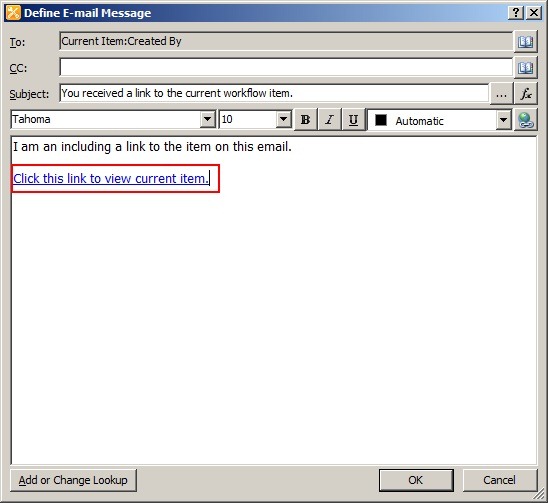
First add a “Send an Email” action to your workflow. Edit the action to pull up the email configuration dialog. Click the “Add hyperlink” button seen below.

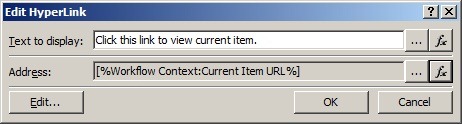
When prompted for the address of the link click the fx button to perform a lookup. Choose Workflow Context from the “data source” dropdown. Choose Current Item URL from the “field from source” dropdown. Click OK.

Your Edit Hyperlink dialog should now look something like this.
The end result will be a hyperlink added to your email pointing to the current workflow item. Note: this link points to the non-modal dialog display form (display form similar to what you had in 2007).
SharePoint 2013 Considerations (update 2015-06-15)
If you attempt to use this process for SharePoint 2013 style workflows (based on Workflow Manager and not the out of the box SharePoint 2010 workflow engine) you will notice that the URL generated is incorrect (ex. “Lists/MyList/1_.00”). It will look something like the following.
![EmailLinkWFItem2013_3_thumb[1]](https://btjblogstorage.blob.core.windows.net/bjackett/SharePoint-Designer-2010-Workflow-Email-_A65C/EmailLinkWFItem2013_3_thumb%5B1%5D_2.png "EmailLinkWFItem2013_3_thumb[1]")
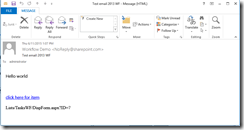
The solution to this is to install the SharePoint 2013 June 2014 CU (I tested with the Server package but it may be included in the Foundation package as well). After you install this cumulative update you may notice that the URL generated only includes from the list level and down (ex. “LIsts/MyList/DispForm.aspx?ID=1). As such you will need to combine this with the site URL. See below for example of the new URL that is generated.
Conclusion
In this post I walked you through the steps to create a SharePoint Designer 2010 workflow with an email that contains a link to the current item. While there are many other options for accomplishing this out on the web I found this to be a more concise process and easy to understand. Hopefully you found this helpful as well. Feel free to leave any comments or feedback if you’ve found other ways that were helpful to you.
-Frog Out
 The Frog Pond of Technology
Originally posted on: https://briantjackett.com/archive/2011/02/18/sharepoint-designer-2010-email-link-to-item.aspx#575936I was stuck for hours on “CurrentItem” then I found this entry and thanks to you now I know it should be “WorkflowContext” :)Thanks!
LikeLike
Originally posted on: https://briantjackett.com/archive/2011/02/18/sharepoint-designer-2010-email-link-to-item.aspx#576035Jed, I ran into the same issue at first. Glad to help you out.
LikeLike
Originally posted on: https://briantjackett.com/archive/2011/02/18/sharepoint-designer-2010-email-link-to-item.aspx#576427in SP 2010 WF do you know the syntax to add a link that would be UrL/Forms/EditForm.aspx?ID= Current list – ID&(Current List ) Source ( http etc)&( Current List) ContentTypeId I do not know how to add the &s in using the auto link selection.
LikeLike
Originally posted on: https://briantjackett.com/archive/2011/02/18/sharepoint-designer-2010-email-link-to-item.aspx#578592How do you do this in SPD 2007? There is no option to add a linkis there another way to do this?
LikeLike
Originally posted on: https://briantjackett.com/archive/2011/02/18/sharepoint-designer-2010-email-link-to-item.aspx#579172Saud, Since there is no action to “add a link” in SPD 2007 you may want to try building the hyperlink () as a dynamic string and insert that into the body of the email. I haven’t gotten a chance to try this myself, but let me know if that works for you.
LikeLike
Originally posted on: https://briantjackett.com/archive/2011/02/18/sharepoint-designer-2010-email-link-to-item.aspx#584021Thanks Heaps, works brilliantly!!
LikeLike
Originally posted on: https://briantjackett.com/archive/2011/02/18/sharepoint-designer-2010-email-link-to-item.aspx#589025Thank you for the tip. It saved my day. 🙂
LikeLike
Originally posted on: https://briantjackett.com/archive/2011/02/18/sharepoint-designer-2010-email-link-to-item.aspx#590796Waht if you wanted to add a link in the body to a item on another list, just not the current list? Ideas
LikeLike
Originally posted on: https://briantjackett.com/archive/2011/02/18/sharepoint-designer-2010-email-link-to-item.aspx#590803Thanx for the tip! The URL is placed as expected … One question/issue…. The List Name has a space in it .. “Trouble Ticket”When the URL is put into the email, the space breaks up the hyperlink of the URL and breaks it … No %20 is placed in the link name to account for the space…Any way around this? Jeff
LikeLike
Originally posted on: https://briantjackett.com/archive/2011/02/18/sharepoint-designer-2010-email-link-to-item.aspx#591816Poled,If you want to use another list you will lose the “Current Item URL” context. Instead you will need to build the URL manually / semi-manually. Read through this forum post for help on how to do that.http://social.msdn.microsoft.com/Forums/en-US/sharepointworkflow/thread/333909e5-da8f-4d91-adb1-02a525553a0e
LikeLike
Originally posted on: https://briantjackett.com/archive/2011/02/18/sharepoint-designer-2010-email-link-to-item.aspx#591818Jeff, Did you change the name/URL of your list after creation? I created a sample list with spaces in the name, sent an email with link to that list, and got the proper “%20” to replace the spaces. Clicking the link successfully brought me to the item.
LikeLike
Originally posted on: https://briantjackett.com/archive/2011/02/18/sharepoint-designer-2010-email-link-to-item.aspx#594395Worked great! Saved me lots of time trying to figure this out on my own…. Thanks!!!!
LikeLike
Originally posted on: https://briantjackett.com/archive/2011/02/18/sharepoint-designer-2010-email-link-to-item.aspx#595430Nice work ..Its working perfectely in SP 2010.
LikeLike
Originally posted on: https://briantjackett.com/archive/2011/02/18/sharepoint-designer-2010-email-link-to-item.aspx#595637What if the ID you are trying to retrieve is from the task list? I have a workflow that is attached to a form library. When a form is submitted to the library it kicks off a task item. I want to include a URL to that task item in the email that is sent out in the form library workflow. All the blogs and suggestions I have read is based on the workflow running on the Task List, so the ID lookup is automatically inherited. Do you know how to get the ID in my situation? I have been hitting my head on the wall about how to get this done. Also, a concern that i have is that even if I get it done, will there be a sychronization issue since I notice the workflow fires of the email immediately even before the task item is created?Thanks,
LikeLike
Originally posted on: https://briantjackett.com/archive/2011/02/18/sharepoint-designer-2010-email-link-to-item.aspx#595941Arnel,You could create 2 workflows. The first workflow runs on your form list and creates an item in the tasks list. The second workflow could then run on the tasks list when an item is created. The task list workflow would use the emailing functionality described in this post to send out a URL to the task item. This should also take care of the issue with the task item existing before sending an email.
LikeLike
Originally posted on: https://briantjackett.com/archive/2011/02/18/sharepoint-designer-2010-email-link-to-item.aspx#596012Thx a lot. Your post saved me loads ot time.Works great.
LikeLike
Originally posted on: https://briantjackett.com/archive/2011/02/18/sharepoint-designer-2010-email-link-to-item.aspx#596218Thanks dude…Good post!!!
LikeLike
Originally posted on: https://briantjackett.com/archive/2011/02/18/sharepoint-designer-2010-email-link-to-item.aspx#596526That’s ace! Is there anyway of including a ‘preview’ of the current item in the message body
LikeLike
Originally posted on: https://briantjackett.com/archive/2011/02/18/sharepoint-designer-2010-email-link-to-item.aspx#596559Rooey,Depending on the content type you are working with you should be able to include a “preview”. In the case of an item on a custom list you can include a lookup to the title field and perform a substring on it for the first X number of characters.
LikeLike
Originally posted on: https://briantjackett.com/archive/2011/02/18/sharepoint-designer-2010-email-link-to-item.aspx#596783Do you know of any way to make the link use the modal popup version of the form?I also notice that when you select “Close” at the bottom of the item after following the link, you automatically go to the “All Items” view of the list the item came from. Any idea how to make it go to one of the other created views instead? Is it simply whichever view is set as the default view?
LikeLike
Originally posted on: https://briantjackett.com/archive/2011/02/18/sharepoint-designer-2010-email-link-to-item.aspx#596788Nathan,I do not know of a way off the top of my head to send the modal popup version of the link. There may be one but you’d have to do some research. If you find a way please share.As for the All Items display I assume that is because it is the default.
LikeLike
Originally posted on: https://briantjackett.com/archive/2011/02/18/sharepoint-designer-2010-email-link-to-item.aspx#597906Hey thanks for the tip.Now i am stoned. I need to add an image into the email that the workflow is generating and sending as part of the notification process.I have tried using the Advanced Features of “Send An Email” action to embed the image source in Sharepoint Designer 2010 all to no avail.Any help as to how I could achieve that?
LikeLike
Originally posted on: https://briantjackett.com/archive/2011/02/18/sharepoint-designer-2010-email-link-to-item.aspx#598411Nonso,I’m not aware of any functionality to send an image in the email. Sorry I can’t be of more help.
LikeLike
Originally posted on: https://briantjackett.com/archive/2011/02/18/sharepoint-designer-2010-email-link-to-item.aspx#599618How do I open the form in a browser on an email approval workflow? The link below requires InfoPath 2010 to review the form before approving.
LikeLike
Originally posted on: https://briantjackett.com/archive/2011/02/18/sharepoint-designer-2010-email-link-to-item.aspx#599756Martin,The instructions I posted were tested against a custom list. Did you implement yours on a forms library? Sounds to me like what you are seeing. In order to view forms through the browser you must have SharePoint Enterprise and configure InfoPath Forms Server service running. Also your form must be browser enabled. Let me know if that is not the case.
LikeLike
Originally posted on: https://briantjackett.com/archive/2011/02/18/sharepoint-designer-2010-email-link-to-item.aspx#600921nice article
LikeLike
Originally posted on: https://briantjackett.com/archive/2011/02/18/sharepoint-designer-2010-email-link-to-item.aspx#603587You’ve saved me much time and aggrivation. Thanks!!
LikeLike
Originally posted on: https://briantjackett.com/archive/2011/02/18/sharepoint-designer-2010-email-link-to-item.aspx#603690Paul, glad I could help you out and save some frustration.
LikeLike
Originally posted on: https://briantjackett.com/archive/2011/02/18/sharepoint-designer-2010-email-link-to-item.aspx#605534This worked great, however, the item opens in read only, and is not editable and the edit button is dimmed. how can I turn on the edit icon so the supervisor can approve? thx
LikeLike
Originally posted on: https://briantjackett.com/archive/2011/02/18/sharepoint-designer-2010-email-link-to-item.aspx#605940Ruth, The link I used goes to the display form for the list. If the user has appropriate edit permissions to the item then they should be able to click the edit item button. It sounds to me that your user only has view permissions since the edit button it dimmed.
LikeLike
Originally posted on: https://briantjackett.com/archive/2011/02/18/sharepoint-designer-2010-email-link-to-item.aspx#608419Hi, the current URL will link the internal address, any ideas how can I create a hyperlink that will have the same structure but have the link use our extranet address?So for example it’s currently http://<servername>/sites/department/document library when it I want it to display http://<external access name>/sites/department/document library.Thanks
LikeLike
Originally posted on: https://briantjackett.com/archive/2011/02/18/sharepoint-designer-2010-email-link-to-item.aspx#608796Fawaz,Using the above described process I don’t believe it is possible to use the external (alternate access mapping) URL. You could create a custom SPD workflow action in Visual Studio, deploy to your farm, and then use that step in SharePoint Designer workflow to grab the external AAM URL. That would require a bit more development and configuration though.
LikeLike
Originally posted on: https://briantjackett.com/archive/2011/02/18/sharepoint-designer-2010-email-link-to-item.aspx#609050Brian,Thank you for the reply and I will look into doing that or altering the default address to the http version of the same name. Since our farm is currently rather small I believe this can be done relatively easily but will test on my test farm first! :)Thanks again.
LikeLike
Originally posted on: https://briantjackett.com/archive/2011/02/18/sharepoint-designer-2010-email-link-to-item.aspx#609794WOOOO HOOOOO! Thanks! It worked perfectly.
LikeLike
Originally posted on: https://briantjackett.com/archive/2011/02/18/sharepoint-designer-2010-email-link-to-item.aspx#610289Thank you! I was stuck before finding this.
LikeLike
Originally posted on: https://briantjackett.com/archive/2011/02/18/sharepoint-designer-2010-email-link-to-item.aspx#611167This did not work for me because when it created the URL, it prefixed the URL with ntlm ie the website is sp.mywebsite.com and it delivered ntlm.mywebsite.comDoes anyone know how to deliver the correct URL.Is it a setup issue??
LikeLike
Originally posted on: https://briantjackett.com/archive/2011/02/18/sharepoint-designer-2010-email-link-to-item.aspx#611169Peter,Are you using Alternate Access Mappings (AAMs) in your farm? It sounds like you have multiple zones configured and the default zone (ntlm) is being used instead of an intranet / custom zone. See my comment to Fawaz above. You would either need to change your AAM zones or create a custom solution to pull a specific zone rather than the default. Hope that helps.
LikeLike
Originally posted on: https://briantjackett.com/archive/2011/02/18/sharepoint-designer-2010-email-link-to-item.aspx#612151Hi Brain,Thank you for your article, saved me alot of research time and headache. However there is one issue i am seeing using the CurrentItemURL. One of our wf is set to run when an item is created, and instead of linking direcly to the Current item’s URL like the string says, it opens the allitems.aspx view. I tried a few instances and the same thing keeps happening. Any ideas/suggestions. Thank you for your help, really appreciate it. – Karan
LikeLike
Originally posted on: https://briantjackett.com/archive/2011/02/18/sharepoint-designer-2010-email-link-to-item.aspx#612295Karan, Is your workflow firing before or after the item is created (ItemAdding or ItemAdded)? If before then there is no item (and thus no URL) for it to interact with. If after then you should be able to get URL via that property.
LikeLike
Originally posted on: https://briantjackett.com/archive/2011/02/18/sharepoint-designer-2010-email-link-to-item.aspx#612376I was looking for this solution for quite some time before I stumbled onto your site. Worked like a charm. Thanks!
LikeLike
Originally posted on: https://briantjackett.com/archive/2011/02/18/sharepoint-designer-2010-email-link-to-item.aspx#612745Hi,I was looking for the same and your post is so simple and accurate. Thanks for posting this. This solved my problem.
LikeLike
Originally posted on: https://briantjackett.com/archive/2011/02/18/sharepoint-designer-2010-email-link-to-item.aspx#612808Another thank you! Would be great if the body of the email could contain more info. A calendar event with the start/end date, etc. But this is great!
LikeLike
Originally posted on: https://briantjackett.com/archive/2011/02/18/sharepoint-designer-2010-email-link-to-item.aspx#614005Thank you very much. Your post was very helpful. Is there any way to link them to a page to approve or reject the item?
LikeLike
Originally posted on: https://briantjackett.com/archive/2011/02/18/sharepoint-designer-2010-email-link-to-item.aspx#614212Thank you for this. But I have an issue, I wish to open a browser enabled form but the output link for this is open the item using info path. Is it possible to open the item even without info path installed to client machine?
LikeLike
Originally posted on: https://briantjackett.com/archive/2011/02/18/sharepoint-designer-2010-email-link-to-item.aspx#614339Hi,how can i add accept and reject link so that user can directly accept / reject from email.thx
LikeLike
Originally posted on: https://briantjackett.com/archive/2011/02/18/sharepoint-designer-2010-email-link-to-item.aspx#614421THANKS A TON!!!!!!!!!!!!!!! was spending hours on current item then when i read this only i realized i should use workflow context
LikeLike
Originally posted on: https://briantjackett.com/archive/2011/02/18/sharepoint-designer-2010-email-link-to-item.aspx#615056Tom, You can add additional info in the body by building a custom string with the Add or Change Lookup button. Inside that you can use a formula to reference other object properties such as start/end date, etc.Tim / Irfan, For accept or reject buttons you would be better suited using an out of the box approval workflow. You can even modify these with SharePoint Designer 2010 if they need tweaking.Janine, Not sure I understand you question. Have you replaced your default item forms (.aspx pages) with InfoPath forms? When I tested this I was using the default ASPX pages so I did not see any InfoPath. If you have browser enabled forms though you shouldn’t need to have InfoPath on the client.
LikeLike
Originally posted on: https://briantjackett.com/archive/2011/02/18/sharepoint-designer-2010-email-link-to-item.aspx#615096Thanks man! that worked like a charm!!!
LikeLike
Originally posted on: https://briantjackett.com/archive/2011/02/18/sharepoint-designer-2010-email-link-to-item.aspx#615101Thank you for this article, it has helped immensely with my current project.Slightly related, I have a current stumbling point which I am hoping someone might be able to help with.In addition to adding the email link to an item, I would also like to add into my text the name of the subsite that the email is being generated from (I have multiple similar subsites, and would like to be able to distinguish within the email text which one is generating the email to help the end user process the information).Is it possible to add the subsite name?Thanks,–Ben–
LikeLike
Originally posted on: https://briantjackett.com/archive/2011/02/18/sharepoint-designer-2010-email-link-to-item.aspx#615113To create a hyperlink back to a Form Library and have the InfoPath form open in the browser, you still use the hyperlink button however you will need to copy the URL from a form in the library opened in the browser. You then replace part of the URL with the Encoded Absolute URL. See sample: http:/myserver.com/site/Library/_layouts/FormServer.aspx?xmlLocation=[%CurrentItem:EncodedAbsoluteURL%]&DefaultItemOpen=1
LikeLike