Speaking at Dog Food Conference 2013

DogFoodLogo

   It has been a couple years since I last attended / spoke at Dog Food Conference, but on Nov 21-22, 2013 I’ll be speaking at Dog Food Conference 2013 here in Columbus, OH.  For those of you confused by the name of the conference (no it’s not about dog food), read up on the concept of dogfooding .  This conference has a history of great sessions from local and regional speakers and I look forward to being a part of it once again.  Registration is now open (registration link) and is expected to sell out quickly.  Reserve your spot today.


Title: The Evolution of Social in SharePoint

Audience and Level: IT Pro / Architect, Intermediate

Abstract: Activities, newsfeed, community sites, following… these are just some of the big changes introduced to the social experience in SharePoint 2013. This class will discuss the evolution of the social components since SharePoint 2010, the architecture (distributed cache, microfeed, etc.) that supports the social experience, Yammer integration, and proper planning considerations when deploying social capabilities (personal sites, SkyDrive Pro and distributed cache). This session will include demos of the social newsfeed, community sites, and mentions. Attendees should have an intermediate knowledge of SharePoint 2010 or 2013 administration.


      -Frog Out

Slides and Script Samples from SharePoint Saturday Columbus 2013

   A big thanks to everyone who attended my “Integrating SharePoint 2013 and Office Web Apps Server” presentation this past weekend at SharePoint Saturday Columbus 2013.  Below you can find a link with the slides and PowerShell script samples that I demoed.  Also a big thanks to all of the organizers and other speakers who made it a great event.  Always great to catch up with old friends and make new connections.

   For those of you interested in more SharePoint community in Columbus, OH feel free to join us at the Buckeye SharePoint User Group (BuckeyeSPUG) each 3rd Thursday of the month at the Microsoft building near the Polaris mall.


      -Frog Out

Speaking at SharePoint Saturday Columbus 2013

SPSFull_BuckeyeBlack_Speaking

   It has been 2 years since the last SharePoint Saturday Columbus but thankfully a new group of organizers is taking up the mantel and putting on a new conference this year.  I am honored to be speaking at this year’s event.  Registration is already filled up but if you want to get on the waiting list please do so.  If you’ll be attending feel free to join my session or track me down in the halls to say hi.  Looking forward to a great event, speakers, and attendees.


SharePoint Saturday Columbus 2013

Title: Integrating SharePoint 2013 with Office Web Apps (WAC) Server

Audience and Level: IT Pro / Architect, Intermediate

Abstract: WAC? WOPI? These are some of the new acronyms for Office Web Apps (WAC) Server 2013. This session will highlight what has changed since the 2010 version, what is new for the 2013 version, and how to administrate WAC. We will also cover considerations for capacity planning, installation, high availability, and common pitfalls when deploying WAC. This session will include demos of how to configure WAC server with SharePoint 2013 and how to enable user license enforcement for editing documents through WAC. Attendees need not have prior experience with Office Web Apps but should have an introductory knowledge of SharePoint 2013 administration.


      -Frog Out

PowerShell Script to Workaround No Data in SharePoint 2013 Usage Reports

   Over the past few months I’ve had 2 customers that have run into an scenario where the SharePoint 2013 web analytics usage reports have no data (all zeroes) in the reports.  While working with some brilliant Microsoft escalation engineers (thanks Anthony and Jason) we were able to run some PowerShell scripts that added receivers to start data showing again on the following day.  Since I haven’t seen any posts on this as of yet I thought I would post a version of the PowerShell scripts we used.


Scenario

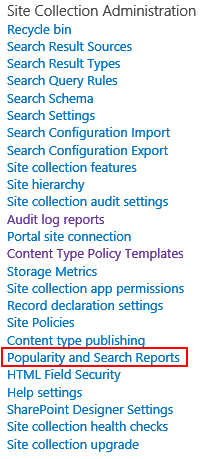
    In SharePoint 2013 the search service application incorporates web analytics (which is a separate service application in SharePoint 2010).  Web analytics processes usage logs on the SharePoint machines and generates reports on a daily schedule.  These reports can be viewed for an individual site in the site settings under Site Collection Administration > Popularity and Search Reports.
UsageReportDataEmpty1


   In the Popularity and Search Reports you can click on the Usage report which will launch an Excel workbook.

UsageReportDataEmpty2


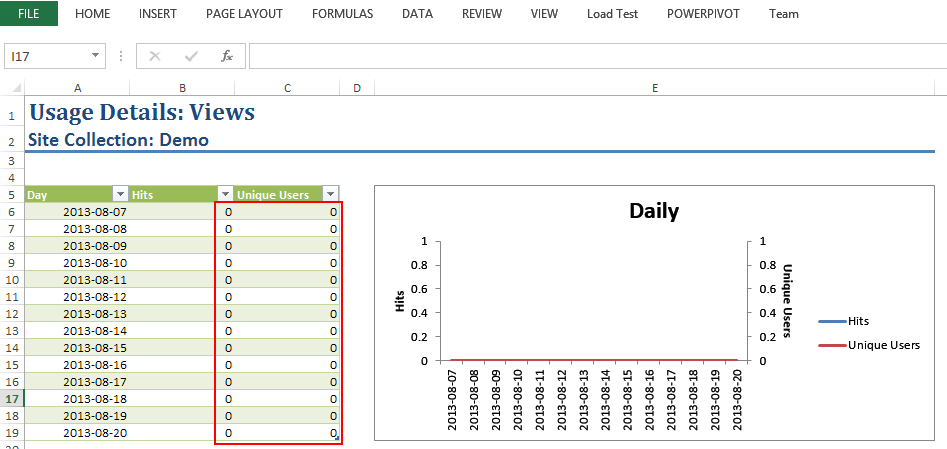
   What I found with 2 customers and one of my lab farms was that the Usage report contained all zeroes for data even though the customer (and me in my lab farm) had been using the site regularly with multiple accounts over the past few days.
UsageReportDataEmpty3


   We analyzed the logging database and found that it had usage data, but the search analytics database did not.  (Note: do not directly query the search analytics database as that is unsupported as of the time this post was written.  See http://technet.microsoft.com/en-us/library/cc678868.aspx for more information.)  So it appeared the data in the logging database wasn’t being processed by the search service web analytics timer jobs.  After verifying that the timer jobs were indeed running the long road of PowerShell queries into the system began.  We finally used the below commands to arrive at what we believe to be the culprit for these customers.  Our findings follow the commands.


$aud = Get-SPUsageDefinition | where {$_.Name -like “Analytics*”} 
$aud | fl 

$prud = Get-SPUsageDefinition | where {$_.Name -like “Page Requests”}  
$prud | fl 
  • AnalyticsUsage usage definition had no Receivers defined
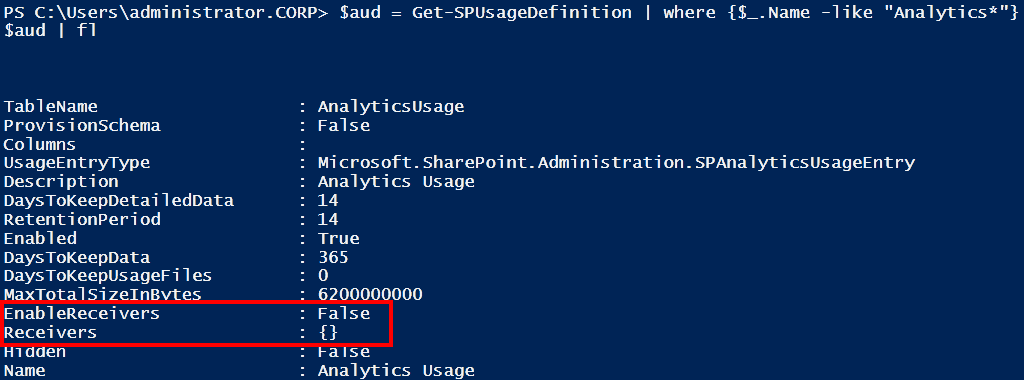
  • PageRequest usage definition had no Receivers defined

UsageReportDataEmpty4


    Not having any Receivers defined also led to the EnableReceivers property to be set to false for both.


Workaround

   The workaround in these scenarios was to manually create the Receivers.  The PowerShell commands to do so is below (slightly modified to check for empty receivers first).  Again this sample script is provided as-is with no warranty.  Do not run this in your environment without first testing.  This is not an official Microsoft approved script.  You can download a copy off my SkyDrive folder as well.


if((Get-PSSnapin -Name Microsoft.SharePoint.PowerShell) -eq $null) 
{ 
    Add-PSSnapin Microsoft.SharePoint.PowerShell 
} 

$aud = Get-SPUsageDefinition | where {$_.Name -like “Analytics*”} 
# if analytics usage definition receivers is empty then manually add back receiver 
if($aud.Receivers.Count -eq 0) 
{ 
    $aud.Receivers.Add(“Microsoft.Office.Server.Search.Applications, Version=15.0.0.0, Culture=neutral, PublicKeyToken=71e9bce111e9429c”, “Microsoft.Office.Server.Search.Analytics.Internal.AnalyticsCustomRequestUsageReceiver”) 
} 
# if analytics usage definition receiver is not enabled then enable it 
if($aud.EnableReceivers -eq $false) 
{ 
    $aud.EnableReceivers = $true 
    $aud.Update() 
} 
$aud | fl 
$prud = Get-SPUsageDefinition | where {$_.Name -like “Page Requests”}  
# if page requests usage definition receivers is empty then manually add back receiver 
if($prud.Receivers.Count -eq 0) 
{ 
    $prud.Receivers.Add(“Microsoft.Office.Server.Search.Applications, Version=15.0.0.0, Culture=neutral, PublicKeyToken=71e9bce111e9429c”, “Microsoft.Office.Server.Search.Analytics.Internal.ViewRequestUsageReceiver”)  
} 
# if page requests usage definition receiver is not enabled then enable it 
if($prud.EnableReceivers -eq $false) 
{ 
    $prud.EnableReceivers = $true 
    $prud.Update() 
} 
$prud | fl 

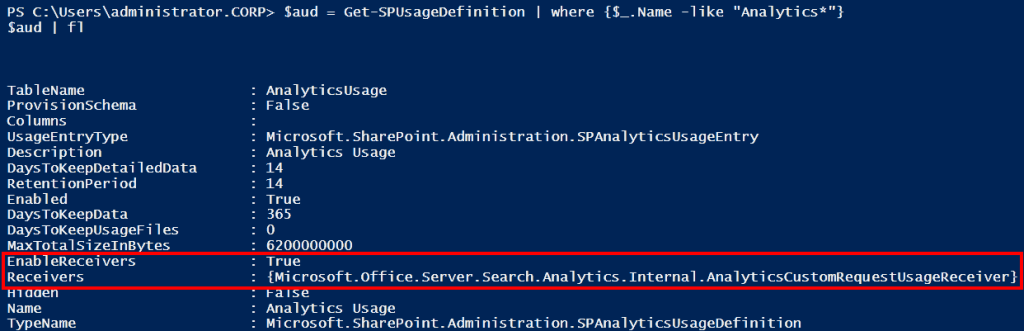
   After the script has been run the output from the prior commands can confirm that Receivers have been created and the EnableReceivers property is set to true.
UsageReportDataEmpty5


<Update 2013-08-09>

   The next step is to recycle the OWSTimer service (SharePoint Timer Service) on each server.  This ensures that the new receivers are properly picked up by the timer jobs.

</Update 2013-08-09> 

  Waiting one day the usage reports were now showing data.  (Note the below report was mocked up manually to show data as I did not have direct access to the customers’ reports, but this is consistent with what we had seen after the scripts were applied.)
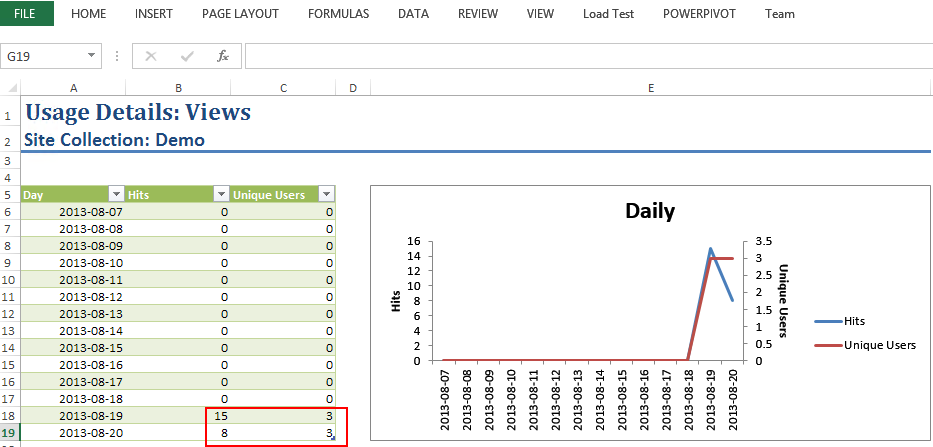
UsageReportDataEmpty6


Conclusion

   This is a strange scenario of no data in the usage reports when there is data in the logging databases.  I’ve run into it myself and with 2 customers, but when I tried to reproduce the scenario I couldn’t.  If anyone is facing this issue hopefully this process of manually creating the usage definition receivers and waiting 24 hrs is a workaround.  Let me know if you have seen this and if the workaround works for you.  Curious to learn more on it.


      -Frog Out

Slides from SPTechCon Boston 2013 Evolution of Social in SharePoint Presentation

   Below are my slides for my SPTechCon Boston 2013 session for “The Evolution of Social in SharePoint 2013”.  I made some last minute updates that will make their way over to the SPTechCon site as well, but for now here they are.  If you attended thanks for coming and I’d love to hear any feedback.  It was a great time presenting at SPTechCon again, sharing knowledge, and connecting with folks..


      -Frog Out

Speaking at SPTechCon Boston 2013 and Call for Speakers SharePoint Saturday Columbus 2013

   Dual purpose blog post this time.  I wanted to announce a presentation I’m giving at SPTechCon Boston 2013 next week as well as pass along info on the call for speakers at the upcoming SharePoint Saturday Columbus 2013.


SPTechCon Boston 2013

   I have the honor of speaking at SPTechCon Boston for another year.  This will make it 4 times now.  The folks at BZ Media always put on a great show with high quality speakers and involvement from the community.  There will even be two different user groups (SharePoint and Project Server) meeting during one night of the conference.  If you haven’t yet registered you still have some time.  If you’ll be attending stop by my session or find me in the halls.


Title: The Evolution of Social in SharePoint

Audience and Level: IT Pro / Architect, Intermediate

Abstract: Activities, newsfeed, community sites, following… these are just some of the big changes introduced to the social experience in SharePoint 2013. This class will discuss the evolution of the social components since SharePoint 2010, the architecture (distributed cache, microfeed, etc.) that supports the social experience, and proper planning considerations when deploying social capabilities (personal sites, SkyDrive Pro and distributed cache). This class will include demos of the social newsfeed, community sites and mentions. Attendees should have an intermediate knowledge of SharePoint 2010 or 2013 administration.


SharePoint Saturday Columbus 2013

   On Sept 14th, 2013 Columbus will be hosting the next SharePoint Saturday Columbus.  This is a bit of a late announcement, but the call for speakers is still open until midnight on Monday Aug 5th, 2013.  That’s tomorrow as of the time of writing.  If you have a topic you’d like to talk about relating in any form to SharePoint we’d love to have you submit.  You can send speaker submissions (click here) to BuckeyeSPUG@live.com if interested.  One of the first conferences I spoke at was a SharePoint Saturday up in Cleveland and it led to so many great opportunities and networking contacts.


      -Frog Out