In this post I will present a script to enumerate SharePoint 2010 or 2013 permissions across the entire farm down to the site (SPWeb) level. As a bonus this script also recursively expands the membership of any Active Directory (AD) group including nested groups which you wouldn’t be able to find through the SharePoint UI.
History
Back in 2009 (over 4 years ago now) I published one my most read blog posts about enumerating SharePoint 2007 permissions. I finally got around to updating that script to remove deprecated APIs, supporting the SharePoint 2010 commandlets, and fixing a few bugs. There are 2 things that script did that I had to remove due to major architectural or procedural changes in the script.
- Indenting the XML output
- Ability to search for a specific user
I plan to add back the ability to search for a specific user but wanted to get this version published first. As for indenting the XML that could be added but would take some effort. If there is user demand for it (let me know in the comments or email me using the contact button at top of blog) I’ll move it up in priorities.
As a side note you may also notice that I’m not using the Active Directory commandlets. This was a conscious decision since not all environments have them available. Instead I’m relying on the older [ADSI] type accelerator and APIs. It does add a significant amount of code to the script but it is necessary for compatibility. Hopefully in a few years if I need to update again I can remove that legacy code.
Solution
Below is the script to enumerate SharePoint 2010 and 2013 permissions down to site level. You can also download it from my SkyDrive account or my posting on the TechNet Script Center Repository.
SkyDrive
TechNet Script Center Repository
http://gallery.technet.microsoft.com/scriptcenter/Enumerate-SharePoint-2010-35976bdb
###########################################################
#DisplaySPWebApp8.ps1
#
#Author: Brian T. Jackett
#Last Modified Date: 2013-07-01
#
#Traverse the entire web app site by site to display
# hierarchy and users with permissions to site.
###########################################################

function Expand-ADGroupMembership
{
    Param
    (
        [Parameter(Mandatory=$true,
                   Position=0)]
        [string]
        $ADGroupName,
        [Parameter(Position=1)]
        [string]
        $RoleBinding
    )
    Process
    {
        $roleBindingText = “”
        if(-not [string]::IsNullOrEmpty($RoleBinding))
        {
            $roleBindingText = ” RoleBindings=`”$roleBindings`””
        }
        Write-Output “<ADGroup Name=`”$($ADGroupName)`”$roleBindingText>”
        $domain = $ADGroupName.substring(0, $ADGroupName.IndexOf(“”) + 1)
        $groupName = $ADGroupName.Remove(0, $ADGroupName.IndexOf(“”) + 1)

        #BEGIN – CODE ADAPTED FROM SCRIPT CENTER SAMPLE CODE REPOSITORY
        #http://www.microsoft.com/technet/scriptcenter/scripts/powershell/search/users/srch106.mspx
        #GET AD GROUP FROM DIRECTORY SERVICES SEARCH
        $strFilter = “(&(objectCategory=Group)(name=”+($groupName)+“))”
        $objDomain = New-Object System.DirectoryServices.DirectoryEntry
        $objSearcher = New-Object System.DirectoryServices.DirectorySearcher
        $objSearcher.SearchRoot = $objDomain
        $objSearcher.Filter = $strFilter
        # specify properties to be returned
        $colProplist = (“name”,“member”,“objectclass”)
        foreach ($i in $colPropList)
        {
            $catcher = $objSearcher.PropertiesToLoad.Add($i)
        }
        $colResults = $objSearcher.FindAll()
        #END – CODE ADAPTED FROM SCRIPT CENTER SAMPLE CODE REPOSITORY
        foreach ($objResult in $colResults)
        {
            if($objResult.Properties[“Member”] -ne $null)
            {
                foreach ($member in $objResult.Properties[“Member”])
                {
                    $indMember = [adsi] “LDAP://$member”
                    $fullMemberName = $domain + ($indMember.Name)

                    #if($indMember[“objectclass”]
                        # if child AD group continue down chain
                        if(($indMember | Select-Object -ExpandProperty objectclass) -contains “group”)
                        {
                            Expand-ADGroupMembership -ADGroupName $fullMemberName
                        }
                        elseif(($indMember | Select-Object -ExpandProperty objectclass) -contains “user”)
                        {
                            Write-Output “<ADUser>$fullMemberName</ADUser>”
                        }
                }
            }
        }

        Write-Output “</ADGroup>”
    }
} #end Expand-ADGroupMembership
# main portion of script
if((Get-PSSnapin -Name microsoft.sharepoint.powershell) -eq $null)
{
    Add-PSSnapin Microsoft.SharePoint.PowerShell
}
$farm = Get-SPFarm
Write-Output “<Farm Guid=`”$($farm.Id)`”>”
$webApps = Get-SPWebApplication
foreach($webApp in $webApps)
{
    Write-Output “<WebApplication URL=`”$($webApp.URL)`” Name=`”$($webApp.Name)`”>”
    foreach($site in $webApp.Sites)
    {
        Write-Output “<SiteCollection URL=`”$($site.URL)`”>”

        foreach($web in $site.AllWebs)
        {
            Write-Output “<Site URL=`”$($web.URL)`”>”
            # if site inherits permissions from parent then stop processing
            if($web.HasUniqueRoleAssignments -eq $false)
            {
                Write-Output “<!– Inherits role assignments from parent –>”
            }
            # else site has unique permissions
            else
            {
                foreach($assignment in $web.RoleAssignments)
                {
                    if(-not [string]::IsNullOrEmpty($assignment.Member.Xml))
                    {
                        $roleBindings = ($assignment.RoleDefinitionBindings | Select-Object -ExpandProperty name) -join “,”
                        # check if assignment is SharePoint Group
                        if($assignment.Member.XML.StartsWith(‘<Group’) -eq “True”)
                        {
                            Write-Output “<SPGroup Name=`”$($assignment.Member.Name)`” RoleBindings=`”$roleBindings`”>”
                            foreach($SPGroupMember in $assignment.Member.Users)
                            {
                                # if SharePoint group member is an AD Group
                                if($SPGroupMember.IsDomainGroup)
                                {
                                    Expand-ADGroupMembership -ADGroupName $SPGroupMember.Name
                                }
                                # else SharePoint group member is an AD User
                                else
                                {
                                    # remove claim portion of user login
                                    #Write-Output “<ADUser>$($SPGroupMember.UserLogin.Remove(0,$SPGroupMember.UserLogin.IndexOf(“|”) + 1))</ADUser>”
                                    Write-Output “<ADUser>$($SPGroupMember.UserLogin)</ADUser>”
                                }
                            }
                            Write-Output “</SPGroup>”
                        }
                        # else an indivdually listed AD group or user
                        else
                        {
                            if($assignment.Member.IsDomainGroup)
                            {
                                Expand-ADGroupMembership -ADGroupName $assignment.Member.Name -RoleBinding $roleBindings
                            }
                            else
                            {
                                # remove claim portion of user login
                                #Write-Output “<ADUser>$($assignment.Member.UserLogin.Remove(0,$assignment.Member.UserLogin.IndexOf(“|”) + 1))</ADUser>”

                                Write-Output “<ADUser RoleBindings=`”$roleBindings`”>$($assignment.Member.UserLogin)</ADUser>”
                            }
                        }
                    }
                }
            }
            Write-Output “</Site>”
            $web.Dispose()
        }
        Write-Output “</SiteCollection>”
        $site.Dispose()
    }
    Write-Output “</WebApplication>”
}
Write-Output “</Farm>”
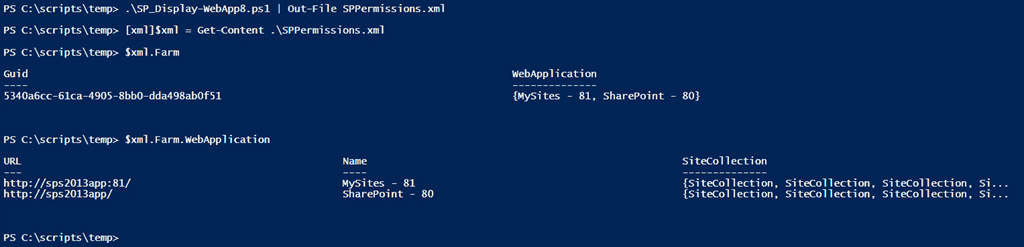
The output from the script can be sent to an XML which you can then explore using the [XML] type accelerator. This lets you explore the XML structure however you see fit. See the screenshot below for an example.
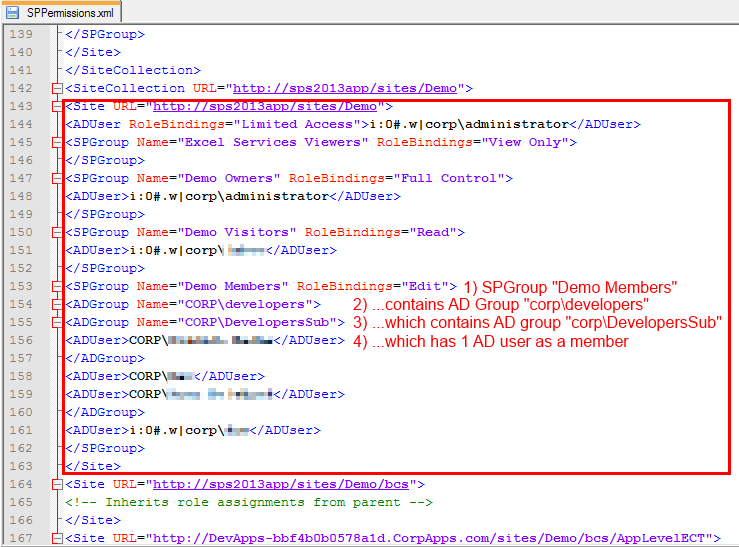
If you do view the XML output through a text editor (Notepad++ for me) notice the format. Below we see a SharePoint site that has a SharePoint group Demo Members with Edit permissions assigned. Demo Members has an AD group corpdevelopers as a member. corpdevelopers has a child AD group called corpDevelopersSub with 1 AD user in that sub group. As you can see the script recursively expands the AD hierarchy.
Conclusion
It took me 4 years to finally update this script but I‘m happy to get this published. I was able to fix a number of errors and smooth out some rough edges. I plan to develop this into a more full fledged tool over the next year with more features and flexibility (copy permissions, search for individual user or group, optional enumerate lists / items, etc.). If you have any feedback, feature requests, or issues running it please let me know. Enjoy the script!
-Frog Out

 The Frog Pond of Technology