Work Is Like A Box Of Chocolates

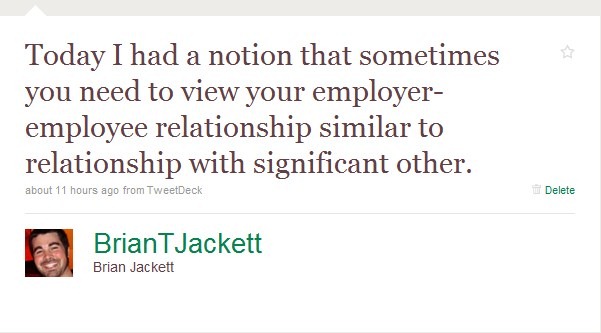
Aside from the facts that I’m blatantly ripping off borrowing from the movie Forrest Gump and also straying away from my usual technical content, I had a notion this morning that I felt like I needed to explain.  In case you missed a tweet of mine from earlier today, here it was.
WorkLikeBoxChocolates1

http://twitter.com/BrianTJackett/status/7989659514

Now you might be saying to yourself “I know exactly what he means” or “I don’t know what the heck he means”.  Never fear, that’s why I’m here to explain.  First things first, I recently went through a break up with a girl that was a bit different than past break ups.  You see, this girl decided to give me constructive criticism about our relationship.  So naturally I’ve been thinking over what she had to say and I started to see parallels between how I approach relationships and how I approach work.  Here are a few of the big things that stood out for me (and perhaps will be relatable for you.)

Communication is a must

Open communication is necessary for any healthy relationship (work or social.)  You may have heard a phrase like “you need to tell me what’s going on, I’m not a mind reader” at some point in your life.  Being able to put thoughts, ideas, and feelings into words is how we as humans relate to others.  The same is needed with your employer.  I’m sure many of you have regular reviews with your manager or superiors, but those meetings once, twice, or however many times a year should only be affirming the communication that is continually going on between you and your employer.  Keep the lines of communication frequent and flowing.

Honesty is a must

Without honesty, all that open communication you’ve been working on can pretty much be thrown into the trash.  Honesty has major implication for relationships of all types, and it takes more forms than just telling the truth or being ethical.  In addition, sometimes dishonesty will manifest through deliberate omissions (I didn’t find any bugs in my code), to white lies (I found one minor bug that isn’t a big deal), all the way to blatant lies (there’s no way this one bug will crash the entire application, oops.)  Honesty is important for both sides of a relationship so that each side is accepting who the other person truly is.

Don’t be afraid to fluff your feathers

I’m not a zoologist by any means, but I hear that when some birds are looking for a potential mate they fluff out their feathers to make themselves appear larger and thus propagate Darwin’s theory of natural selection.  Just as we humans like to show off our positive qualities to potential significant others, so too should you show off your positive work to your employer.  I’m a consultant, so whenever I receive a praising email from a client or have a notable success I like to pass that along to my superiors.  Not only does this help my case for getting a raise or promotion at review time, it also reaffirms my employer that they made the right choice hiring me and I’m bringing positive value to the company.  As a side bonus, it also means I want them to share in my joy/celebration over a job well done.


Conclusion

This has been just a brief glimpse into what I think it means to view your employer-employee relationships like your relationships with a significant other.  Glad to see my psychology minor getting put to a little bit of use.  If any of you are interested in singularity type ideas (seeing the relatedness of everything) then I highly recommend you read The Glass Bead Game by Herman Hesse.  It is one of my favorite books of all time and really digs into that “everything is connected” notion in a science fiction / mathematics type of ways.  So enjoy this short break from my technical posts and expect me to return to my usual types of posts next time.


-Frog Out
How I Blog

<Updated 2018-07-10> See the updated version of this post: How I Blog – Updated 2018</Updated>

After my last post about goals for 2010 when I realized it has been over 6 months since I started blogging, I began to think about my blogging process and how it has changed over that time.  I’ve made quite a few changes and upgrades to various portions of my blogging process over that time.  Here’s a quick overview of where I’m at now as well as some tips for those of you thinking about starting up a blog but not knowing where to start.

Tools

  • Live Writer – Based on various buzz from other bloggers I gave Live Writer a shot when I began and haven’t needed anything else ever since.  Live Writer allows me to write up drafts, insert pictures, markup code (via numerous plug-ins), preview my post using my blog’s theme, publish finished posts, and pull up old posts quickly and easily.  All in all it’s a solid tool and has served my needs quite fine.
  • Twitter Notify – Live Writer has a nice plug-in called Twitter Notify that allows you to link your Twitter account to Live Writer.  Every time you publish a post it will give you the option of sending out a tweet with the title of your post and a link to the post.  I use this as my primary method to notify (aside from automated RSS feeds) others when I have new content posted.
  • Live Mesh – Live Mesh is a Microsoft tool that allows you to sync the content of folders across multiple computers and have 5 GBs worth of backups online.  I really can’t say enough about how much time Live Mesh saves me when it comes to blogging.  I use this to sync screenshots, Live Writer files (drafts and posts), and code snippets between my work laptop and my home desktop.  As an added bonus I also get all these files backed up into the glorious “interwebs cloud” should I ever have an issue with my personal backups.
  • Paint.Net – Paint.Net is a free tool that gives you basic PhotoShop-like image editing.  I use this for cropping screenshots, pixelating images with sensitive information, and many other minor tasks.  I find the software very easy to use and it’s hard to beat free.  Please support the tool providers with a donation if you end up using and liking it.

Hosting/Online Services

  • Geeks With Blogs – As this if my first blog, I took a recommendation from my coworker Kelly Jones and I signed up for a free account with Geeks With Blogs when I started out.  In the future I may look to get a most advanced solution offering, but so far this has been a great hosting site and suited my needs just fine.  There are dozens, probably hundreds of different sites that will host your blog.  If you are looking for specific features and capabilities take the time to research what they have to offer before choosing.
  • Google Analytics – What good is blogging if you can’t track statistics like number of visitors or which of your posts are the most popular?  With a simple sign up and just a small snippet of javascript on a layout page within your blog you can track page views and visitors, see who is linking to your content or where visitors came from, and get some nice charts and graphs trending usage over time.  This has helped me get a glimpse into what type of content and posts are the most popular for my audience.  For example the top 3 posts all time for me are:
  1. Alternative Modal Popup in SharePoint 2007
  2. Deploying Files to SharePoint Web App Directories
  3. The Power Of PowerShell and SharePoint: Enumerating SharePoint Permissions
  • FeedBurner – I have to admit, FeedBurner is one of the only blogging tools that I use but don’t fully understand.  The basic premise as I understand it is that it allows you to customize your RSS feeder by taking the current output and redirecting it through their services.  You can add functionality to your RSS feed, cross promote your feeds amongst multiple sites, track subscribers who are reading your posts through RSS vs. actually hitting your site, and do a host of other things.  The piece about tracking RSS subscribers is the main thing that attracted me to FeedBurner.  If anyone has feedback on what else FeedBurner is or how to better use it please let me know in the comments below.
  • GoDaddy – A few months ago I attended one of Jeff Blankenburg’s presentations called “Making A Name For Yourself” in which he talked about a number of ways to create a solid identity of who you are and promoting that identity in various forms.  One of those ways is reserving a domain name for your site that helps customize and personify your site.  I chose to go with GoDaddy.com because they are one of the cheapest and easiest to get started with.  My current primary domain is BrianTJackett.com which happens to coincide with my Twitter handle, username on various social sites, and if you couldn’t tell contains most of my full name to make it fairly easy for others to remember.

Tips for Starting Out

So, if you’ve read this far and you yourself don’t have a blog but are interested in starting one here are a few tips.

  • Know your content – What is it that you want to blog about?  Will your blog contains posts about cool robotics work that you are doing, video game reviews, or perhaps your super cute cat Mr. Mittens?  Decide on an area or related group of topics (such as SharePoint and general .Net like I have) and focus on those.
  • Know your audience – Relating to the above, who are you writing your content for?  Are you writing posts for personal reference in the future (I know some people who do this), for internal company coworkers, or for the community at large.  This will shape what, how, and why you write.
  • Set goals – Define some goals for yourself about how often you plan to publish content, how many visitors/subscribers you are aiming for, or some other means of measuring how you are doing with your blogging.  As stated in my previous post I’ve set some blogging goals for myself and have done fairly well sticking to them. This not only helps motivate you to keep writing but also offers some level of consistency for your audience.  Nothing is worse than starting out great publishing 10 posts in one month and then going silent for a year, don’t be that guy/gal.
  • Write when it’s right – You like that play on words?  I bet you chuckled for brief second before shaking your head.  I have never been great at writing, literature, and all those book type things.  For me it’s very rare that I can sit down and just let my thoughts flow onto paper (or monitor/screen as it were.)  When I do get those moments of clarity I shut out distractions, turn on some music, and capitalize on the moment.  Don’t force your writing, but when a good idea comes to mind start to write it out or at least jot it down for future use.
  • Read other blogs – Seems obvious, but really go out there and start reading some blogs that interest you.  Perhaps they are written by coworkers, people you’ve met at user groups, or some super awesome person in your field of work that everyone talks about.  This can help you find your footing for style, content, and many other things.
  • Get feedback – This one is huge.  Find some trusted friends, coworkers, or even your family to read over your posts and give you feedback on what they like/dislike about your posts.  Just like giving a presentation to a practice audience, having others review and comment on your writing can be very helpful to making you a stronger writer.

Conclusion

So there you have it, my current blogging tools, a little about my process, and some tips for starting out.  If you’d like to share anything about your own blogging experience or have some feedback of your own feel free to comment below.  Thanks to everyone who has been reading my blog over the past almost 7 months now and giving me encouragement to keep writing.  I find it very fulfilling and hopefully you do as well.

-Frog Out

Goals for 2010

Updated 2010/1/6 – added Android Development

    In the past few days I’ve been catching up on various blogs and ran across a few listing goals for 2010 (notably Matt Nowack and Jeremiah Peschka.)  As in years past I’ve made goals for myself, but this year I’d like to formalize them and revisit this at the conclusion of this year to see how well my grit and determination stood up.  Similar to Jeremiah I have a PDP (personal development plan) that contains work related goals I work towards and update throughout the year.  Here’s an expansion of my current list of goals broken up by relevant areas.

Professional

  • Blog – I can’t believe it’s been just over 6 months since I started blogging.  When I started I tried to set a few ground rules for myself.  I wanted to keep my posts mostly tech-related focusing on “how-to” or “here’s where I messed up and you can learn from my mistakes” types of articles.  I also wanted to write at least 2 posts a month, closer to 4 or more if my schedule allowed.  All of these goals I still want to keep, perhaps expanding article topics to also include “hey check out this cool new feature I’m researching at the moment.”
  • Speaking – Last year I was graced with the opportunity to speak at a number of events both at my company and in the community (notably COSPUG and SharePoint Saturday Cleveland.)  I hope to have the opportunity to speak at more events this year, but that won’t be a huge focus for me.  I feel like my efforts can be better utilized with the next item and spending more time on research and learning new technologies.
  • Volunteering – Ever since a very young age I have always been a big proponent of volunteering time to the community at large.  In the past few months I volunteered to help out with the COSPUG steering committee and the Stir Trek Conference volunteer board for 2010 (and beyond if possible.)  I greatly look forward to helping out with these in an official role as well as other events such as Columbus Give Camp, all of which have been very worthwhile endeavors in my experience.
  • Android Development – About 2 months ago I made the leap from my old served-my-limited-needs phone to the new hotness Droid.  (You can tell my old phone is old because it’s on the “discontinued” page from LG 🙂 )  In addition to getting all the nice features of GPS, web access, and Google Marketplace apps, the Droid also runs Android 2.0 which offers open development.  I’d like to test the water of mobile development by creating a very simple app or two, perhaps something related to some of the groups I’m working with (thinking Stir Trek schedule app at the moment.)  This would also give me a chance to brush up on my Java as I spent half of my college classes in it, got my current job at Sogeti in large part due to my Java knowledge, and later got certified in Java development.

Personal

  • Getting in Shape – In general I’d say I’m a fairly healthy guy, but when I recently started playing indoor soccer with some coworkers in a league I noticed how badly I got out of breath after just a few minutes of running on the field.  I’m going to continue playing on multiple softball and volleyball leagues throughout the year, but also work in some cardio and light running to get my wind back.
  • Volunteering – Yes, I can hear you through your monitor saying “Brian you already listed this one.”  This is a different form of volunteering.  For the past 2 years I’ve been helping out at my local parish’s high school youth group with weekly meetings and chaperoning special events.  In addition to continuing that I would like to get back to working with Habitat for Humanity.  Throughout my 5 years in college (I had a co-op, wasn’t because I was slow or anything) I worked with our college chapter of Habitat building houses and leading the group in some fashion.  I’d like to help with house builds or events at least every other month this year.
  • House/Condo – I’ve been living in an apartment close to 2 years now.  I really love my place and all the benefits it offers (free hot chocolate/coffee machine, pool, rentable movie theater, and others) but I’d also like a little more space and an area where I can have a work bench.  Back to the Habitat mention above, I love working with my hands on carpentry projects and the like, but haven’t really been able to since moving into my apartment due to the space limitations.  I’ll be looking around in the summer when my lease comes up.  If you know any great places in the northern Columbus area let me know.


    So that wraps up my current goals.  I’ll be checking back in with these periodically throughout the year to measure how I’m stacking up.  If any of the following people are reading this, consider yourselves tagged because I’d love to see you post your goals for 2010: Kelly Jones, Dan Luciano, Don Zielke, Jennifer Mason, and Sean McDonough.  Here’s to the start of a great 2010 🙂


     -Frog Out

Deploying SharePoint Solution Files to Non-12 Hive Locations on Multiple Web Front Ends

In a previous post, I mentioned having an issue deploying SharePoint solution files to a non-12 Hive locations on all web front ends (WFEs).  The problem I faced was that WSPBuilder doesn’t allow me to edit the manifest.xml file (reference, near bottom) and my custom code to copy the files was successful, but only executing on the WFE from which the feature activation command was being called.  Once we moved to a multiple WFE environment all of the other WFEs were missing files.

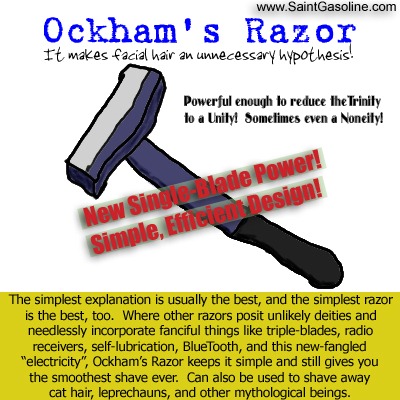
The always helpful Sean McDonough suggested that I use an SharePoint Timer job because that will execute code on all WFEs.  I had never built a custom timer job so I researched the links Sean shared and dove head first into it.  I had moderate success but ran into an issue with the account running my timer job (which ended up being the Farm Access account) not having write permissions to the non-12 Hive location as it was not a local admin on every WFE in the farm.  The solution to that problem (another blog post forthcoming on solving that ACL permission issue) was looping through the WFEs during feature activation.  As it turns out, discovering that I could loop through each WFE led to a much simpler solution to my original problem.2007-02-13-Ockhams_Razor    Any of you familiar with Occam’s Razor (also spelled Ockham) will realize that simpler solutions are almost always the better solution.  So instead of wiring up a feature to set write permissions, then store needed values in a property bag, and then kick off a timer job I went with a much simpler solution.  Below is a code snippet for how to deploy SharePoint solution files to a non-12 Hive location on multiple web front ends without using a timer job (wow that’s a mouthful.)

The files I am deploying are a set of support files for the RadEditor for MOSS Lite Edition that need to live in the “wpresources” folder (which is a sibling folder of the 12-Hive.)  I originally deploy the files to a subfolder “Support Files” of the feature root folder.  From there they are copied to the appropriate location within “wpresources”.  You may also download the code snippet from my SkyDrive here.

public override void FeatureActivated(SPFeatureReceiverProperties properties)

{

    // set source and destination folders

    string sourceFolder = properties.Definition.RootDirectory + @"Support Files";

    string destinationFolder = properties.Definition.RootDirectory + @"........wpresourcesRadEditorSharePoint4.5.6.0__1f131a624888eeedRadControlsEditor";

    List<string> filesToDeploy = new List<string>();


    // dynamically find all files in the source folder

    DirectoryInfo folder = new DirectoryInfo(sourceFolder);

    FileInfo[] filesInFolder = folder.GetFiles();

    foreach (FileInfo file in filesInFolder)

    {

        filesToDeploy.Add(file.Name);

    }


    // recurse through each web front end

    foreach (SPServer server in properties.Definition.Farm.Servers)

    {

        if (server.Role == SPServerRole.WebFrontEnd)

        {

            // copy support files per web front end

            foreach (string filename in filesToDeploy)

            {

                try

                {

                    // reference files based on network share format (serverNameC$...)

                    string sourceFile = @"" + server.Address + @"" + sourceFolder.Replace(":", "$") + @"" + filename;

                    string destinationFile = @"" + server.Address + @"" + destinationFolder.Replace(":", "$") + @"" + filename;


                    System.IO.File.Copy(sourceFile, destinationFile, true);

                }

                catch (Exception ex)

                {

                    // ..exception handling goes here

                }

            }

        }

    }

}

As far as I can tell my research didn’t turn up any other results on this topic so this may be me blazing some trails on the subject matter.  If you have any questions, comments, or feedback please feel free to leave some below.  I’ll update this post with a link to my forthcoming post on setting ACL permissions during feature activate.  Happy SharePointing.

-Frog Out

Fixing the SharePoint DateTimeControl MinDate Property (or How I Learned to Make the DateTimeControl Read-Only and Love SharePoint Controls)

Excusing the long post title referencing Dr. Strangelove, I’d like to point out a small bug with the SharePoint DateTimeControl.  If you have ever implemented this control, you may find that you can set the MinDate property which is supposed to limit the range of dates allowed.  However, doing so only limits the calendar popup associated with this control, but the user can still enter a date below the MinDate into the textbox (see comments in reference.)

I did a little searching on the interwebs and found the following post which described setting that textbox control read-only on the aspx page.  Below you will find the code to make it read-only in the code behind.

using Microsoft.SharePoint.WebControls;


DateTimeControl dtc = new DateTimeControl();

dtc.DateOnly = true;

dtcMinDate = DateTime.Today.Date;

((TextBox)dtc.Controls[0]).ReadOnly = true;

In the last line, you will see that we are accessing a child control.  At a basic level, the SharePoint DateTimeControl is just a wrapper for 4 controls: a date textbox, an hour and a minute dropdown, and a required field validator.  Since the date textbox is the first control, we can cast it as a textbox and set the ReadOnly property and be all set.

DateTimeControl1

Before: able to edit textbox

DateTimeControl2

After: textbox is read only and calendar selection limited

One other note about the DateTimeControl.  There is an issue with the SelectedDate property of the DateTimeControl not persisting through postback (reference 1 and reference 2).  Example scenario: if you set the SelectedDate on page load, change the SelectedDate through UI, then have a page postback (perhaps for a required field validation on another control) your change to the SelectedDate will be lost and the original value from during page load will reappear.  I have attempted all suggestions for enabling viewstate on parent container, removing Id, and clearing selection to no avail.  My next steps will be to convert this over to an AJAXControlToolkit Calendar Extender implementation and see if that works.  Expect a follow up post if that does fix the problem.

As you can see, the SharePoint DateTimeControl is a nice option since you’ll have access to it out of the box with SharePoint, but there are a few bugs to be aware of when deciding whether to use it or not.  You might just be as well off building your own control to handle date selection.  If you’ve run into any other issue or have suggestions for fixes to the problems above please leave some feedback below.

-Frog Out

Links

SharePoint DateTimeControl MSDN page

http://msdn.microsoft.com/en-us/library/microsoft.sharepoint.webcontrols.datetimecontrol.aspx

Make SharePoint DateTimeControl textbox read-only

http://greggalipeau.wordpress.com/2008/06/27/sharepoint-datetimecontrol-validation/

DateTimeControl SelectedDate issue

http://www.eggheadcafe.com/software/aspnet/31645560/problem-with-sharepoint-d.aspx

DateTimeControl ViewState issue

http://social.msdn.microsoft.com/Forums/en-US/sharepointdevelopment/thread/efe5602f-ed95-44c8-8722-077eacdb9844/

Register External JavaScript and CSS Files On SharePoint 2007 WebPart

     If mathematics teaches us anything, it’s that there are usually multiple solutions for one problem.  When you need to add a reference to a JavaScript or CSS file for a .Net web application (such as SharePoint) from the code behind you have many options available to you.  Below are two SharePoint specific methods that you can use to reference a JavaScript and CSS file from within a web part (or any other custom code solution.)


Registering Javascript 

   The first example registers an external JavaScript file.  Typically when you reference an external JavaScript file it is cached by the browser so it doesn’t need to be re-downloaded each time the page is loaded.  This is good for improving performance, but can be an issue when you update your JavaScript file and find that you are still executing the old JavaScript.  Using the below method appends a unique postfix to the JavaScript filename so that a new version is downloaded as needed without having to reset browser files or do other sorts of trickery.

using Microsoft.SharePoint.WebControls;

ScriptLink.Register(this.Page, <JS_FILE_NAME>, true);

Example of output

"text/javascript" language="javascript" 

src="/_layouts/1033/MyAppCommon/JS_File_Name.js?97XRFCZSv%2BI8aGRCPfUgTg%3D%3D">


Registering CSS

     The second example registers a cascading style sheet.  This is useful for when you have a CSS file that contains branding styles that you need to include with a web part but don’t want to include on a master page.  This method will handle adding the link to the <head> tag of the page as needed.

using Microsoft.SharePoint.WebControls;

CssRegistration.Register(CSS_FILE_NAME);

Example of output

<link rel="stylesheet" type="text/css" href="/_layouts/MyAppCommon/Css_FileName.css"/>


Conclusion

    These are both very simplistic methods that can be utilized on your SharePoint web parts to help you include JavaScript and CSS files.  On my current project we have used these quite a bit to pair custom JavaScript and CSS with individual web parts instead of at a higher level where they may not be appropriate.  Perhaps you’ll be able to make use of these as well.  Until next time, happy SharePoint’ing.

Links

Scriptlink.Register MSDN page

CSSRegistration.Register MSDN page


     -Frog Out
