<Updated 2013-02-06>
Recently a fellow SQL PFE Lisa Gardner asked me for a PowerShell script that would create a SharePoint list with numerous (100+) columns. She was doing some research for an upcoming internal presentation on SharePoint databases for SQL database administrators and wanted samples of really nasty SQL queries that are generated when querying a large SharePoint list. The script that I came up with is below in the Solution section.
<Update 2013-02-06>
Lisa posted her findings on the SQL query generated from the script I provided. You can read about it on her blog post here.
</Update>
Before I get to my script though I did want to call out sample scripts that two other fellow SharePoint PFEs have created that are helpful for working with SharePoint lists. Kirk Evans wrote a post on creating a SharePoint list with multiple folders and subfolders. Josh Gavant has written a custom module with commandlets that return SPList objects along with column metadata. Feel free to take a look at these for additional insight in working with SharePoint lists and items.
Problem
Create a SharePoint 2010 (or 2013) custom list that has a configurable number of columns with various datatypes. Also populate these columns with random sample data.
Solution
The only assumption for this script is that you already have a SharePoint site to work with and have modified the variables at the header to suit your needs. If you do not have a site created there is a New-SPWeb commandlet call that you can uncomment early in the script to create a site if needed. The list, columns, and sample data will be generated by the script. Be sure to fill in the URL of the “big list” site to be used.
Note: When working with SharePoint lists it is important to be aware of SharePoint column limits and what is known as SQL row wrapping. Read the information on the following TechNet article for more information about these: http://technet.microsoft.com/en-us/library/cc262787(v=office.14).aspx#Column
Here is the script that I came up with. You can also download the script from my SkyDrive folder.
##########################
# Date: Feb 5, 2013
# Author: Brian T. Jackett
##########################

# set number of columns to create for various data types
# column limits courtesy of http://technet.microsoft.com/en-us/library/cc262787(v=office.14).aspx#Column
$IntColumnsToCreate = 30               # max of 96
$BoolColumnsToCreate = 30              # max of 96
$ChoiceColumnsToCreate = 0             # max of 276
$SingleLineTextColumnsToCreate = 70    # max of 276
$MultiLineTextColumnsToCreate = 42     # max of 192
$DateTimeColumnsToCreate = 10          # max of 48
$CurrencyColumnsToCreate = 40          # max of 72
$LookupColumnsToCreate = 20            # max of 96
# set number of items to create
$ItemsToCreate = 10
# URL of site that will contain big list
$BigListSiteURL = “<set a value for this>”
if((Get-PSSnapin “Microsoft.SharePoint.PowerShell”) -eq $null)
{
    Add-PSSnapin Microsoft.SharePoint.PowerShell
}
Start-SPAssignment -Global
# uncomment the New-SPWeb command to create a new site if necessary
#New-SPWeb -Url http://sps2013app/sites/demo/BigList -Template “STS#0”
# get reference to the “big list” site
$web = Get-SPWeb -Identity $BigListSiteURL
# if creating lookup columns and lookup list does not exist then create it
if($LookupColumnsToCreate -gt 0 -and $web.Lists[“MyLookupList”] -ne $null)
{
    $web.Lists[“MyLookupList”].Delete()
}
# if big list exists delete it
if($web.Lists[“MyBigList”] -ne $null)
{
    $web.Lists[“MyBigList”].Delete()
}
# if creating lookup columns create list and get reference to list
if($LookupColumnsToCreate -gt 0)
{
    $web.Lists.Add(“MyLookupList”, “My Lookup List”, [microsoft.sharepoint.splisttemplatetype]::GenericList)
    $lookuplist = $web.Lists[“MyLookupList”]
    $lookupItem = $lookuplist.Items.Add()
    $lookupItem[“Title”] = “The one lookup item to rule them all”
    $lookupItem.Update()
}
# create list and get reference to list
$web.Lists.Add(“MyBigList”, “My Big List”, [microsoft.sharepoint.splisttemplatetype]::GenericList)
$list = $web.Lists[“MyBigList”]
# add integer columns
for($count = 1; $count -le $IntColumnsToCreate; $count++)
{$list.Fields.Add(“Int$count”, [microsoft.sharepoint.SPFieldType]::Integer, $false)}
# add boolean columns
for($count = 1; $count -le $BoolColumnsToCreate; $count++)
{$list.Fields.Add(“Bool$count”, [microsoft.sharepoint.SPFieldType]::Boolean, $false)}
# add choice columns
for($count = 1; $count -le $ChoiceColumnsToCreate; $count++)
{$list.Fields.Add(“Choice$count”, [microsoft.sharepoint.SPFieldType]::Choice, $false)}
# add single line text columns
for($count = 1; $count -le $SingleLineTextColumnsToCreate; $count++)
{$list.Fields.Add(“SingleLineText$count”, [microsoft.sharepoint.SPFieldType]::Text, $false)}
# add multi line text columns
for($count = 1; $count -le $MultiLineTextColumnsToCreate; $count++)
{$list.Fields.Add(“MultiLineText$count”, [microsoft.sharepoint.SPFieldType]::Note, $false)}
# add date time columns
for($count = 1; $count -le $DateTimeColumnsToCreate; $count++)
{$list.Fields.Add(“DateTime$count”, [microsoft.sharepoint.SPFieldType]::DateTime, $false)}
# add currency columns
for($count = 1; $count -le $CurrencyColumnsToCreate; $count++)
{$list.Fields.Add(“Currency$count”, [microsoft.sharepoint.SPFieldType]::Currency, $false)}
# add lookup columns
for($count = 1; $count -le $LookupColumnsToCreate; $count++)
{$list.Fields.AddLookup(“Lookup$count”, $lookuplist.ID, $false)}
# populate list with items
foreach($x in 1..$ItemsToCreate)
{
    $item = $list.AddItem()
    $item[“Title”] = [char](97 + (Get-Random -Maximum 25))
    # assign values integer columns
    for($count = 1; $count -le $IntColumnsToCreate; $count++)
    {$item[“Int$count”] = Get-Random -Minimum -100000 -Maximum 100000}
    # assign values boolean columns
    for($count = 1; $count -le $BoolColumnsToCreate; $count++)
    {$item[“Bool$count”] = [bool](Get-Random -Minimum 0 -Maximum 2)}
    # assign values choice columns
    # not implemented
    # assign values single line text columns
    for($count = 1; $count -le $SingleLineTextColumnsToCreate; $count++)
    {$item[“SingleLineText$count”] = “lorem ipsum “ * (Get-Random -Minimum 1 -Maximum 8)}
    # assign values multi line text columns
    for($count = 1; $count -le $MultiLineTextColumnsToCreate; $count++)
    {$item[“MultiLineText$count”] = “lorem ipsum “ * (Get-Random -Minimum 1 -Maximum 200)}
    # assign values date time columns
    for($count = 1; $count -le $DateTimeColumnsToCreate; $count++)
    {$item[“DateTime$count”] = (Get-Date).AddDays((Get-Random -Minimum -1000 -Maximum 1000))}
    # assign values currency columns
    for($count = 1; $count -le $CurrencyColumnsToCreate; $count++)
    {$item[“Currency$count”] = [system.decimal](Get-Random -Minimum -10000 -Maximum 10000)}
    # assign values lookup columns
    # not implemented

    $item.Update()
}
Stop-SPAssignment -Global
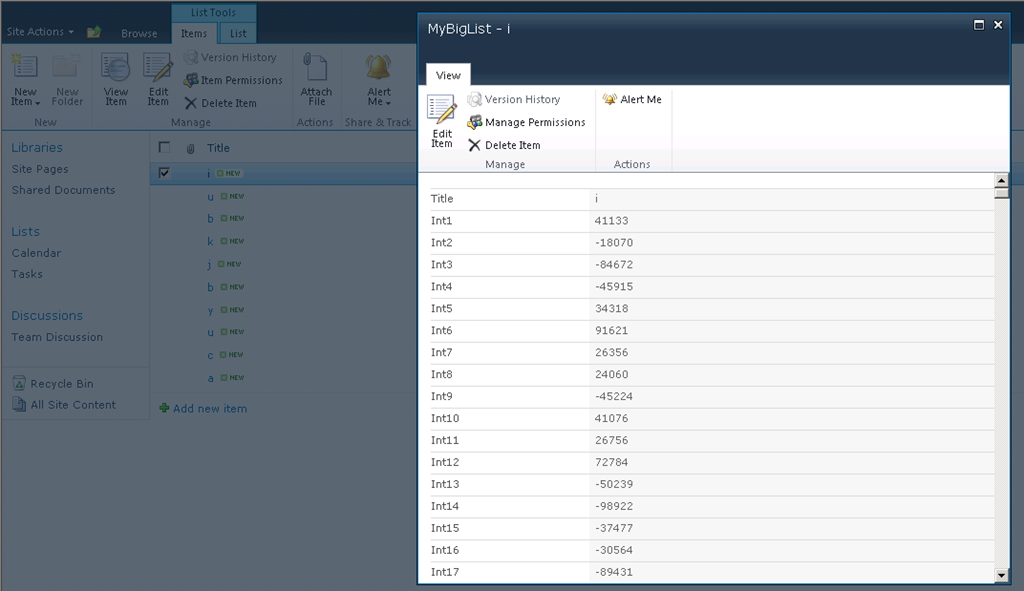
Here is a screenshot of the list that this script creates.
Conclusion
Lisa was very happy with the results of this script and I learned a bit about generating SharePoint columns and random data. This script is not very polished but it gets the job done. If you have a need to generate a lot of SharePoint list columns or random data hopefully this script will be helpful. If you have any feedback on it feel free to leave a comment or email me.
-Frog Out
 The Frog Pond of Technology
Originally posted on: https://briantjackett.com/archive/2013/02/05/powershell-script-to-create-a-large-sharepoint-list-with-random.aspx#624762Thanks again for the script! It works great and will be a great example for my training session!
LikeLike